

編輯:Android 開發教學
Remote Service Controller 與先前解析過的 Local Service Controller 都採用 Service 的 Started 模式,兩者在生命週期管理上完全一致,差別只在於 RemoteService 跑在另一個行程裡。
關鍵是 android:process=":remote" 這個屬性,它讓該服務被配置到一個獨立行程:
<service android:name=".app.RemoteService" android:process=":remote">
<intent-filter>
<!-- 服務支援的介面,可被打綁 -->
<action android:name="com.example.android.apis.app.IRemoteService" />
<action android:name="com.example.android.apis.app.ISecondary" />
<!-- 用於在不指定實作類別的情況下選取服務 -->
<action android:name="com.example.android.apis.app.REMOTE_SERVICE" />
</intent-filter>
</service>
RemoteService.Controller 中的相關程式碼,比 Bound 模式要簡單得多:
// 確保服務已啟動,它會持續執行直到有人呼叫 stopService()
// 這裡用 action code 而非明確的元件名稱,
// 好讓其他套件可以替換這個服務的實作
startService(new Intent("com.example.android.apis.app.REMOTE_SERVICE"));

// 取消先前的 startService 呼叫。
// 注意:若仍有用戶端處於綁定狀態,服務不會真的停下來
stopService(new Intent("com.example.android.apis.app.REMOTE_SERVICE"));
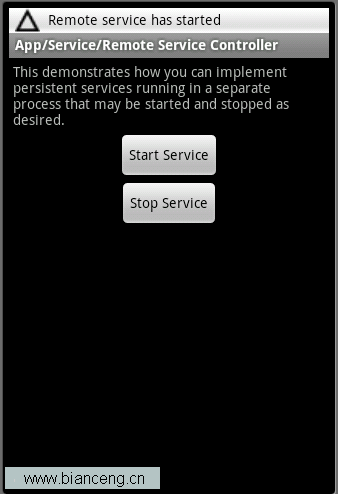
Started 模式的特性是「一旦啟動就自己跑到底」,必須有人明確呼叫 stopService 才會結束。因此在按下 Start Service 之後,再去執行 ApiDemos 解析(42)中介紹的 Remote Service Binding 來綁定這個服務,你會發現「Received from Service」的初始值通常不是 1——因為服務早已在背景累計過若干次呼叫了。
這個現象剛好說明了 Started 與 Bound 在概念上的根本差異:前者的生命週期由啟動者與停止者的配對決定,與綁定數量無關;後者則隨綁定用戶端的數量自動伸縮。
 Android Activity 生命週期與狀態轉換完整解析
Activity 的生命週期是 Android 開發最基礎也最重要的課題之一。理解它,你才能正確回答幾個關鍵問題:資料該在哪裡存?資源該在哪裡釋放?為什麼旋轉螢幕後我的變
 Android XML 處理:DOM、SAX 與解析方案概述
Android 常需處理 XML,常見方案包含 DOM、SAX、Pull 與 DOM4J。概念DOM 以樹狀結構載入整份文件,操作直觀但耗記憶體;SAX 以事件觸發,適合
 Android 的沙箱模型:應用程式隔離與權限的實作基礎
沙箱模型是業界保障系統安全的關鍵技術,在瀏覽器等領域已獲得意外的成功。作為一套優秀的開源行動平台作業系統,Android 自然也有自己的沙箱設計,本文就來談談它。 一、
 Android Fragment完全解析:碎片的用途與螢幕適配
Android早期主要用Activity呈現畫面,但在平板與大螢幕裝置上,單一Activity往往難以兼顧靈活性。Fragment的出現,讓畫面可以拆成多個可重複使用的區