

編輯:Android 開發教學
先看一段程式碼:
package com.maso.test;

public class ThreadTest2 implements Runnable {
    private TestObj testObj = new TestObj();

    public static void main(String[] args) {
        ThreadTest2 tt = new ThreadTest2();
        Thread t1 = new Thread(tt, "thread_1");
        Thread t2 = new Thread(tt, "thread_2");
        t1.start();
        t2.start();
    }

    @Override
    public void run() {
        for (int j = 0; j < 10; j++) {
            int i = fix(1);
            try {
                Thread.sleep(1);
            } catch (InterruptedException e) {
                e.printStackTrace();
            }
            System.out.println(Thread.currentThread().getName() + " : i = " + i);
        }
    }

    public int fix(int y) {
        return testObj.fix(y);
    }

    public class TestObj {
        int x = 10;

        public int fix(int y) {
            return x = x - y;
        }
    }
}
執行後會發現 x 被兩個執行緒同時讀寫,出現跳號、重複值甚至負數亂跳的情況。原因是 x = x - y 並不是不可分割的單一操作,它至少包含「讀取 x」、「相減」、「寫回 x」三步,而 thread_1 與 thread_2 共用同一個 TestObj 實例,交錯執行時就會互相踩到。
在呼叫端加上同步關鍵字:
public synchronized int fix(int y) {
    return testObj.fix(y);
}
此時輸出會變成從 9 一路遞減到 -10 的有序結果,不再錯亂。
如果把 synchronized 加到 TestObj 類別自己的 fix 方法上:
public class TestObj {
    int x = 10;

    public synchronized int fix(int y) {
        return x = x - y;
    }
}
同樣可以達到目的,而且更合理——因為被保護的資料 x 屬於 TestObj,把鎖放在資料擁有者身上,語意比在外部呼叫端加鎖清楚得多。
把 synchronized 加在實例方法上,等價於:
synchronized (this) {
}
也就是以該物件本身作為鎖。若方法宣告為 static,synchronized 鎖的則是該類別的 Class 物件,這兩者互不相等,混用時會出現「看起來有鎖但其實沒互斥」的情況,實務上要特別留意。
最後提醒:synchronized 只能保證同一把鎖之間的互斥,若在多個資源之間取得順序不一致(A 先鎖 1 再鎖 2,B 先鎖 2 再鎖 1),就會形成死鎖。解法是約定全域一致的加鎖順序,並盡量縮小同步區塊的範圍。
 ApiDemos 解析(18):用主題把系統桌布設為 Activity 背景
Wallpaper 這個示例示範如何透過 Style 主題,把系統桌布直接拿來當作當前 Activity 的背景。整個效果不需要寫一行 Java 程式碼,全靠宣告式設定完
 Android 實作帶進度條的 WebView
若不使用系統標題列,就必須自行處理網頁載入進度。常見做法是建立一個自定義 WebView,在頂部加入水平 ProgressBar,並透過 WebChromeClient
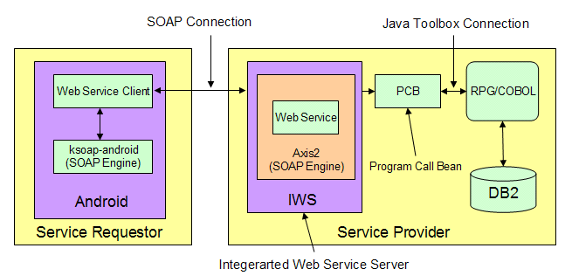 Android 調用 IBM i Web 服務實作
Web 服務具備跨平台與跨語言特性,可讓 Android 應用重用 IBM i 上的 RPG、COBOL 等業務邏輯。本文說明如何讓 Android 客戶端透過 SOAP
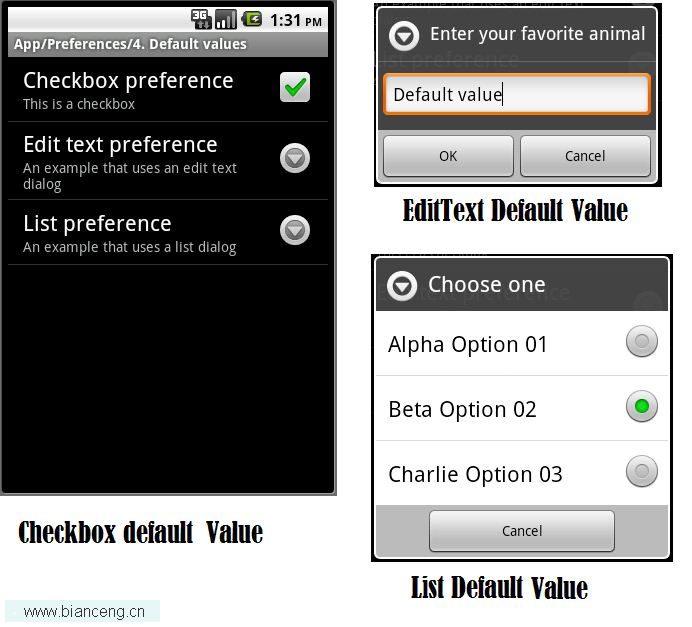 ApiDemos 解析(33):在 XML 中定義 Preference 預設值
DefaultValues 這個示例示範了如何直接在 XML 裡為各種類型的偏好設定指定預設值。做法是在對應的 Preference 標籤上加上 android:defa