

編輯:Android 開發教學
最近要做一个類似滑動選單欄的標題,資料來源綁的是 GridView,需求是橫向滑動且只顯示一列。最後的做法是在 Activity 中用程式碼動態調整版面參數。
ViewGroup.LayoutParams params = dishtype.getLayoutParams();
// dishtype 為 GridView,welist 為 ArrayList
int dishtypes = welist.size();
params.width = 115 * dishtypes;
Log.d("看看這個寬度", params.width + "" + welist.size());
dishtype.setLayoutParams(params);
// 列數設為資料筆數,強制只排一列
dishtype.setNumColumns(welist.size());
關鍵在最後兩行:把 numColumns 設成資料總筆數,GridView 就只能排成一列;再把元件寬度設為「單項寬度 × 筆數」,讓它撐開到超出畫面而變成可捲動。這裡的 115 是假設的單項寬度,實務上建議改用 getResources().getDimensionPixelSize() 讀取 dimens 中的數值,避免在不同解析度上手機上比例跑掉。
左右滑動則交給 HorizontalScrollView:
<HorizontalScrollView
    android:layout_width="match_parent"
    android:layout_height="wrap_content"
    android:scrollbars="none" >

    <FrameLayout
        android:layout_width="match_parent"
        android:layout_height="80dp" >

        <LinearLayout
            android:id="@+id/liear"
            android:layout_width="match_parent"
            android:layout_height="wrap_content"
            android:orientation="horizontal" >

            <GridView
                android:id="@+id/dishtype"
                android:layout_width="match_parent"
                android:layout_height="80dip"
                android:cacheColorHint="#00000000"
                android:columnWidth="108dip"
                android:gravity="center"
                android:horizontalSpacing="1.0dip"
                android:listSelector="#00000000"
                android:numColumns="auto_fit"
                android:stretchMode="spacingWidthUniform"
                android:verticalSpacing="1.0dip" >
            </GridView>
        </LinearLayout>
    </FrameLayout>
</HorizontalScrollView>
有兩個屬性值得留意:cacheColorHint 與 listSelector 設為全透明,可以避免捲動時出現突兀的背景色塊;HorizontalScrollView 只能包一個直接子元件,所以外層需要 FrameLayout 或 LinearLayout 墊一層。
 Android 開發入門:適應螢幕方向改變
Android 裝置可旋轉螢幕,支援 portrait 與 landscape 兩種方向。預設情況下,方向改變會使目前 Activity 被銷毀並重建,因此布局可能重新繪
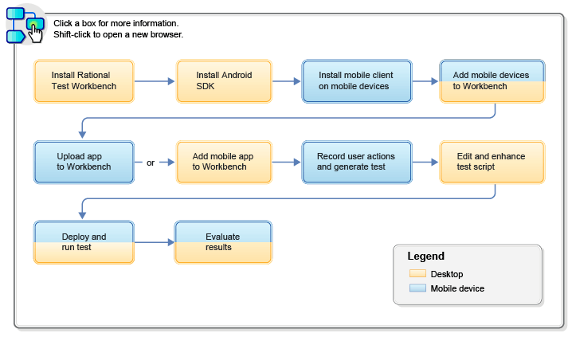 使用 IBM Rational Test Workbench 測試 Android App
IBM Rational Test Workbench 是一套整合功能、效能與介面測試的工具。RTW 8.5 加入行動應用測試能力,可支援 Android 與 iOS A
 Android 版 Outlook 強化收件箱:未讀篩選與郵件追蹤
微軟再次升級了 Android 平台的 Outlook 應用。這一版除了修掉大量使用者回報的問題,還強化了收件箱功能:新增未讀與已標記的篩選、郵件追蹤,以及把信件標記為垃
 C/C++ 交叉編譯環境建置與 Android 可執行檔
x86 與 ARM 使用不同指令集,因此在 x86 電腦上開發可在 ARM 裝置運行的程式,需要交叉編譯環境。CodeSourcery 工具鏈CodeSourcery 是