

編輯:Android 開發教學
第八篇說明了程式需要實現的功能,現在可以開始建立專案了。請參考教程第三篇建立一個名為 AndroidGraphics2DTutorial 的新專案,並先搭好整體骨架。
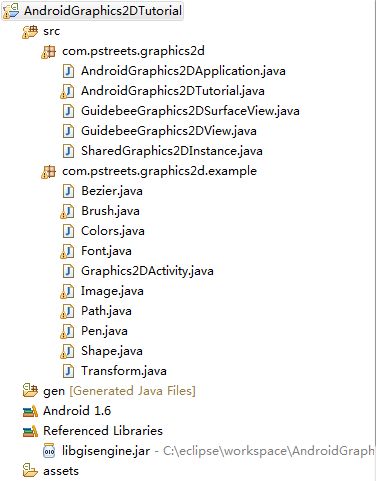
由於 AndroidGraphics2DTutorial 會呼叫引路蜂二維圖形庫,必須先把 libgisengine.jar 的參照加進來。開啟專案的 Android 屬性視窗,選擇 Add External JARs 即可。引路蜂二維圖形庫是引路蜂地圖開發包的一部分。
專案中定義的類別與職責如下:
AndroidGraphics2DApplication:應用程式類,繼承 Application。
AndroidGraphics2DTutorial:主 Activity,繼承 ListActivity,用於列出其他範例。
GuidebeeGraphics2DSurfaceView:SurfaceView 子類,用於顯示圖形。
GuidebeeGraphics2DView:View 子類,功能與上一個相同,兩者在程式中可以互換。
SharedGraphics2DInstance:定義共享物件,主要包含 Graphics2D。
Graphics2DActivity:Activity 子類,所有範例的基底類別,定義共享的類變數與函式。
Bezier、Brush、Colors、Font、Image、Path、Pen、Shape、Transform:Graphics2DActivity 的子類,各自示範二維圖形的一項功能。
一般 Android 應用其實不需要定義 Application 的派生類——例如 Hello World 就沒有。但如果你想在多個 Activity 之間共享變數,或需要初始化一些全域物件,定義一個就很有幫助。
定義好之後,可以在 Activity 或 Service 中呼叫 getApplication() 或 getApplicationContext() 取得該物件,存取其中定義的共享變數。
本例嚴格說來也可以不定義,但為了示範還是在 AndroidGraphics2DApplication 中初始化 Graphics2D 實例,讓 Colors、Font 等所有範例 Activity 都能存取同一份画板。記得:一旦定義了 Application 派生類,就必須在 AndroidManifest.xml 中宣告它的位置。
<manifest xmlns:android="https://schemas.android.com/apk/res/android"
    package="com.pstreets.graphics2d"
    android:versionCode="1"
    android:versionName="1.0">

    <application android:name="AndroidGraphics2DApplication"
        android:icon="@drawable/icon"
        android:label="@string/app_name">

        <activity android:name=".AndroidGraphics2DTutorial"
            android:label="@string/app_name">
            <intent-filter>
                <action android:name="android.intent.action.MAIN" />
                <category android:name="android.intent.category.LAUNCHER" />
            </intent-filter>
        </activity>
        ...
    </application>

    <uses-sdk android:minSdkVersion="4" />
</manifest>
Application 可以覆寫 onCreate() 與 onTerminate(),前者在應用啟動時執行一次,後者在應用退出時執行一次。這裡在 onCreate 中初始化 Graphics2D:
public void onCreate() {
    SharedGraphics2DInstance.graphics2d =
        new Graphics2D(SharedGraphics2DInstance.CANVAS_WIDTH,
                       SharedGraphics2DInstance.CANVAS_HEIGHT);
}
AndroidGraphics2DTutorial 是 ListActivity 子類,它直接從 AndroidManifest.xml 讀取 Intent-Filter Category 為 com.pstreets.graphics2d.SAMPLE_CODE 的所有 Activity:
private static final String SAMPLE_CATEGORY = "com.pstreets.graphics2d.SAMPLE_CODE";

Intent mainIntent = new Intent(Intent.ACTION_MAIN, null);
mainIntent.addCategory(SAMPLE_CATEGORY);
...
注意這裡的手法:主清單並不硬編碼任何範例名稱,而是靠 PackageManager 去查詢「哪些 Activity 宣告了 SAMPLE_CODE 這個 category」,再把查到的結果動態填進 ListActivity。
這帶來一個很好的性質——新增範例時,你完全不需要改動主 Activity。只要新範例在 manifest 中加上對應的 intent-filter,它就會自動出現在清單裡。
這個模式在 Android 中很常見(ApiDemos 本身就是這樣做的),值得記住:當你發現自己在維護一份「手寫的清單」時,往往就该問問能不能改成宣告式的自動收集。
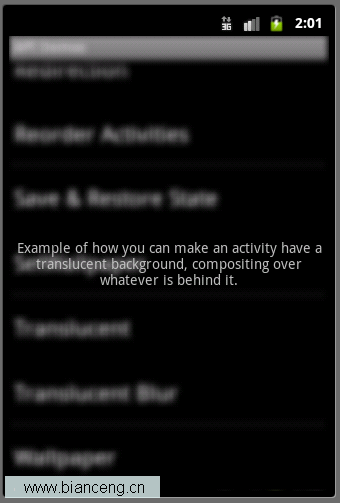 Android ApiDemos 解析(17):App → Activity → Translucent Blur
這個例子與 Translucent 的差别只有一個字:Blur。除了讓背後的 Activity 半透明顯現之外,還要讓它處於模糊狀態,營造出類似 iOS 毛玻璃那樣的視覺
 Android 開發入門:Activity 生命週期
Activity 是 Android 應用程式的核心元件,透過一組回呼方法控制其生命週期。常見回呼包括 onCreate、onStart、onResume、onPause
 Android GUI 系統之 SurfaceFlinger(5):BufferQueue 的內部原理
1.1 BufferQueue 詳解 上一小節我們已經見過 BufferQueue,它是 SurfaceTextureClient 實現本地視窗的關鍵。從邏輯上推斷,Bu
 Android 系統聯絡人全特效實現(下):字母表快速滾動
在上一篇文章中,我和大家一起實現了類似 Android 系統聯絡人的分組導航與擠壓動畫功能。不過,既然文章名叫《Android 系統聯絡人全特效實現》,那麼少了快速滾動功