

編輯:Android 開發實例
Android 四大元件中,Activity、BroadcastReceiver、ContentProvider、Service 都具備跨進程能力。ContentProvider 偏向資料共享(例如 SQLite),而當你想跨進程呼叫「服務」時,Android 用的是遠程程序呼叫(RPC)模式,並以一種名為 AIDL 的介面定義語言來描述服務的對外介面。百度地圖 SDK 這類需要常駐背景的能力,就是靠 AIDL Service 實作的。
1. 撰寫 AIDL 檔
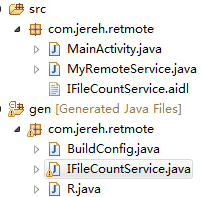
2. 若 AIDL 內容正確,工具會自動產生對應的 Java 介面檔
3. 建立一個 Service 子類別
4. 實作自動產生的 Java 介面
5. 在 AndroidManifest.xml 註冊服務,並加上 <action> 標籤,讓客戶端能用隱式 Intent 啟動
6. 在客戶端加入同一份 AIDL 檔並綁定服務
LocalService.aidl:
package com.jereh.remote;

interface LocalService {
    String getLocal();
}
存檔後 IDE 會自動產生 LocalService.java:
public class MyRemoteService extends Service {

    @Override
    public IBinder onBind(Intent arg0) {
        return new MyRemoteServiceImpl();
    }

    private class MyRemoteServiceImpl extends LocalService.Stub {
        @Override
        public String getLocal() throws RemoteException {
            return "煙台傑瑞教育";
        }
    }
}
並在 AndroidManifest.xml 中註冊。這裡的 android:process="remote" 讓服務跑在獨立行程,<intent-filter> 則供客戶端以隱式 Intent 找到它:
<service android:name="com.jereh.retmote.MyRemoteService"
         android:process="remote">
    <intent-filter>
        <action android:name="com.jereh.remote_service"/>
    </intent-filter>
</service>
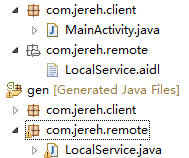
把 LocalService.aidl 複製到客戶端專案,套件名稱必須與服務端一致,否則產生的 Stub 型別對不上。
public class MainActivity extends Activity {

    private LocalService service;
    private String local;

    @Override
    protected void onCreate(Bundle savedInstanceState) {
        super.onCreate(savedInstanceState);
        setContentView(R.layout.activity_main);
    }

    /** 綁定遠程服務 */
    public void startService(View view) {
        Intent service = new Intent("com.jereh.remote_service");
        super.bindService(service, conn, Context.BIND_AUTO_CREATE);
    }

    /** 呼叫遠程方法 */
    public void showInfo(View view) {
        try {
            local = service.getLocal();
            Log.d("jereh", local);
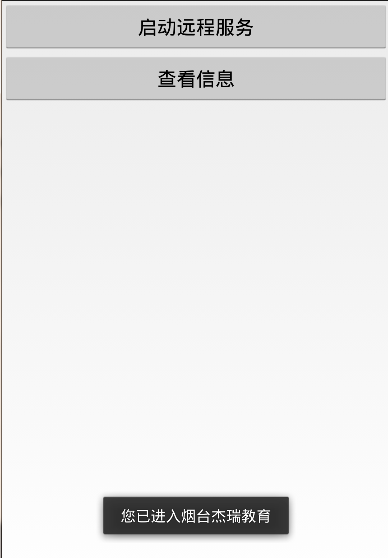
            Toast.makeText(this, "您已進入" + local, Toast.LENGTH_LONG).show();
        } catch (RemoteException e) {
            e.printStackTrace();
        }
    }

    private ServiceConnection conn = new ServiceConnection() {
        @Override
        public void onServiceDisconnected(ComponentName arg0) {
        }

        @Override
        public void onServiceConnected(ComponentName name, IBinder binder) {
            // 取得 onBind 回傳物件的代理
            service = LocalService.Stub.asInterface(binder);
        }
    };

    @Override
    public boolean onCreateOptionsMenu(Menu menu) {
        getMenuInflater().inflate(R.menu.main, menu);
        return true;
    }
}
對應的版面檔:
<LinearLayout xmlns:android="https://schemas.android.com/apk/res/android"
    xmlns:tools="https://schemas.android.com/tools"
    android:layout_width="match_parent"
    android:layout_height="match_parent"
    android:orientation="vertical"
    tools:context=".MainActivity">

    <Button
        android:layout_width="match_parent"
        android:layout_height="wrap_content"
        android:text="啟動遠程服務"
        android:onClick="startService" />

    <Button
        android:layout_width="match_parent"
        android:layout_height="wrap_content"
        android:text="查看資訊"
        android:onClick="showInfo" />
</LinearLayout>
AIDL 檔的位置:檔案的路徑(不含 .aidl 副檔名)就代表套件與介面名稱,兩端必須完全一致,這是最常見的踩坑點。
跨進程只傳得出基本型別:AIDL 支援 8 種基本型別、String、CharSequence、List、Map,以及實作 Parcelable 的自訂物件(此時還要額外寫一份同名 .aidl 宣告)。自訂類別若忘了聲明,編譯就會失敗。
記得解除綁定:bindService 之後應在 onDestroy() 呼叫 unbindService(),否則會留下洩漏的連線。另外 RemoteException 是跨進程呼叫的常客,所有遠程方法呼叫都該處理它。
 Android 網絡編程:獲取網絡上的 JSON 數據實例
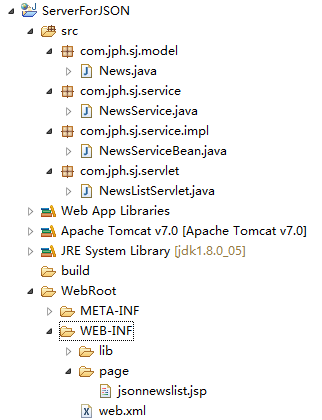
要獲取網絡上的 JSON 數據,首先需要服務器端提供相應支持。本文以一個新聞列表為例,完整演示從服務器端構建 JSON 接口到 Android 端解析展示的全流程。一、創
 Android Dialog 去除白色邊框的實作思路與程式碼
用系統預設的 Dialog 樣式時,四周總會帶一圈白框,很多時候並不是我們想要的。要拿掉它,正解不是去改圖片,而是覆寫樣式。 第一步:自訂 style 在 values
 Android 多語言應用:本地化字串與 values-it 資料夾怎麼用
一支上架的 App,很可能同時被台灣、日本、德國的使用者打開。要讓每個人都看得懂,App 就得依裝置的語言環境,換上對應的文字、數字與格式。這件事在 Android 裡稱
 Android RSS閱讀器實作(二):用 SAX 解析 XML 與建立資料物件
要在 Android 上讀取 RSS,第一個要解決的問題是:如何解析 XML。RSS 本身就是 XML,因此只要掌握 XML 解析,就能把網路資料轉成應用程式可用的物件。