

編輯:Android 開發實例
<?xml version="1.0" encoding="utf-8"?>
<LinearLayout xmlns:android="https://schemas.android.com/apk/res/android"
android:orientation="vertical"
android:layout_width="fill_parent"
android:layout_height="fill_parent"
>
<TextView android:id="@+id/tv"
android:layout_width="fill_parent"
android:layout_height="wrap_content"
android:text=""
/>
<ProgressBar android:id="@+id/down_pb"
android:layout_width="fill_parent"
android:layout_height="wrap_content"
android:max="100"
/>
</LinearLayout>
package com.pocketdigi.download;
import java.io.FileOutputStream;
import java.io.IOException;
import java.io.InputStream;
import java.net.URL;
import java.net.URLConnection;
import org.apache.http.client.ClientProtocolException;
import android.app.Activity;
import android.os.Bundle;
import android.os.Handler;
import android.os.Message;
import android.util.Log;
import android.widget.ProgressBar;
import android.widget.TextView;
import android.widget.Toast;
public class main extends Activity {
ProgressBar pb;
TextView tv;
int fileSize;
int downLoadFileSize;
String fileEx,fileNa,filename;
private Handler handler = new Handler()
{
@Override
public void handleMessage(Message msg)
{//定義一個Handler,用於處理下載線程與UI間通訊
if (!Thread.currentThread().isInterrupted())
{
switch (msg.what)
{
case 0:
pb.setMax(fileSize);
case 1:
pb.setProgress(downLoadFileSize);
int result = downLoadFileSize * 100 / fileSize;
tv.setText(result + "%");
break;
case 2:
Toast.makeText(main.this, "文件下載完成", 1).show();
break;
case -1:
String error = msg.getData().getString("error");
Toast.makeText(main.this, error, 1).show();
break;
}
}
super.handleMessage(msg);
}
};
@Override
public void onCreate(Bundle savedInstanceState) {
super.onCreate(savedInstanceState);
setContentView(R.layout.main);
pb=(ProgressBar)findViewById(R.id.down_pb);
tv=(TextView)findViewById(R.id.tv);
new Thread(){
public void run(){
try {
down_file("https://wallpaper.pocketdigi.com/upload/1/bigImage/1284565196.jpg","/sdcard/");
//下載文件,參數:第一個URL,第二個存放路徑
} catch (ClientProtocolException e) {
e.printStackTrace();
} catch (IOException e) {
e.printStackTrace();
}
}
}.start();
}
public void down_file(String url,String path) throws IOException{
//下載函數
filename=url.substring(url.lastIndexOf("/") + 1);
//獲取文件名
URL myURL = new URL(url);
URLConnection conn = myURL.openConnection();
conn.connect();
InputStream is = conn.getInputStream();
this.fileSize = conn.getContentLength();//根據響應獲取文件大小
if (this.fileSize <= 0) throw new RuntimeException("無法獲知文件大小 ");
if (is == null) throw new RuntimeException("stream is null");
FileOutputStream fos = new FileOutputStream(path+filename);
//把數據存入路徑+文件名
byte buf[] = new byte[1024];
downLoadFileSize = 0;
sendMsg(0);
do
{
//循環讀取
int numread = is.read(buf);
if (numread == -1)
{
break;
}
fos.write(buf, 0, numread);
downLoadFileSize += numread;
sendMsg(1);//更新進度條
} while (true);
sendMsg(2);//通知下載完成
try
{
is.close();
} catch (Exception ex)
{
Log.e("tag", "error: " + ex.getMessage(), ex);
}
}
private void sendMsg(int flag)
{
Message msg = new Message();
msg.what = flag;
handler.sendMessage(msg);
}
}
整體邏輯是這樣的:開一條子執行緒負責下載,透過 Handler 與 UI 執行緒溝通,即時更新 ProgressBar 與百分比文字。下載時先以 getContentLength() 取得檔案總大小作為進度最大值,再迴圈讀取串流寫入檔案,每讀一段就回報進度。
提醒:緩衝區 byte buf[] = new byte[1024]; 的大小 1024 是常見設定,而 sendMsg(0) 中的 0 代表初始化進度條,別誤寫成 1。
 Android OpenGL 繪圖技巧完整總結
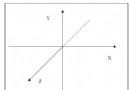
本文重新複習了 Android 上使用 OpenGL ES 繪圖的原理與技巧,並把重點整理如下,方便日後查閱。1. Android 三維座標系統如圖:Android 的三
 Android 登入範例:帳號密碼與重試次數
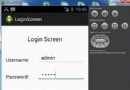
登入畫面的設計重點一個基本的登入畫面通常包含使用者名稱、密碼與登入按鈕。密碼欄位應使用密碼輸入型態,讓輸入內容以遮罩方式顯示。帳號密碼驗證按下登入鈕後,程式會取得輸入框中
 Android 應用本地化:多語系字串資源設定
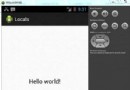
Android App 可能在不同語言與地區運行。本地化可讓文字、數字、日期等更符合當地使用者的習慣。 建立語言資源資料夾 在 res 下建立 values-it、val
 Android 轉圈動畫怎麼做:ProgressBar 的 Spinner 用法
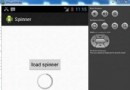
當 App 要跑一段耗時的工作,使用者需要一個「你正在忙」的提示,而 ProgressBar 就是最直接的答案。它分成兩種外觀:橫向的進度條(progress bar),