

編輯:Android 開發實例
Android 為 Intent 預先定義了大量標準化的 Activity Action,善用這些常數,我們就能輕鬆調用系統內建的各項功能。以下列舉部分常用的標準 Activity Actions:
ACTION_MAIN:作為主要進入點,通常不接收輸入資料。ACTION_VIEW:向使用者顯示指定資料。ACTION_ATTACH_DATA:指定某些資料應附加於他處,例如把圖片附加到聯絡人。ACTION_EDIT:提供明確可編輯的資料給使用者編輯。ACTION_PICK:從資料集合中挑選一個子項目並回傳。ACTION_CHOOSER:顯示選擇器,讓使用者在執行前挑選想要的目標。ACTION_GET_CONTENT:讓使用者挑選特定種類的資料並回傳(如拍照、錄音)。ACTION_DIAL:顯示帶有指定號碼的撥號介面,由使用者決定是否撥出。ACTION_CALL:直接依指定號碼發起通話(多數應用偏好 ACTION_DIAL;緊急呼叫應使用 ACTION_DIAL)。ACTION_SEND:傳遞資料給某個目標,由接收方決定如何送出。ACTION_SENDTO:向指定對象發送一則訊息。ACTION_ANSWER:接聽一通來電。ACTION_INSERT:向容器中插入一筆空項目。ACTION_DELETE:從容器中刪除指定資料。ACTION_RUN:執行資料。ACTION_SYNC:同步伺服器與裝置上的資料。ACTION_SEARCH / ACTION_WEB_SEARCH:執行本機搜尋或網頁搜尋。此外,系統也定義了大量標準廣播 Action,例如:
ACTION_TIME_TICK:目前時間改變,每分鐘發送一次,只能透過 Context.registerReceiver() 註冊接收。ACTION_TIME_CHANGED / ACTION_TIMEZONE_CHANGED:時間或時區被設定。ACTION_BOOT_COMPLETED:系統完成開機後發送一次。ACTION_PACKAGE_ADDED / ACTION_PACKAGE_REMOVED:應用包被安裝或移除。ACTION_BATTERY_CHANGED:電池狀態或電量改變,同樣只能透過 registerReceiver() 註冊。以下範例以 ListActivity 呈現一份功能選單,點選不同項目便會觸發對應的系統 Action。
/Chapter06_Intent_SystemAction/src/com/amaker/ch06/app/MainActivity.java
package com.amaker.ch06.app;

import android.app.ListActivity;
import android.content.Intent;
import android.net.Uri;
import android.os.Bundle;
import android.view.View;
import android.widget.ArrayAdapter;
import android.widget.ListView;

public class MainActivity extends ListActivity {
 @Override
 public void onCreate(Bundle savedInstanceState) {
 super.onCreate(savedInstanceState);
 String[] menus = { "查看電話信息", "編輯電話信息", "顯示撥打電話界面", "直接打電話", "訪問浏覽器", "訪問地圖"};
 setListAdapter(new ArrayAdapter<String>(this,
 android.R.layout.simple_list_item_1, menus));
 getListView().setTextFilterEnabled(true);
 }

 @Override
 protected void onListItemClick(ListView l, View v, int position, long id) {
 Intent intent = new Intent();
 Uri uri ;
 String data;
 switch (position) {
 case 0:
 data = "content://contacts/people/1";
 uri = Uri.parse(data);
 intent.setAction(Intent.ACTION_VIEW);
 intent.setData(uri);
 startActivity(intent);
 break;
 case 1:
 data = "content://contacts/people/1";
 uri = Uri.parse(data);
 intent.setAction(Intent.ACTION_EDIT);
 intent.setData(uri);
 startActivity(intent);
 break;
 case 2:
 data = "tel:13800138000";
 uri = Uri.parse(data);
 intent.setAction(Intent.ACTION_DIAL);
 intent.setData(uri);
 startActivity(intent);
 break;
 case 3:
 data = "tel:13800138000";
 uri = Uri.parse(data);
 intent.setAction(Intent.ACTION_CALL);
 intent.setData(uri);
 startActivity(intent);
 break;
 case 4:
 data = "https://www.google.com";
 uri = Uri.parse(data);
 intent.setAction(Intent.ACTION_VIEW);
 intent.setData(uri);
 startActivity(intent);
 break;
 case 5:
 data = "geo:39.92,116.46";
 uri = Uri.parse(data);
 intent = new Intent(Intent.ACTION_VIEW, uri);
 startActivity(intent);
 break;
 default:
 break;
 }
 }
}
由於範例中使用了直接撥號的 ACTION_CALL,務必在清單檔中加上通話權限,否則執行時會因缺乏授權而失敗:
<uses-permission android:name="android.permission.CALL_PHONE"></uses-permission>
透過這些標準 Action,我們只需組裝好正確的 Intent,就能把實際的執行交給系統與其他應用去完成,這正是 Android 元件復用精神的體現。
 Android 登入頁面開發:帳密驗證與三次錯誤鎖定機制
登入頁面是應用程式的入口。使用者可能要登入 Facebook、微博或其他服務,而這道關卡既要讓正規使用者順利通過,也要擋住惡意嘗試。本章說明如何建立登入介面,並處理安全性
 Android 天氣 JSON 解析範例:從網路資料到畫面顯示
天氣應用是練習 JSON 解析的好題目。透過網路取得 JSON 後,只要掌握物件與陣列結構,就能把資料填入畫面。 解析流程 確認要顯示的欄位。 建立 JSONObjec
 Android JSON 解析常見錯誤排查:從 JSONObject 例外反推資料結構
JSON 是 JavaScript 對象符號的縮寫,如今已成為一門獨立的資料交換格式,也是 XML 最有力的替代方案。它比 XML 短、比 XML 好讀,解析時也不必處理
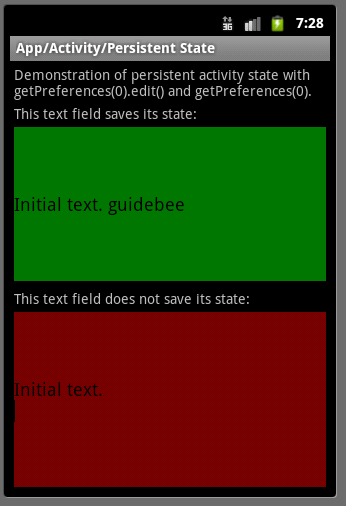 Android ApiDemo 系列九:Shared Preferences 保存狀態
Android 提供多種資料保存方式,其中 Shared Preferences 是最輕量的一種,適合保存少量 key-value 格式的偏好設定或簡單狀態。它支援 bo