

編輯:Android 開發實例
Android 2.2 起新增的縮圖類別 ThumbnailUtils,主要方法都是靜態的,因此即使是 API Level 8 以下的專案也可以直接把這份程式碼複製進來使用。
相對於我們平常自己寫的縮圖工具,這個類別考慮得周全許多:除了尺寸比例的優化處理,在記憶體管理與 OOM 防範上也下了不少功夫。以下為完整程式碼,使用方法與簡介可參考 ThumbnailUtils - Android 2.2 新增類別 一文。
讀這份原始碼時,建議特別注意以下幾處:
inJustDecodeBounds = true 只讀取圖片尺寸而不配置像素記憶體,再據此計算 inSampleSize,最後才真正解碼。這是避免大圖 OOM 的標準手法。transform() 會依寬高比決定裁切方向,並在需要時回收中間產生的 Bitmap。public class ThumbnailUtils {
private static final String TAG = "ThumbnailUtils";
/* Maximum pixels size for created bitmap. */
private static final int MAX_NUM_PIXELS_THUMBNAIL = 512 * 384;
private static final int MAX_NUM_PIXELS_MICRO_THUMBNAIL = 128 * 128;
private static final int UNCONSTRAINED = -1;
/* Options used internally. */
private static final int OPTIONS_NONE = 0x0;
private static final int OPTIONS_SCALE_UP = 0x1;
/**
* Constant used to indicate we should recycle the input in
* {@link #extractThumbnail(Bitmap, int, int, int)} unless the output is the input.
*/
public static final int OPTIONS_RECYCLE_INPUT = 0x2;
/**
* Constant used to indicate the dimension of mini thumbnail.
* @hide Only used by media framework and media provider internally.
*/
public static final int TARGET_SIZE_MINI_THUMBNAIL = 320;
/**
* Constant used to indicate the dimension of micro thumbnail.
* @hide Only used by media framework and media provider internally.
*/
public static final int TARGET_SIZE_MICRO_THUMBNAIL = 96;
/**
* This method first examines if the thumbnail embedded in EXIF is bigger than our target
* size. If not, then it'll create a thumbnail from original image. Due to efficiency
* consideration, we want to let MediaThumbRequest avoid calling this method twice for
* both kinds, so it only requests for MICRO_KIND and set saveImage to true.
*
* This method always returns a "square thumbnail" for MICRO_KIND thumbnail.
*
* @param filePath the path of image file
* @param kind could be MINI_KIND or MICRO_KIND
* @return Bitmap
*
* @hide This method is only used by media framework and media provider internally.
*/
public static Bitmap createImageThumbnail(String filePath, int kind) {
boolean wantMini = (kind == Images.Thumbnails.MINI_KIND);
int targetSize = wantMini
? TARGET_SIZE_MINI_THUMBNAIL
: TARGET_SIZE_MICRO_THUMBNAIL;
int maxPixels = wantMini
? MAX_NUM_PIXELS_THUMBNAIL
: MAX_NUM_PIXELS_MICRO_THUMBNAIL;
SizedThumbnailBitmap sizedThumbnailBitmap = new SizedThumbnailBitmap();
Bitmap bitmap = null;
MediaFileType fileType = MediaFile.getFileType(filePath);
if (fileType != null && fileType.fileType == MediaFile.FILE_TYPE_JPEG) {
createThumbnailFromEXIF(filePath, targetSize, maxPixels, sizedThumbnailBitmap);
bitmap = sizedThumbnailBitmap.mBitmap;
}
if (bitmap == null) {
try {
FileDescriptor fd = new FileInputStream(filePath).getFD();
BitmapFactory.Options options = new BitmapFactory.Options();
options.inSampleSize = 1;
options.inJustDecodeBounds = true;
BitmapFactory.decodeFileDescriptor(fd, null, options);
if (options.mCancel || options.outWidth == -1
|| options.outHeight == -1) {
return null;
}
options.inSampleSize = computeSampleSize(
options, targetSize, maxPixels);
options.inJustDecodeBounds = false;
options.inDither = false;
options.inPreferredConfig = Bitmap.Config.ARGB_8888;
bitmap = BitmapFactory.decodeFileDescriptor(fd, null, options);
} catch (IOException ex) {
Log.e(TAG, "", ex);
}
}
if (kind == Images.Thumbnails.MICRO_KIND) {
// now we make it a "square thumbnail" for MICRO_KIND thumbnail
bitmap = extractThumbnail(bitmap,
TARGET_SIZE_MICRO_THUMBNAIL,
TARGET_SIZE_MICRO_THUMBNAIL, OPTIONS_RECYCLE_INPUT);
}
return bitmap;
}
/**
* Create a video thumbnail for a video. May return null if the video is
* corrupt or the format is not supported.
*
* @param filePath the path of video file
* @param kind could be MINI_KIND or MICRO_KIND
*/
public static Bitmap createVideoThumbnail(String filePath, int kind) {
Bitmap bitmap = null;
MediaMetadataRetriever retriever = new MediaMetadataRetriever();
try {
retriever.setMode(MediaMetadataRetriever.MODE_CAPTURE_FRAME_ONLY);
retriever.setDataSource(filePath);
bitmap = retriever.captureFrame();
} catch (IllegalArgumentException ex) {
// Assume this is a corrupt video file
} catch (RuntimeException ex) {
// Assume this is a corrupt video file.
} finally {
try {
retriever.release();
} catch (RuntimeException ex) {
// Ignore failures while cleaning up.
}
}
if (kind == Images.Thumbnails.MICRO_KIND && bitmap != null) {
bitmap = extractThumbnail(bitmap,
TARGET_SIZE_MICRO_THUMBNAIL,
TARGET_SIZE_MICRO_THUMBNAIL,
OPTIONS_RECYCLE_INPUT);
}
return bitmap;
}
/**
* Creates a centered bitmap of the desired size.
*
* @param source original bitmap source
* @param width targeted width
* @param height targeted height
*/
public static Bitmap extractThumbnail(
Bitmap source, int width, int height) {
return extractThumbnail(source, width, height, OPTIONS_NONE);
}
/**
* Creates a centered bitmap of the desired size.
*
* @param source original bitmap source
* @param width targeted width
* @param height targeted height
* @param options options used during thumbnail extraction
*/
public static Bitmap extractThumbnail(
Bitmap source, int width, int height, int options) {
if (source == null) {
return null;
}
float scale;
if (source.getWidth() < source.getHeight()) {
scale = width / (float) source.getWidth();
} else {
scale = height / (float) source.getHeight();
}
Matrix matrix = new Matrix();
matrix.setScale(scale, scale);
Bitmap thumbnail = transform(matrix, source, width, height,
OPTIONS_SCALE_UP | options);
return thumbnail;
}
/*
* Compute the sample size as a function of minSideLength
* and maxNumOfPixels.
* minSideLength is used to specify that minimal width or height of a
* bitmap.
* maxNumOfPixels is used to specify the maximal size in pixels that is
* tolerable in terms of memory usage.
*
* The function returns a sample size based on the constraints.
* Both size and minSideLength can be passed in as IImage.UNCONSTRAINED,
* which indicates no care of the corresponding constraint.
* The functions prefers returning a sample size that
* generates a smaller bitmap, unless minSideLength = IImage.UNCONSTRAINED.
*
* Also, the function rounds up the sample size to a power of 2 or multiple
* of 8 because BitmapFactory only honors sample size this way.
* For example, BitmapFactory downsamples an image by 2 even though the
* request is 3. So we round up the sample size to avoid OOM.
*/
private static int computeSampleSize(BitmapFactory.Options options,
int minSideLength, int maxNumOfPixels) {
int initialSize = computeInitialSampleSize(options, minSideLength,
maxNumOfPixels);
int roundedSize;
if (initialSize <= 8) {
roundedSize = 1;
while (roundedSize < initialSize) {
roundedSize <<= 1;
}
} else {
roundedSize = (initialSize + 7) / 8 * 8;
}
return roundedSize;
}
private static int computeInitialSampleSize(BitmapFactory.Options options,
int minSideLength, int maxNumOfPixels) {
double w = options.outWidth;
double h = options.outHeight;
int lowerBound = (maxNumOfPixels == UNCONSTRAINED) ? 1 :
(int) Math.ceil(Math.sqrt(w * h / maxNumOfPixels));
int upperBound = (minSideLength == UNCONSTRAINED) ? 128 :
(int) Math.min(Math.floor(w / minSideLength),
Math.floor(h / minSideLength));
if (upperBound < lowerBound) {
// return the larger one when there is no overlapping zone.
return lowerBound;
}
if ((maxNumOfPixels == UNCONSTRAINED) &&
(minSideLength == UNCONSTRAINED)) {
return 1;
} else if (minSideLength == UNCONSTRAINED) {
return lowerBound;
} else {
return upperBound;
}
}
/**
* Make a bitmap from a given Uri, minimal side length, and maximum number
* of pixels.
* The image data will be read from specified pfd if it's not null, otherwise
* a new input stream will be created using specified ContentResolver.
*
* Clients are allowed to pass their own BitmapFactory.Options used for bitmap decoding. A
* new BitmapFactory.Options will be created if options is null.
*/
private static Bitmap makeBitmap(int minSideLength, int maxNumOfPixels,
Uri uri, ContentResolver cr, ParcelFileDescriptor pfd,
BitmapFactory.Options options) {
Bitmap b = null;
try {
if (pfd == null) pfd = makeInputStream(uri, cr);
if (pfd == null) return null;
if (options == null) options = new BitmapFactory.Options();
FileDescriptor fd = pfd.getFileDescriptor();
options.inSampleSize = 1;
options.inJustDecodeBounds = true;
BitmapFactory.decodeFileDescriptor(fd, null, options);
if (options.mCancel || options.outWidth == -1
|| options.outHeight == -1) {
return null;
}
options.inSampleSize = computeSampleSize(
options, minSideLength, maxNumOfPixels);
options.inJustDecodeBounds = false;
options.inDither = false;
options.inPreferredConfig = Bitmap.Config.ARGB_8888;
b = BitmapFactory.decodeFileDescriptor(fd, null, options);
} catch (OutOfMemoryError ex) {
Log.e(TAG, "Got oom exception", ex);
return null;
} finally {
closeSilently(pfd);
}
return b;
}
private static void closeSilently(ParcelFileDescriptor c) {
if (c == null) return;
try {
c.close();
} catch (Throwable t) {
// do nothing
}
}
private static ParcelFileDescriptor makeInputStream(
Uri uri, ContentResolver cr) {
try {
return cr.openFileDescriptor(uri, "r");
} catch (IOException ex) {
return null;
}
}
/**
* Transform source Bitmap to targeted width and height.
*/
private static Bitmap transform(Matrix scaler,
Bitmap source,
int targetWidth,
int targetHeight,
int options) {
boolean scaleUp = (options & OPTIONS_SCALE_UP) != 0;
boolean recycle = (options & OPTIONS_RECYCLE_INPUT) != 0;
int deltaX = source.getWidth() - targetWidth;
int deltaY = source.getHeight() - targetHeight;
if (!scaleUp && (deltaX < 0 || deltaY < 0)) {
/*
* In this case the bitmap is smaller, at least in one dimension,
* than the target. Transform it by placing as much of the image
* as possible into the target and leaving the top/bottom or
* left/right (or both) black.
*/
Bitmap b2 = Bitmap.createBitmap(targetWidth, targetHeight,
Bitmap.Config.ARGB_8888);
Canvas c = new Canvas(b2);
int deltaXHalf = Math.max(0, deltaX / 2);
int deltaYHalf = Math.max(0, deltaY / 2);
Rect src = new Rect(
deltaXHalf,
deltaYHalf,
deltaXHalf + Math.min(targetWidth, source.getWidth()),
deltaYHalf + Math.min(targetHeight, source.getHeight()));
int dstX = (targetWidth - src.width()) / 2;
int dstY = (targetHeight - src.height()) / 2;
Rect dst = new Rect(
dstX,
dstY,
targetWidth - dstX,
targetHeight - dstY);
c.drawBitmap(source, src, dst, null);
if (recycle) {
source.recycle();
}
return b2;
}
float bitmapWidthF = source.getWidth();
float bitmapHeightF = source.getHeight();
float bitmapAspect = bitmapWidthF / bitmapHeightF;
float viewAspect = (float) targetWidth / targetHeight;
if (bitmapAspect > viewAspect) {
float scale = targetHeight / bitmapHeightF;
if (scale < .9F || scale > 1F) {
scaler.setScale(scale, scale);
} else {
scaler = null;
}
} else {
float scale = targetWidth / bitmapWidthF;
if (scale < .9F || scale > 1F) {
scaler.setScale(scale, scale);
} else {
scaler = null;
}
}
Bitmap b1;
if (scaler != null) {
// this is used for minithumb and crop, so we want to filter here.
b1 = Bitmap.createBitmap(source, 0, 0,
source.getWidth(), source.getHeight(), scaler, true);
} else {
b1 = source;
}
if (recycle && b1 != source) {
source.recycle();
}
int dx1 = Math.max(0, b1.getWidth() - targetWidth);
int dy1 = Math.max(0, b1.getHeight() - targetHeight);
Bitmap b2 = Bitmap.createBitmap(
b1,
dx1 / 2,
dy1 / 2,
targetWidth,
targetHeight);
if (b2 != b1) {
if (recycle || b1 != source) {
b1.recycle();
}
}
return b2;
}
/**
* SizedThumbnailBitmap contains the bitmap, which is downsampled either from
* the thumbnail in exif or the full image.
* mThumbnailData, mThumbnailWidth and mThumbnailHeight are set together only if mThumbnail
* is not null.
*
* The width/height of the sized bitmap may be different from mThumbnailWidth/mThumbnailHeight.
*/
private static class SizedThumbnailBitmap {
public byte[] mThumbnailData;
public Bitmap mBitmap;
public int mThumbnailWidth;
public int mThumbnailHeight;
}
/**
* Creates a bitmap by either downsampling from the thumbnail in EXIF or the full image.
* The functions returns a SizedThumbnailBitmap,
* which contains a downsampled bitmap and the thumbnail data in EXIF if exists.
*/
private static void createThumbnailFromEXIF(String filePath, int targetSize,
int maxPixels, SizedThumbnailBitmap sizedThumbBitmap) {
if (filePath == null) return;
ExifInterface exif = null;
byte [] thumbData = null;
try {
exif = new ExifInterface(filePath);
if (exif != null) {
thumbData = exif.getThumbnail();
}
} catch (IOException ex) {
Log.w(TAG, ex);
}
BitmapFactory.Options fullOptions = new BitmapFactory.Options();
BitmapFactory.Options exifOptions = new BitmapFactory.Options();
int exifThumbWidth = 0;
int fullThumbWidth = 0;
// Compute exifThumbWidth.
if (thumbData != null) {
exifOptions.inJustDecodeBounds = true;
BitmapFactory.decodeByteArray(thumbData, 0, thumbData.length, exifOptions);
exifOptions.inSampleSize = computeSampleSize(exifOptions, targetSize, maxPixels);
exifThumbWidth = exifOptions.outWidth / exifOptions.inSampleSize;
}
// Compute fullThumbWidth.
fullOptions.inJustDecodeBounds = true;
BitmapFactory.decodeFile(filePath, fullOptions);
fullOptions.inSampleSize = computeSampleSize(fullOptions, targetSize, maxPixels);
fullThumbWidth = fullOptions.outWidth / fullOptions.inSampleSize;
// Choose the larger thumbnail as the returning sizedThumbBitmap.
if (thumbData != null && exifThumbWidth >= fullThumbWidth) {
int width = exifOptions.outWidth;
int height = exifOptions.outHeight;
exifOptions.inJustDecodeBounds = false;
sizedThumbBitmap.mBitmap = BitmapFactory.decodeByteArray(thumbData, 0,
thumbData.length, exifOptions);
if (sizedThumbBitmap.mBitmap != null) {
sizedThumbBitmap.mThumbnailData = thumbData;
sizedThumbBitmap.mThumbnailWidth = width;
sizedThumbBitmap.mThumbnailHeight = height;
}
} else {
fullOptions.inJustDecodeBounds = false;
sizedThumbBitmap.mBitmap = BitmapFactory.decodeFile(filePath, fullOptions);
}
}
}這份程式碼直接貼進專案不一定能立刻編譯,因為它依賴了幾個 framework 內部的類別,例如 MediaFile、MediaFileType、Images.Thumbnails、SizedThumbnailBitmap 所在的 media 內部結構等。若要在自己的 App 中使用,最省事的做法是只挑出你需要的部分——通常就是 extractThumbnail()、computeSampleSize() 與 transform() 這三個方法,把 Images.Thumbnails.MINI_KIND 這類內部常數換成自己的整數常數即可。
另外要提醒的是,createVideoThumbnail() 用到的 MediaMetadataRetriever.setMode() 與 captureFrame() 在公開 API 中並不存在,改用 getFrameAtTime() 才是標準做法。
 ListView 動態修改字體大小的實例講解
本文實現一個小效果:點擊列表中某一項,該項的文字變大。核心思路只有兩個方法——自定義 Adapter 的 getView() 負責渲染,setOnItemClickLis
 Android 登入實作:帳號密碼驗證與三次錯誤鎖定
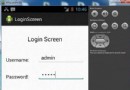
登入畫面負責向使用者索取帳號與密碼以驗證身分,是許多應用(如 Facebook、微博)的必備環節。本章說明如何建立登入介面,並處理安全性與錯誤嘗試次數的限制。 首先在版
 PreferenceActivity 設定頁面開發詳解
PreferenceActivity 是 Android 中專門用於建立設定頁面的 Activity。它能把 CheckBox、清單、輸入框與鈴聲選擇等常見設定控制項,以
 Android 源碼中的工廠方法模式:定義、優勢與 ListActivity 案例
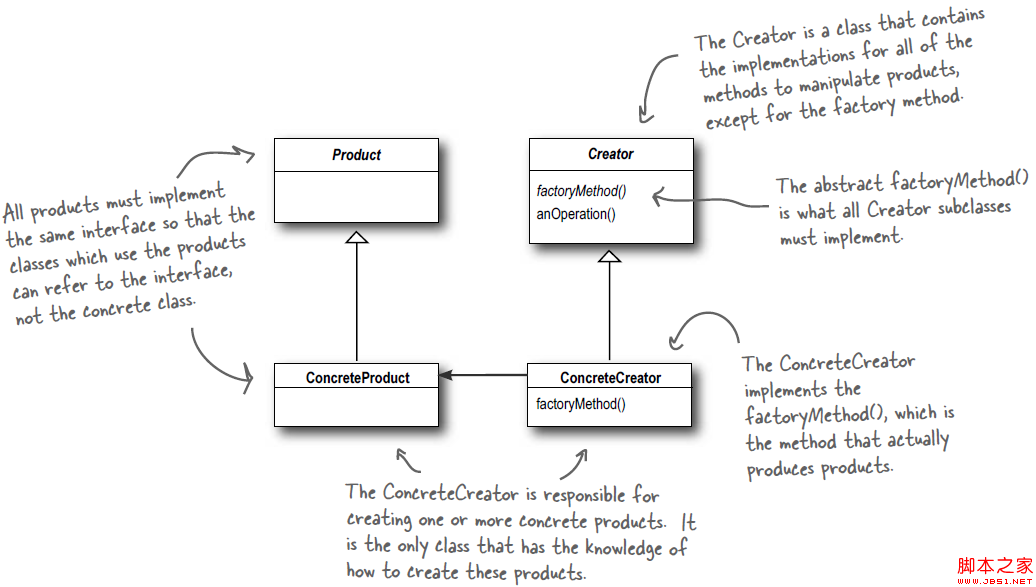
定義 Define an interface for creating an object, but let subclasses decide which class