編輯:Android開發教程
Toast通知是Android中最簡單的消息通知。接下來展示如何使用吐司通知。
1. 新建一個工程, Toast。
2. main.xml中的代碼。
<RelativeLayout xmlns:android="http://schemas.android.com/apk/res/android"
    xmlns:tools="http://schemas.android.com/tools"
    android:layout_width="match_parent"
    android:layout_height="match_parent" >

    <Button
        android:id="@+id/button"
        android:layout_width="wrap_content"
        android:layout_height="wrap_content"
        android:layout_centerHorizontal="true"
        android:layout_centerVertical="true"
        android:padding="@dimen/padding_medium"
        android:text="@string/hello_world" />

</RelativeLayout>
3. MainActivity.java中的代碼。
public class MainActivity extends Activity {
    private Button button;

    @Override
    public void onCreate(Bundle savedInstanceState) {
        super.onCreate(savedInstanceState);
        setContentView(R.layout.main);
        button = (Button) findViewById(R.id.button);
        button.setOnClickListener(new OnClickListener() {

            @Override
            public void onClick(View v) {
                Toast.makeText(getBaseContext(), "Hi, I am a Toast Message.",
                        Toast.LENGTH_SHORT).show();
            }
        });
    }

}
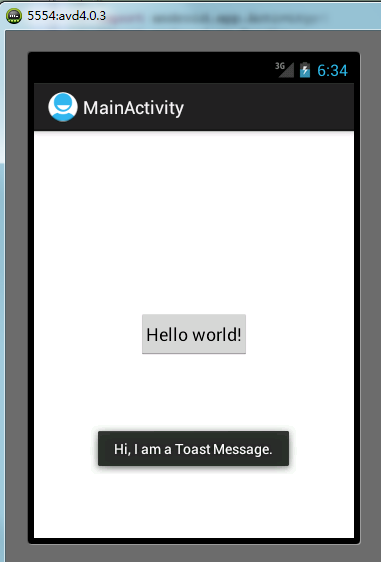
4. 按F11在模擬器上面調試。點擊中心的按鈕,就會彈出吐司通知了。
 Android連接網絡的時候對網絡的狀態進行判斷
Android連接網絡的時候,並不是每次都能連接到網絡,因此在程序啟動中需要對網絡的狀態進行判斷,如果沒有網絡則提醒 用戶進行設置。首先,要判斷網絡狀態,需要有相應的權限
 Android開發入門(八)使用活動欄 8.1 操縱ActionBar
除了fragments(碎片),在Android3和4中新增加的特性,還有ActionBar(活動欄)。ActionBar位於傳 統標題欄的位置,就在設備屏幕的頂部。Ac
 Android中Intent使用Serializable和Parcelable傳遞對象
Android中Intent中如何傳遞對象,就我目前所知道的有兩種方法,一種是Bundle.putSerializable(Key,Object);另一種是Bundle.
 Android ApiDemos示例解析(31):App->Preferences->Launching preferences
前給例子介紹了如何使用PreferenceActivity 來顯示修改應用偏好,用戶對Preferences的修改自動存儲在應用對應的 Shared Preferenc