編輯:Android開發教程
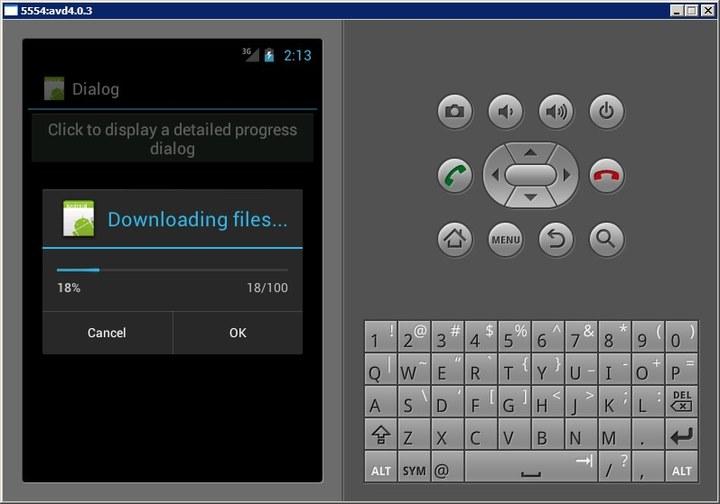
除了“對話框”進度條,也可以創建一個顯示“操作進度”的對話框,例如顯示正在下載的狀態。
1. 創建一個工程:Dialog。
2. main.xml中的代碼。
<?xml version="1.0" encoding="utf-8"?>
<LinearLayout xmlns:android="http://schemas.android.com/apk/res/android"
    android:layout_width="fill_parent"
    android:layout_height="fill_parent"
    android:orientation="vertical" >

    <Button
        android:id="@+id/btn_dialog3"
        android:layout_width="fill_parent"
        android:layout_height="wrap_content"
        android:onClick="onClick3"
        android:text="Click to display a detailed progress dialog" />

</LinearLayout>
3. DialogActivity.java中的代碼。
public class DialogActivity extends Activity {
    ProgressDialog progressDialog;

    /** Called when the activity is first created. */
    @Override
    public void onCreate(Bundle savedInstanceState) {
        super.onCreate(savedInstanceState);
        setContentView(R.layout.main);
    }

    public void onClick3(View v) {
        showDialog(1);
        progressDialog.setProgress(0);

        new Thread(new Runnable() {
            public void run() {
                for (int i = 1; i <= 15; i++) {
                    try {
                        // ---simulate doing something lengthy---
                        Thread.sleep(1000);
                        // ---update the dialog---
                        progressDialog.incrementProgressBy((int) (100 / 15));
                    } catch (InterruptedException e) {
                        e.printStackTrace();
                    }
                }
                progressDialog.dismiss();
            }
        }).start();
    }

    @Override
    protected Dialog onCreateDialog(int id) {
        switch (id) {
        case 1:
            progressDialog = new ProgressDialog(this);
            progressDialog.setIcon(R.drawable.ic_launcher);
            progressDialog.setTitle("Downloading files...");
            progressDialog.setProgressStyle(ProgressDialog.STYLE_HORIZONTAL);
            progressDialog.setButton(DialogInterface.BUTTON_POSITIVE, "OK",
                    new DialogInterface.OnClickListener() {
                        public void onClick(DialogInterface dialog,
                                int whichButton) {
                            Toast.makeText(getBaseContext(), "OK clicked!",
                                    Toast.LENGTH_SHORT).show();
                        }
                    });
            progressDialog.setButton(DialogInterface.BUTTON_NEGATIVE, "Cancel",
                    new DialogInterface.OnClickListener() {
                        public void onClick(DialogInterface dialog,
                                int whichButton) {
                            Toast.makeText(getBaseContext(), "Cancel clicked!",
                                    Toast.LENGTH_SHORT).show();
                        }
                    });
            return progressDialog;
        }
        return null;
    }
}
4. 按F11調試。
 Android UI設計與開發教程 引導界面(四)仿人人網V5.9.2最新版引導界面
這一篇我將會以人人網的引導界面為實例來展開詳細的講解,人人網的引導界面比較的新穎,不同於其他 應用程序千篇一律的靠滑動來引導用戶,而是以一個一個比較生動形象的動畫效果展
 Android多線程研究(2)定時器
先來看一段代碼:public static void main(String[] args) { new Timer().schedule(new TimerT
 Android UI設計與開發教程 引導界面(二)使用ViewPager實現歡迎引導頁面
本系列文章都會以一個程序的實例開發為主線來進行講解,以求達到一個循序漸進的學習效果,這樣更能 加深大家對於程序為什麼要這樣寫的用意,理論加上實際的應用才能達到事半功倍的
 Android中升級ADT 22 引發的錯誤
今天心血來潮,又把ADT升級了一下,升級到了ADT 22,悲催的發現項目用不了了(能編譯通過,運行出錯)。錯誤一:(警告)Unable to resolve superc