編輯:Android開發教程
Android 操作系統對於<intent-filter>含有下列屬性的Activity會在應用程序管理器(Launcher)顯示一項,一般這 個Activity對應於某個應用的主Activity。
<action android:name=”android.intent.action.MAIN” />
<category android:name=”android.intent.category.LAUNCHER” />
此外,如果用戶想在設備的Home Screen 上添加應用的快捷方式,可以在Launcher中長按這個應用的圖標,Android系統會自動為該應用在Home Screen上添加一個快捷方 式,名稱和圖標和在Launcher中的一樣。
除了支持指向應用(主Activity)的快捷方式外,Android可以在Home Screen 上定義指向Application中任意Activity的快捷方式。
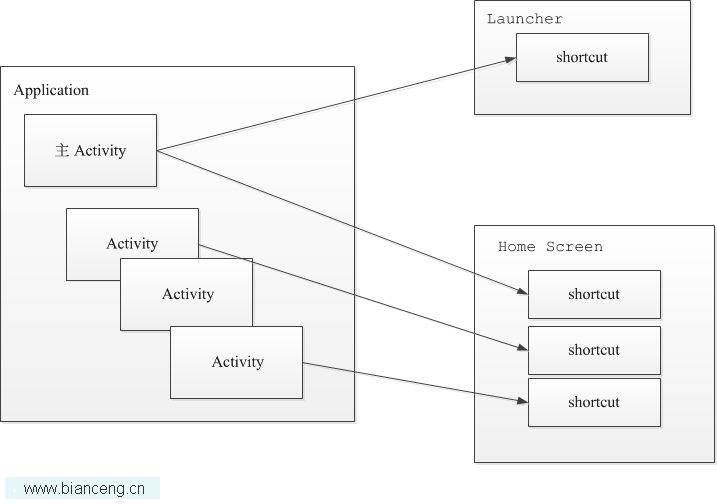
比如說你的應用中有個功能用戶可能會經常使用,比如說地圖中查詢地址,正常情況下用戶需要先啟動主Activity,可能需 要經過幾次菜單選擇或是其它方式才能進到這個功能,用戶可能感覺到不方便,這是可以為這個功能在Home Screen建立一個快 捷方式,用戶按這個快捷方式後會直接進入這個功能界面,即使這個Activity不是主Activity。
Launcher Shortcuts就 是介紹了如何為某個非主Activity在Home Screen上建立一個快捷方式。
實現這個快捷方式,可以分下面幾步來完成:
1.為需要創建快捷方式的Activity的<intent-filter>添加<action android:name=” android.intent.action.CREATE_SHORTCUT” /> ,標識這個Activity可以支持在Home Screen上添加快捷方式。Launcher Shortcuts 是采用的是activity-alias,activity-alias為Target的別名,類似於Activity.
2.添加相應用戶添加快捷方 式的代碼,一般在Activity的onCreate方法中為Activity安裝快捷方式:
if

(Intent.ACTION_CREATE_SHORTCUT.equals(action))
{
 setupShortcut();
 finish();
 return;
}

...
private void setupShortcut() {
 // First, set up the shortcut intent.
 //For this example, we simply create an intent that
 // will bring us directly back to this activity.
 //A more typical implementation would use a
 // data Uri in order to display a more specific result,
 //or a custom action in order to
 // launch a specific operation.

 Intent shortcutIntent = new Intent(Intent.ACTION_MAIN);
 shortcutIntent.setClassName(this, this.getClass().getName());
 shortcutIntent.putExtra(EXTRA_KEY, "ApiDemos Provided This Shortcut");

 // Then, set up the container intent (the response to the caller)

 Intent intent = new Intent();
 intent.putExtra(Intent.EXTRA_SHORTCUT_INTENT, shortcutIntent);
 intent.putExtra(Intent.EXTRA_SHORTCUT_NAME, getString(R.string.shortcut_name));
 Parcelable iconResource = Intent.ShortcutIconResource.fromContext(
 this,  R.drawable.app_sample_code);
 intent.putExtra(Intent.EXTRA_SHORTCUT_ICON_RESOURCE, iconResource);

 // Now, return the result to the launcher

 setResult(RESULT_OK, intent);
}
 繪制幾何圖形 - 使用android.graphics類
范例說明“如何在和機上繪制2D圖形呢?”這是許多android游戲開發都是常提到的問題,在android SDK 當中,並沒有Java Graph
 Android基於Openfire開發即時通訊工具(3)建立好友列表
通過roster可以獲得好友列表,前提是在服務器中建立了好友列表,不然沒有的話,不會獲取全部用戶的,roster.getEntries()的size將會為0。下面來看看怎
 Android如何讀取doc文件
在Android中讀取doc文件需要用第三方jar包tm-extractors-0.4.jar,讀取的過程很簡單和普通的文件流操作基本一樣,下面寫一個簡單的例子:pack
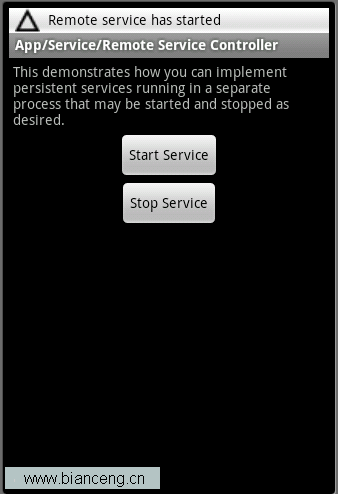 Android ApiDemos示例解析(43):App->Service->Remote Service Controller
Remote Service Controller 和使用Local Service的Android ApiDemo示例解析(40):App->Service-&g