編輯:Android開發教程
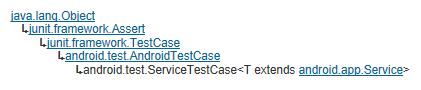
ServiceTestCase 為測試Service提供了一個可控的測試環境,它提供對Service 生命周期的基本支持,並可以通過注入一些 依賴對象來控制測試環境以便測試Service。
ServiceTestCase的類繼承如下圖所示:
Service Lifecycle 支持, 每個Service運行 都遵循一定的順序(生命周期方法),ServiceTestCase提供下面方法來支持對Service生命周期方法 的測試:
每個測試方法調用之前首先會執行setUp 方法,setUp 的基本實現是取得系統Context ,如果你要重載setUp 的話,注意在 第一行加上super.setUp.
在調用startService(Intent) 或bindService(Intent) 之後,ServiceTestCase才會調用Service的onCreate 方法,從而使 你有機會在Service啟動之前對測試環境做些調整。
當你的測試方法調用startService(Intent) 或bindService(Intent) 之後,ServiceTestCase 調用Service 的onCreate 方 法,然後再調用Service相應的 startService(Intent)或 service 的bindService(Intent, ServiceConnection, int)方法。並 保存用於tracking 和支持Lifecycle 對應的值。
每個測試方法結束後,調用tearDown 方法,這個方法stop 並destroy 被測試的service. 如果你需要重載tearDown, 注意先 調用super.tearDown.
Dependency Injection 每個Service都依賴於運行它的Context 對象和Application 對象,ServiceTestCase 測試框架允許 你注入這些對象(修改過,Mocked等)以實現真正的單元測試.
LocalServiceTest 的代碼如下:
public class

LocalServiceTest
 extends ServiceTestCase<LocalService> {

 public LocalServiceTest() {
 super(LocalService.class);
 }

 @Override
 protected void setUp() throws Exception {
 super.setUp();
 }

 @SmallTest
 public void testPreconditions() {
 }

 /**
 * Test basic startup/shutdown of Service
 */
 @SmallTest
 public void testStartable() {
 Intent startIntent = new Intent();
 startIntent.setClass(getContext(), LocalService.class);
 startService(startIntent);
 }

 /**
 * Test binding to service
 */
 @MediumTest
 public void testBindable() {
 Intent startIntent = new Intent();
 startIntent.setClass(getContext(), LocalService.class);
 IBinder service = bindService(startIntent);
 }

}
testStartable 測試對應的Service能否正常啟動。
testBindable 測試對應的Service能否綁定成功
查看全套教程:http://www.bianceng.cn/OS/extra/201301/35252.htm
 享受Android應用程序的Java技術盛宴
准備開始本文介紹幾種處理復雜情況的 Android SDK 工具。開發 Android 應用程序,需要最新版 Android SDK,這需要一個 Java Develop
 Android瀑布流照片牆實現,體驗不規則排列的美感
傳統界面的布局方式總是行列分明、坐落有序的,這種布局已是司空見慣,在不知不覺中大家都已經對它 產生了審美疲勞。這個時候瀑布流布局的出現,就給人帶來了耳目一新的感覺,這種布
 Android定位知識詳解
相信很多的朋友都有在APP中實現定位的需求,今天我就再次超炒冷飯,為大家獻上國內開發者常用到的三種定位方式。它們分別為GPS,百度和高德,慣例先簡單介紹下定位的背景知識。
 在Android應用中使用HTML Parser便捷的解析html內容
概述隨著移動互聯網的發展,更多的內容需要從傳統互聯網延伸到移動終端呈現。一般的做法有三 種:1. Web APP:利用 HTML5 技術,例如 JQuery mobil