

編輯:Android 資訊
單選按鈕 RadioButton 在 Android 平台上應用得非常廣泛,比如一些選擇項的場景就會用到它。實現單選按鈕通常由兩部分組成:RadioButton 與 RadioGroup 配合使用。
要點如下:
RadioButton 是單選按鈕;
RadioGroup 是單選組合框,用於把 RadioButton 框起來;
在沒有 RadioGroup 的情況下,多個 RadioButton 可以全部被選中;
當多個 RadioButton 被 RadioGroup 包含時,隻能選中其中一個;
注意:單選按鈕的事件監聽用 setOnCheckedChangeListener 來完成。
例子:
一道選擇題——哪個城市美女最多(純粹為了測試)。
RadioTest.java:
package org.loulijun.radio; import android.app.Activity; import android.os.Bundle; import android.view.Gravity; import android.widget.RadioButton; import android.widget.RadioGroup; import android.widget.TextView; import android.widget.Toast; public class RadioTest extends Activity { /** Called when the activity is first created. */ TextView textview; RadioGroup radiogroup; RadioButton radio1,radio2,radio3,radio4; @Override public void onCreate(Bundle savedInstanceState) { super.onCreate(savedInstanceState); setContentView(R.layout.main); textview=(TextView)findViewById(R.id.textview1); radiogroup=(RadioGroup)findViewById(R.id.radiogroup1); radio1=(RadioButton)findViewById(R.id.radiobutton1); radio2=(RadioButton)findViewById(R.id.radiobutton2); radio3=(RadioButton)findViewById(R.id.radiobutton3); radio4=(RadioButton)findViewById(R.id.radiobutton4); radiogroup.setOnCheckedChangeListener(new RadioGroup.OnCheckedChangeListener() { @Override public void onCheckedChanged(RadioGroup group, int checkedId) { // TODO Auto-generated method stub if(checkedId==radio2.getId()) { DisplayToast("正確答案:"+radio2.getText()+",恭喜你,回答正確!"); }else { DisplayToast("請注意,回答錯誤!"); } } }); } public void DisplayToast(String str) { Toast toast=Toast.makeText(this, str, Toast.LENGTH_LONG); toast.setGravity(Gravity.TOP,0,220); toast.show(); } }
strings.xml 文件:
<?xml version="1.0" encoding="utf-8"?> <resources> <string name="hello">哪個城市美女多?</string> <string name="app_name">單選按鈕測試</string> <string name="radiobutton1">杭州</string> <string name="radiobutton2">成都</string> <string name="radiobutton3">重慶</string> <string name="radiobutton4">蘇州</string> </resources>
main.xml 文件(注意四個 RadioButton 都包含在 RadioGroup 中):
<?xml version="1.0" encoding="utf-8"?> <LinearLayout xmlns:android="https://schemas.android.com/apk/res/android" android:orientation="vertical" android:layout_width="fill_parent" android:layout_height="fill_parent" > <TextView android:layout_width="fill_parent" android:layout_height="wrap_content" android:text="@string/hello" android:id="@+id/textview1" /> <RadioGroup android:id="@+id/radiogroup1" android:layout_width="wrap_content" android:layout_height="wrap_content" android:orientation="vertical" android:layout_x="3px" > <RadioButton android:id="@+id/radiobutton1" android:layout_width="wrap_content" android:layout_height="wrap_content" android:text="@string/radiobutton1" /> <RadioButton android:id="@+id/radiobutton2" android:layout_width="wrap_content" android:layout_height="wrap_content" android:text="@string/radiobutton2" /> <RadioButton android:id="@+id/radiobutton3" android:layout_width="wrap_content" android:layout_height="wrap_content" android:text="@string/radiobutton3" /> <RadioButton android:id="@+id/radiobutton4" android:layout_width="wrap_content" android:layout_height="wrap_content" android:text="@string/radiobutton4" /> </RadioGroup> </LinearLayout>
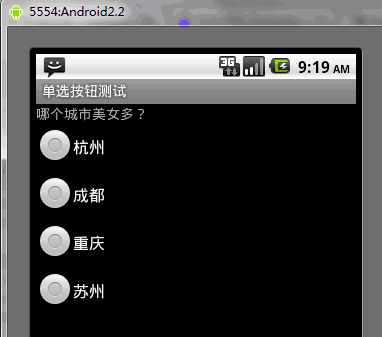
運行結果如下:
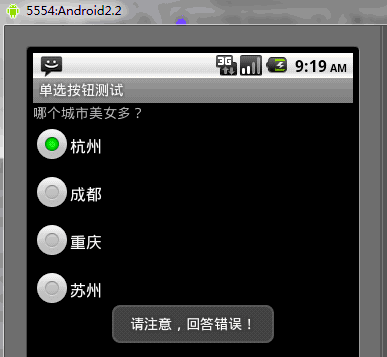
若選擇杭州,會彈出錯誤的 Toast 提示:
再次選中成都後,會提示答案正確:
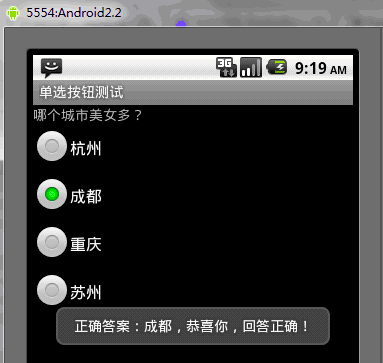
由此可見單選按鈕的效果。若隻用 RadioButton 而去掉 RadioGroup,就必須為每個按鈕單獨設監聽,此時 RadioButton 與普通 Button 已無二致——可以多選。所以請記住:單選按鈕必須與 RadioGroup 搭配,才能實現真正的"單選"。
 如何反編譯 Android 5.0 framework
在 Android 平台上,對於與硬件交互相關的模塊——比如對應雙卡的 Telephony、對應拍照的 Camera,以及 Bluetooth 等等——不同廠商會不同程度
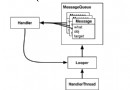 一篇讀懂 Android 異步消息機制:Looper、Message 與 Handler
整體架構其實很簡單 Android 的異步消息處理機制,並沒有傳說中那麼玄。核心關係就一句話:Looper 持有一個 MessageQueue,負責從隊列中取出消息交給
 Android 性能優化:如何量化並壓縮 App 的冷啟動時間
用戶對「卡」的容忍度極低。動畫掉幀也許還能忍,但點擊圖標後盯著白屏等一秒,就足以讓人皺眉。本文把啟動這件事拆成三部分:啟動方式、啟動流程、以及可量化的測量與優化手段。一、
 優雅地用 Kotlin 開發 Android:Anko 實戰與對照 Java 的寫法
寫在前面 上一篇我們看過 Kotlin 的優勢與基本語法,這次直接進到實作:如何在 Android 專案裡把 Kotlin 用起來,並與傳統 Java 寫法並排對照,你會