

編輯:Android 資訊
LinearLayout 是一個以線性方向排列子 View 的 ViewGroup,方向可以是水平,也可以是垂直。
你可以重複巢狀使用多層 LinearLayout;不過若發現巢狀層數過多,建議改用 RelativeLayout 來取代,能讓版面結構更精簡。
1、開始建立一個名為 HelloLinearLayout 的工程。
2、打開 res/layout/main.xml 並插入以下內容。
<?xml version="1.0" encoding="utf-8"?> <LinearLayout xmlns:android="https://schemas.android.com/apk/res/android" android:orientation="vertical" android:layout_width="fill_parent" android:layout_height="fill_parent" > <LinearLayout android:orientation="horizontal" android:layout_width="fill_parent" android:layout_height="fill_parent" android:layout_weight="1"> <TextView android:text="red" android:gravity="center_horizontal" android:background="#aa0000" android:layout_width="wrap_content" android:layout_height="fill_parent" android:layout_weight="1" /> <TextView android:text="green" android:gravity="center_horizontal" android:background="#00aa00" android:layout_width="wrap_content" android:layout_height="fill_parent" android:layout_weight="1" /> <TextView android:text="blue" android:gravity="center_horizontal" android:background="#0000aa" android:layout_width="wrap_content" android:layout_height="fill_parent" android:layout_weight="1" /> <TextView android:text="yellow" android:gravity="center_horizontal" android:background="#aaaa00" android:layout_width="wrap_content" android:layout_height="fill_parent" android:layout_weight="1" /> </LinearLayout> <LinearLayout android:orientation="vertical" android:layout_width="fill_parent" android:layout_height="fill_parent" android:layout_weight="1"> <TextView android:text="row one" android:textSize="15pt" android:layout_width="fill_parent" android:layout_height="wrap_content" android:layout_weight="1" /> <TextView android:text="row two" android:textSize="15pt" android:layout_width="fill_parent" android:layout_height="wrap_content" android:layout_weight="1" /> <TextView android:text="row three" android:textSize="15pt" android:layout_width="fill_parent" android:layout_height="wrap_content" android:layout_weight="1" /> <TextView android:text="row four" android:textSize="15pt" android:layout_width="fill_parent" android:layout_height="wrap_content" android:layout_weight="1" /> </LinearLayout> </LinearLayout>
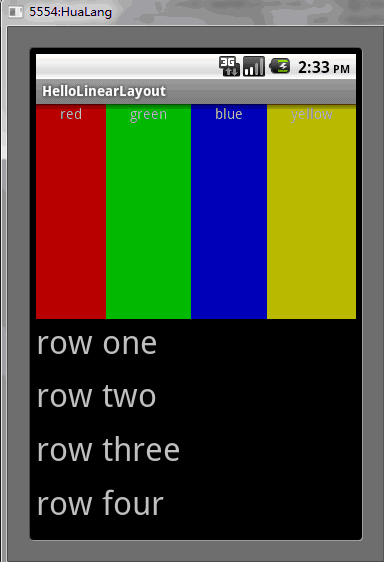
仔細檢視這個 XML:根元素 LinearLayout 定義了垂直方向,其兩個子 View 都沿垂直方向堆疊。第一個子元素是水平方向的 LinearLayout,第二個子元素則是垂直方向的 LinearLayout,而這兩個巢狀的 LinearLayout 各自又包含數個 TextView,其排列方向由父 LinearLayout 標籤所定義。
3、現在打開 HelloLinearLayout.java,確認它已在 onCreate() 方法中載入 res/layout/main.xml 版面配置檔。
public void onCreate(Bundle savedInstanceState) { super.onCreate(savedInstanceState); setContentView(R.layout.main);
setContentView(int) 方法為 Activity 載入指定的版面配置檔,其中 R.layout.main 即對應 res/layout/main.xml。
4、執行程式,你會看到如下畫面。
 Android View 佈局定位流程解析
在 Android 的 View 繪製流程中,測量完成之後,下一步就是佈局定位。這個階段決定每個 View 在父容器中的位置與大小。本文將跟蹤 performLayout
 Android UI 控件系列:Button 按鈕
Button 就是按鈕,是 Android 中應用最多的組件之一。它有兩種用法:一是在 XML 中配置,二是直接在程序中操作。 在 XML 布局中,常會遇到這些單位: p
 最詳盡的 Android Toolbar 開發實踐與踩坑總結
年前我發過一篇介紹 Translucent System Bar 特性的文章《Translucent System Bar 的最佳實踐》,收到不少開發者的關注和反饋。今天
 Android 為何比 iOS 卡?從 1G 記憶體說起
日前一位認證為小米員工的人在微博上說:「iPhone 6 使用者都不在意 1G 記憶體不夠,紅米 2 的 1G 夠用了,保持流暢的秘訣就是少裝 App。」後續發展大家都知