

編輯:更多教學
一、需求描述
專案裡需要把資訊轉成QR Code,並在正中央疊上公司LOGO。Google的Zxing開源專案在條碼與QR Code的產生與解析上都很成熟,但官方並未提供含LOGO的範例,以下就透過實作說明怎麼做,同時整理Zxing的關鍵元件。
二、案例準備
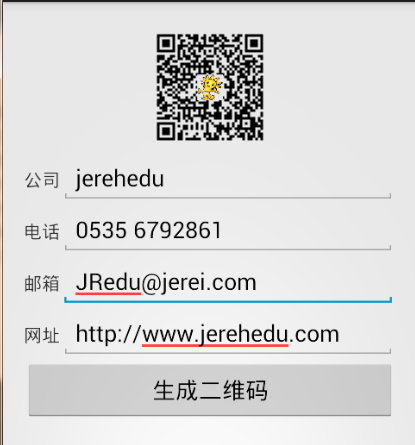
專案中只需加入core.jar即可。Zxing專案網址:https://github.com/zxing/zxing/
三、Zxing 主要元件
1. BarcodeFormat
定義不同的二進位編碼方式,常見取值包括:
・EAN_13:13位元條碼,商品包裝上最常見的一種。
・QR_CODE:QR Code(矩陣碼),能承載的資訊量遠大於條碼,目前最為普及。
・CODE_128:可表示ASCII 0到127共128個字元,常用於企業管理與生產流程控制。
・CODE_39:編碼簡單,僅接受43個特定字元。
2. MultiFormatWriter
核心是 encode() 方法,用來產生條碼或QR Code:
BitMatrix encode(String contents, BarcodeFormat format, int width, int height, Hashtable hints)
參數說明:
・contents:要編碼的內容。
・format:編碼格式(條碼或QR Code)。
・width、height:產生圖碼的尺寸。
・hints:EncodeHintType 的集合,主要用於指定字元編碼,例如支援中文需設為UTF-8:
Hashtable hst = new Hashtable();
hst.put(EncodeHintType.CHARACTER_SET, "UTF-8");
回傳值為 BitMatrix,也就是二維矩陣點陣。
3. BitMatrix
BitMatrix 表現為二維矩陣,x代表欄位置、y代表列位置,從左上角開始逐欄排列(先x後y)。主要方法:
・getWidth():回傳矩陣寬度。
・getHeight():回傳矩陣高度。
・boolean get(x, y):關鍵方法,判斷指定座標是否有黑點。
產生QR Code時正是靠這個方法逐點判斷,把黑點記下來,再用 Bitmap 的 setPixels() 繪製成圖形,細節可參考下方 createCode() 的實作。
四、完整程式碼
public class MainActivity extends Activity {
private EditText etCompany;
private EditText etPhone;
private EditText etEmail;
private EditText etWeb;
private Bitmap logo;
private static final int IMAGE_HALFWIDTH = 40;//寬度值,影響中間圖片大小
@Override
protected void onCreate(Bundle savedInstanceState) {
super.onCreate(savedInstanceState);
setContentView(R.layout.activity_main);
//獲得資源圖片,可改成獲取本地圖片或拍照獲取圖片
logo=BitmapFactory.decodeResource(super.getResources(),R.drawable.y014);
etCompany =(EditText) findViewById(R.id.etCompany);
etPhone=(EditText) findViewById(R.id.etPhone);
etEmail =(EditText) findViewById(R.id.etEmail);
etWeb =(EditText) findViewById(R.id.etWeb);
findViewById(R.id.but).setOnClickListener(new OnClickListener() {
@Override
public void onClick(View v) {
// TODO Auto-generated method stub
String company=etCompany.getText().toString().trim() ;
String phone =etPhone .getText().toString().trim() ;
String email = etEmail.getText().toString().trim() ;
String web = etWeb.getText().toString().trim() ;
//二維碼中包含的文本信息
String contents= "BEGIN:VCARD/nVERSION:3.0/nORG:"+company+"/nTEL:"+phone+"/nURL:"+web+"/nEMAIL:"+email+"/nEND:VCARD";
try {
//調用方法createCode生成二維碼
Bitmap bm=createCode(contents,logo,BarcodeFormat.QR_CODE);
ImageView img=(ImageView)findViewById(R.id.imgCode) ;
//將二維碼在界面中顯示
img.setImageBitmap(bm);
} catch (WriterException e) {
// TODO Auto-generated catch block
e.printStackTrace();
}
}
});
}
/**
* 生成二維碼
* @param string 二維碼中包含的文本信息
* @param mBitmap logo圖片
* @param format 編碼格式
* @return Bitmap 位圖
* @throws WriterException
*/
public Bitmap createCode(String string,Bitmap mBitmap, BarcodeFormat format)
throws WriterException {
Matrix m = new Matrix();
float sx = (float) 2 * IMAGE_HALFWIDTH / mBitmap.getWidth();
float sy = (float) 2 * IMAGE_HALFWIDTH
/ mBitmap.getHeight();
m.setScale(sx, sy);//設置縮放信息
//將logo圖片按martix設置的信息縮放
mBitmap = Bitmap.createBitmap(mBitmap, 0, 0,
mBitmap.getWidth(), mBitmap.getHeight(), m, false);
MultiFormatWriter writer = new MultiFormatWriter();
Hashtable hst = new Hashtable();
hst.put(EncodeHintType.CHARACTER_SET, "UTF-8");//設置字符編碼
BitMatrix matrix = writer.encode(string, format, 400, 400, hst);//生成二維碼矩陣信息
int width = matrix.getWidth();//矩陣高度
int height = matrix.getHeight();//矩陣寬度
int halfW = width / 2;
int halfH = height / 2;
int[] pixels = new int[width * height];//定義數組長度為矩陣高度*矩陣寬度,用於記錄矩陣中像素信息
for (int y = 0; y < height; y++) {//從行開始迭代矩陣
for (int x = 0; x < width; x++) {//迭代列
if (x > halfW - IMAGE_HALFWIDTH && x < halfW + IMAGE_HALFWIDTH
&& y > halfH - IMAGE_HALFWIDTH
&& y < halfH + IMAGE_HALFWIDTH) {//該位置用於存放圖片信息
//記錄圖片每個像素信息
pixels[y * width + x] = mBitmap.getPixel(x - halfW
+ IMAGE_HALFWIDTH, y - halfH + IMAGE_HALFWIDTH); } else {
if (matrix.get(x, y)) {//如果有黑塊點,記錄信息
pixels[y * width + x] = 0xff000000;//記錄黑塊信息
}
}
}
}
Bitmap bitmap = Bitmap.createBitmap(width, height,
Bitmap.Config.ARGB_8888);
// 通過像素數組生成bitmap
bitmap.setPixels(pixels, 0, width, 0, 0, width, height);
return bitmap;
}
}
實作重點提醒
中央嵌LOGO時要留意兩件事:一是LOGO面積別超過整體的四分之一,否則過多的遮擋會讓QR Code無法被掃描;二是建議提高錯誤更正等級(ErrorCorrectionLevel.H),Zxing預設等級對這類遮損的容忍度有限。
 樂視樂S3聯通定制版圖賞:金屬一體與無邊框ID
樂視與中國聯通發表樂S3聯通定制版,定位千元市場。樂S3延續無螺絲ID與無邊框ID設計,採用金屬一體機身與鏡面指紋識別。規格為5.5吋1080P、Helio X20十核心
 Galaxy Note II 與 S III 月底有望升級 Android 4.2.2
三星兩款舊旗艦 Galaxy Note II 與 Galaxy S3 將於本月底獲得 Android 4.2.2 的官方固件更新,用戶屆時可留意推送。 不過
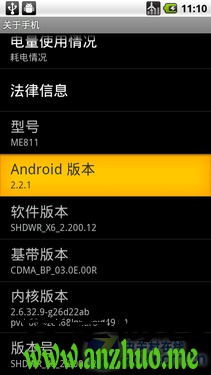 如何把Android應用程式移到SD卡?版本限制與操作步驟
「程式能不能裝到 SD 卡」是 Android 新手最常問的問題之一。答案先講:取決於系統版本。 只有 Android 2.2 以上才支援把應用程式安裝或移動到 SD 卡
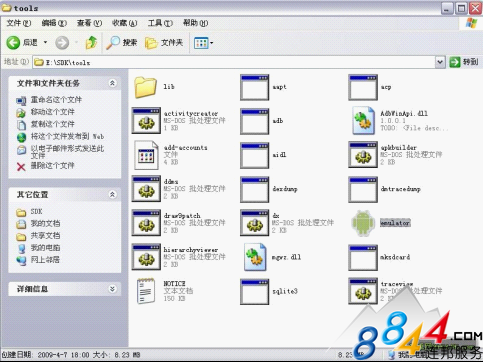 SDK Android 模擬器使用教程
Android SDK 不只是開發工具,也可當作系統模擬器使用。它能模擬大部分 Android 操作,適合測試應用或體驗系統。啟動模擬器下載並解壓 SDK 後,雙擊 em