

編輯:進階開發
在自訂 Android Launcher 或桌面容器開發中,若需要知道每個圖示在畫面上的位置,例如要繪製連線、做拖曳吸附或動畫對齊,最直接的方式是遍歷桌面容器中的子 View,再逐一取出座標。
桌面通常是由一個 View 群組構成,每個圖示對應一個子 View。只要呼叫 getChildCount 取得子項數量,再用 getChildAt 取出物件,就能判斷其型別並讀取位置。getLeft 與 getTop 會回傳相對父容器的橫向與縱向座標。
public int[][] getAllChildCoordinate() {
    int size = this.getChildCount();
    int[][] coordinates = new int[size][2];

    for (int i = 0; i != size; i++) {
        View child = this.getChildAt(i);
        if (child instanceof BubbleTextView) {
            BubbleTextView btv = (BubbleTextView) child;
            coordinates[i][0] = btv.getLeft();
            coordinates[i][1] = btv.getTop();
        }
    }
    return coordinates;
}
上述程式會把符合條件的圖示座標寫入二維陣列。若只想取得可見圖示,還可加上 visibility 判斷。此處的圖示範圍包含 padding 與圖片內容,也就是 BubbleTextView 可見區域的左上角。
 谷歌Android 2.0使用心得:版本節奏與NDK的取捨
Google正式推出Android 2.0系統的SDK(軟體開發套件,供開發人員除錯系統之用),這讓越來越普及的GPhone變得更好用,也大幅方便了使用者。 應用數量的
 Dashboard:Android 使用者自訂 UI 設計模板解析
Dashboard(儀表板)原本是 Apple 在 Mac OS X v10.4 Tiger 中推出的應用,作為執行各類 widget 小程式的基礎。在 Android
 Android 手機問題全解析:接受度曲線與成長的代價
Android 手機作為 Google 企業戰略的重要組成部分,將進一步推進「隨時隨地為每個人提供資訊」這一企業目標的實現。我們發現,全球為數眾多的行動電話使用者從未使用
 如何為 Android 平板電腦開發應用程式
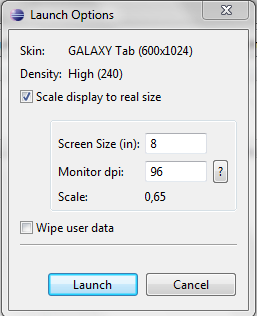
Android 2.3 SDK 發布時,SDK 裡加入了第三方 add-ons,其中就包含針對平板設計的 Galaxy Tab Addon。想為平板開發,第一步是建立平板