

編輯:進階開發
本文彙整多個 Android 開發中經常用到的實用小技巧,涵蓋圖片處理、Intent 呼叫、畫面控制與背景漸層等,方便隨查隨用。
Bitmap buffer = Bitmap.createBitmap(width, height, Bitmap.Config.ARGB_4444);

buffer.eraseColor(Color.TRANSPARENT);
Intent intent = new Intent(Intent.ACTION_SENDTO, Uri.fromParts("mailto", "test@test.com", null));

intent.setFlags(Intent.FLAG_ACTIVITY_NEW_TASK);

context.startActivity(intent);
WindowManager.LayoutParams lp = getWindow().getAttributes();

lp.screenBrightness = 100 / 100.0f;

getWindow().setAttributes(lp);
Filter filter = myAdapter.getFilter();

filter.filter(mySearchText);
透過 setOnScrollListener,在 onScrollStateChanged 中判斷 scrollState 為 0 時,即代表滾動停止。
把檔案存成 PNG 後,用 ACTION_VIEW 加上 setDataAndType 指定 MIME 類型即可開啟:
Intent intent = new Intent();

intent.setAction(android.content.Intent.ACTION_VIEW);

intent.setDataAndType(Uri.fromFile(new File(path)), "image/png");

startActivity(intent);
影片用 "video/*"、音訊用 "audio/*",同理可開啟對應檔案。
setTextAppearance(context, android.R.style.TextAppearance_Medium);
在 AndroidManifest 中設 android:launchMode="singleTop",程式碼中也可加 intent.addFlags(Intent.FLAG_ACTIVITY_SINGLE_TOP);
原理是用遮罩:先畫一個圓角矩形,再用 PorterDuffXfermode 的 DST_IN 模式把原圖「裁」成圓角:
Bitmap rounder = Bitmap.createBitmap(w, h, Bitmap.Config.ARGB_8888);

Canvas canvas = new Canvas(rounder);

Paint xferPaint = new Paint(Paint.ANTI_ALIAS_FLAG);

canvas.drawRoundRect(new RectF(0, 0, w, h), 20.0f, 20.0f, xferPaint);

xferPaint.setXfermode(new PorterDuffXfermode(PorterDuff.Mode.DST_IN));

canvas.drawBitmap(myCoolBitmap, 0, 0, null);

canvas.drawBitmap(rounder, 0, 0, xferPaint);
Notification notification = new Notification(icon, tickerText, when);

notification.number = 4;
先建立 drawable/shape.xml:
<shape xmlns:android="https://schemas.android.com/apk/res/android" android:shape="rectangle">

<gradient android:startColor="#FFFFFFFF" android:endColor="#FFFF0000" android:angle="270" />

</shape>
再建立主題 values/style.xml 並在 AndroidManifest 中套用 android:theme="@style/NewTheme" 即可。
若在一個實例中保存靜態資料,實例關閉後下一個實例引用時會變成 null。這時必須重寫 Application,用 getter/setter 保存資料,再透過 getApplication() 取得,就能在整個行程中共享。
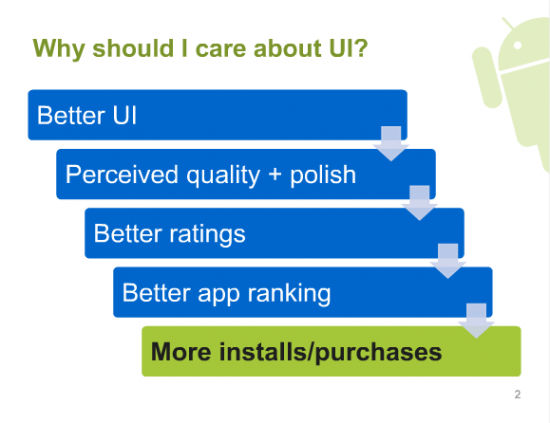 圖解 Android UI 設計官方教程:五不要與核心設計模式
先前我們分享過《MeeGo 行動終端裝置開發 UI 設計基礎教程》,同時也收到不少讀者在找 Android UI 開發的教材。這次整理自 Android 官方開發者部落格
 谷歌 Android SDK 系統細節總結:JDK、JUnit 與測試環境配置
在 Android SDK 系統中已經沒有了 JDK,自然也無法直接運行 JUnit,但這並不阻止我們利用 JUnit 來編寫單元測試。本文把這件事的來龍去脈說清楚。
 Monkey 壓力測試全解析:Android 應用穩定性的第一道防線
Android Chrome 瀏覽器是運行於模擬器或裝置上的一個程式,盡力為用戶提供良好的 Web 體驗,其穩定性與智慧程度在業界屬一流水準。而要驗證這種穩定度,Monk
 新奇解讀:Nexus One背後的Android佈局
對許多Android手機的忠實愛好者而言,Android的問世彌補了他們心裡的那塊缺角。而對整個手機市場來說,它的出現等於多了一名重量級對手,連微軟與諾基亞這幾家一線廠商