

編輯:進階開發
Android 可以透過 Intent 呼叫手機平台既有的服務來完成特定功能,例如開啟網頁、顯示地圖、撥號或傳送訊息,不必自己從零實作。以下整理幾個最常派上用場的片段。
Uri uri = Uri.parse("https://google.com");
Intent it = new Intent(Intent.ACTION_VIEW, uri);
startActivity(it);
用 ACTION_VIEW 搭配 http URI,系統會自動交給預設瀏覽器處理,不必指定元件。
Uri uri = Uri.parse("geo:38.899533,-77.036476");
Intent it = new Intent(Intent.ACTION_VIEW, uri);
startActivity(it);

// 其他 geo URI 範例
// geo:latitude,longitude
// geo:latitude,longitude?z=zoom
// geo:0,0?q=my+street+address
// geo:0,0?q=business+near+city
// google.streetview:cbll=lat,lng&cbp=1,yaw,,pitch,zoom&mz=mapZoom
geo: 是 Android 定義的地理 URI scheme,可以直接帶座標、放的程度,或用 q= 參數做地址與周邊搜尋。
// 叫出撥號程式,由使用者按下通話鍵
Uri uri = Uri.parse("tel:0800000123");
Intent it = new Intent(Intent.ACTION_DIAL, uri);
startActivity(it);

// 直接撥出
Uri uri = Uri.parse("tel:0800000123");
Intent it = new Intent(Intent.ACTION_CALL, uri);
startActivity(it);
// 使用這個寫法,需在 AndroidManifest.xml 中加入:
// <uses-permission id="android.permission.CALL_PHONE" />
兩者的差別很重要:ACTION_DIAL 只是把號碼填進撥號介面,不需要任何權限;ACTION_CALL 會直接撥出,必須具備 CALL_PHONE 權限,而這屬於高風險權限,上架審核時會被重點檢視。除非有明确需求,否則優先用 ACTION_DIAL 讓使用者保有最終決定權。
// 指定號碼並帶入簡訊內容
Intent it = new Intent(Intent.ACTION_VIEW);
it.putExtra("sms_body", "The SMS text");
it.setType("vnd.android-dir/mms-sms");
startActivity(it);

// 發送 SMS
Uri uri = Uri.parse("smsto:0800000123");
Intent it = new Intent(Intent.ACTION_SENDTO, uri);
it.putExtra("sms_body", "The SMS text");
startActivity(it);

// 發送 MMS(含圖片附件)
Uri uri = Uri.parse("content://media/external/images/media/23");
Intent it = new Intent(Intent.ACTION_SEND);
it.putExtra("sms_body", "some text");
it.putExtra(Intent.EXTRA_STREAM, uri);
it.setType("image/png");
startActivity(it);
這三段都是「交給簡訊 App 處理」而非由程式自行發送,因此不需要 SEND_SMS 權限。若你確實需要不經使用者確認就送出簡訊,則要改用 SmsManager,並且在設計上必須格外謹慎。
這些片段的共同模式是:用 URI 描述「要做什麼、對象是誰」,再交給系統挑合適的程式執行。依此類推,檢視聯絡人、開啟相簿挑圖片(ACTION_PICK)、分享文字到社群軟體(ACTION_SEND 搭配 text/plain)都屬於同一家族。牢記這個模式,能省下大量查文件與自製 UI 的功夫,也能讓 App 與系統其他應用有更好的整合體驗。
 Eclipse 開發 Android 入門:重裝上陣(4)用 SQLite 存資料
我們要建的資料表長這樣: +------------+------------------------+ | Column | Description
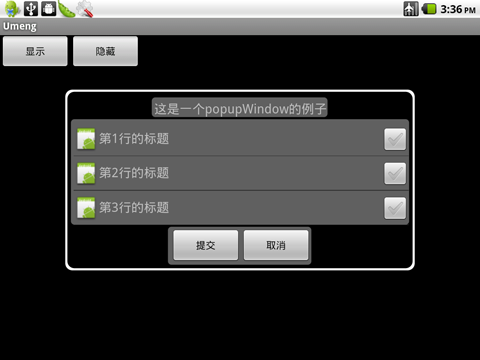 Android 開發實作:在 PopupWindow 中呈現 ListView
前文我們已經談過如何在 Android 中打造帶圖片與勾選框的 ListView,那麼該怎麼把 ListView 放進 PopupWindow 裡呢?關於 ListVie
 淺談 Android 源碼與開發工具:Motodev Studio 實測評析
談 Android 源碼之前,先把定義講清楚:Android 是基於 Linux 平台的開源手機作業系統。理解這個定位,才能理解為什麼它的測試與工具鏈都長得跟傳統 Jav
 圖解「Android UI」設計官方教程(二):資源、九宮格與狀態列表
編者按:本文是 Android 官方開發者部落格那份 UI 設計簡報譯文的第二部分,專講幾個實作面的小技巧。第一部分刊出後有不少朋友在等續篇,這裡一次把下半場的內容補齊。