

編輯:進階開發
操作 Android 資料庫時,有兩個實務原則值得牢記:第一,廣播 action 必須名副其實;第二,為資料庫互動建立一層包裝。本文說明這兩個原則,並提供一個可直接套用的資料庫 Adapter 骨架。
強烈建議,當你接收或發出一個系統 action 時,做的要是名副其實的事。例如你回應一個 VIEW 動作,做的卻是編輯;或你送出一個 PICK 訊息,其實想讓對方執行編輯。這些都會造成語意混亂,讓組件之間的匹配變得不可預期。
一個好習慣是建立輔助類來簡化資料庫互動。具體做法是建立一個資料庫 Adapter,為資料庫操作加上一層包裝。它應該提供直觀、強型別的方法,如新增、刪除、更新項目;同時負責查詢,以及建立、開啟與關閉資料庫的包裝。
此外,它常用靜態常數來定義表名、欄名與欄位索引。下面的程式碼片段展示了一個標準資料庫 Adapter 類的骨架,其中包含一個擴充 SQLiteOpenHelper 的內部類,用於簡化資料庫的開啟、建立與升級。
import android.content.Context;
import android.database.*;
import android.database.sqlite.*;
import android.database.sqlite.SQLiteDatabase.CursorFactory;
import android.util.Log;

public class MyDBAdapter {

    // 每個欄位的名稱與索引
    public static final String KEY_NAME = "name";
    public static final int NAME_COLUMN = 1;

    // TODO: 為資料表中的每個欄位建立 public 常數

    // 建立資料庫的 SQL 敘述
    private static final String DATABASE_CREATE = "create table "
        + DATABASE_TABLE + " (" + KEY_ID
        + " integer primary key autoincrement, "
        + KEY_NAME + " text not null);";

    // 資料庫實例
    private SQLiteDatabase db;

    // 使用資料庫的應用 context
    private final Context context;

    // 資料庫開啟/升級輔助類
    private myDbHelper dbHelper;

    public MyDBAdapter(Context _context) {
        context = _context;
        dbHelper = new myDbHelper(context, DATABASE_NAME, null, DATABASE_VERSION);
    }

    public MyDBAdapter open() throws SQLException {
        db = dbHelper.getWritableDatabase();
        return this;
    }

    public void close() {
        db.close();
    }

    public long insertEntry(MyObject _myObject) {
        ContentValues contentValues = new ContentValues();
        // TODO 填入代表新列的 ContentValues
        return db.insert(DATABASE_TABLE, null, contentValues);
    }

    public boolean removeEntry(long _rowIndex) {
        return db.delete(DATABASE_TABLE, KEY_ID + "=" + _rowIndex, null) > 0;
    }

    public Cursor getAllEntries() {
        return db.query(DATABASE_TABLE, new String[] {KEY_ID, KEY_NAME},
                null, null, null, null, null);
    }

    public MyObject getEntry(long _rowIndex) {
        MyObject objectInstance = new MyObject();
        // TODO 回傳指向該列的 Cursor,並用其值填充 MyObject
        return objectInstance;
    }

    public int updateEntry(long _rowIndex, MyObject _myObject) {
        String where = KEY_ID + "=" + _rowIndex;
        ContentValues contentValues = new ContentValues();
        // TODO 依新物件填入 ContentValues
        return db.update(DATABASE_TABLE, contentValues, where, null);
    }

    private static class myDbHelper extends SQLiteOpenHelper {

        public myDbHelper(Context context, String name,
                CursorFactory factory, int version) {
            super(context, name, factory, version);
        }

        // 當資料庫不存在時呼叫,用於建立新庫
        @Override
        public void onCreate(SQLiteDatabase _db) {
            _db.execSQL(DATABASE_CREATE);
        }

        // 當資料庫版本升級時呼叫
        @Override
        public void onUpgrade(SQLiteDatabase _db, int oldVersion, int newVersion) {
            // TODO 實作版本升級邏輯
        }
    }
}
把資料庫細節收攏在 Adapter 裡,上層程式碼只需要呼叫 insertEntry、removeEntry、updateEntry 這類語意明確的方法,不必處理由 SQL 字串拼接帶來的錯誤與安全性風險。當資料表結構需要調整時,你也只需要改一處——這個成本,遠低於讓資料庫邏輯散落在各個 Activity 之中。
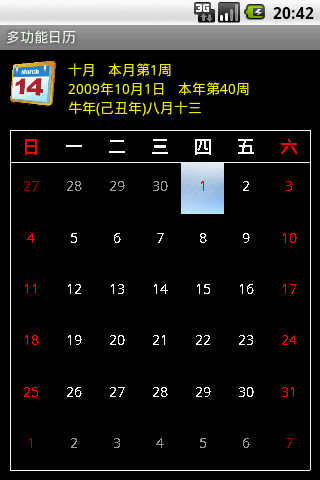 Android 多功能日曆,歡迎大家下載測試(一)
這支小工具在传统日曆功能之外,還塞進了不少實用的附加資訊。 功能概覽 除了基本的月曆檢視,它還能查詢天氣預報、設定提醒時間,並顯示農曆日期、天干地支、宜忌、國曆與農曆節日
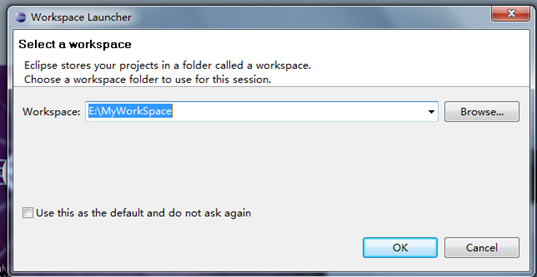 Win7 建置 Android 開發環境(4):裝好 Eclipse
下載 eclipse-java-helios-SR2-win32-x86_64.zip 這個檔案,解壓縮後即可使用;啟動時選擇一個 workspace 目錄就能正常運作。
 NDK 入門專案實戰(二)
hello-jni 為 apps 下 hello-jni 資料夾的名稱。這個指令會先找到 apps\hello-jni 下的 Application.mk,再找到 sou
 Android 拖放實作:DragEvent 與拖曳監聽器完整解析
Android 的拖放(Drag and Drop)框架讓使用者能在同一個布局中,用圖形化的拖曳手勢把資料從一個 View 搬到另一個 View。這個框架由三個部分組成: