

編輯:進階開發
清單裡的每一列,其實就是一段水平排列的 LinearLayout:
<LinearLayout
    android:orientation="horizontal"
    android:layout_width="fill_parent"
    android:layout_height="wrap_content"
    android:padding="10dip">
    <TextView
        android:layout_width="wrap_content"
        ...
</LinearLayout>
關鍵在 orientation="horizontal":子元件會由左到右依序排開。搭配 layout_height="wrap_content",每一列的高度會依內容自動伸縮,不會彼此擠壓;padding 則負責把文字與邊界拉開距離。
這個模式在 Android 版面上到處可見:外層放一個垂直的 LinearLayout 當清單,內層每列再用水平的 LinearLayout 排「名稱 + 時間」兩個 TextView,就能做出整齊的列表。學會這兩層巢狀,多數清單畫面都能自己拼出來。
 Android 開發者將獲 Sprint 網路資源支持
Android 近來火熱,這也讓 Android 開發者面臨更大的開發壓力。為了更好地幫助廣大開發者,Sprint 將提供網路資源支持。 一般而言,手機作業系統廠商會向開
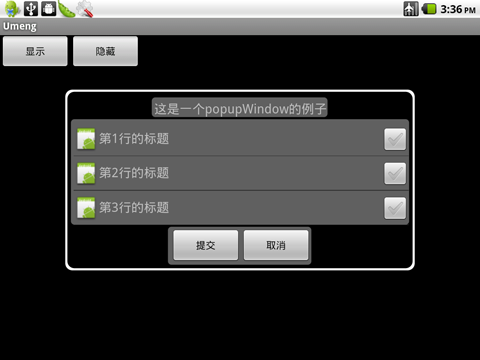 Android 開發實作:在 PopupWindow 中呈現 ListView
前文我們已經談過如何在 Android 中打造帶圖片與勾選框的 ListView,那麼該怎麼把 ListView 放進 PopupWindow 裡呢?關於 ListVie
 2011 年 2 月十大值得一試的 Android 應用
谷歌新推出的網頁版 Android Market 老實說相當平庸,逛起來毫無樂趣。但也別擔心,為廣大 Android 迷著想,我們再度潛入深不見底的应用市場,替你挑出近期
 先睹為快:Android 3.0 細節曝光
國外網站 Phandroid 近日披露了 Android 3.0(Gingerbread)的一些細節。雖然系統仍在開發中,但從這些曝光的畫面已能看出方向:外觀更順滑,視覺