

編輯:關於 Android 程式設計
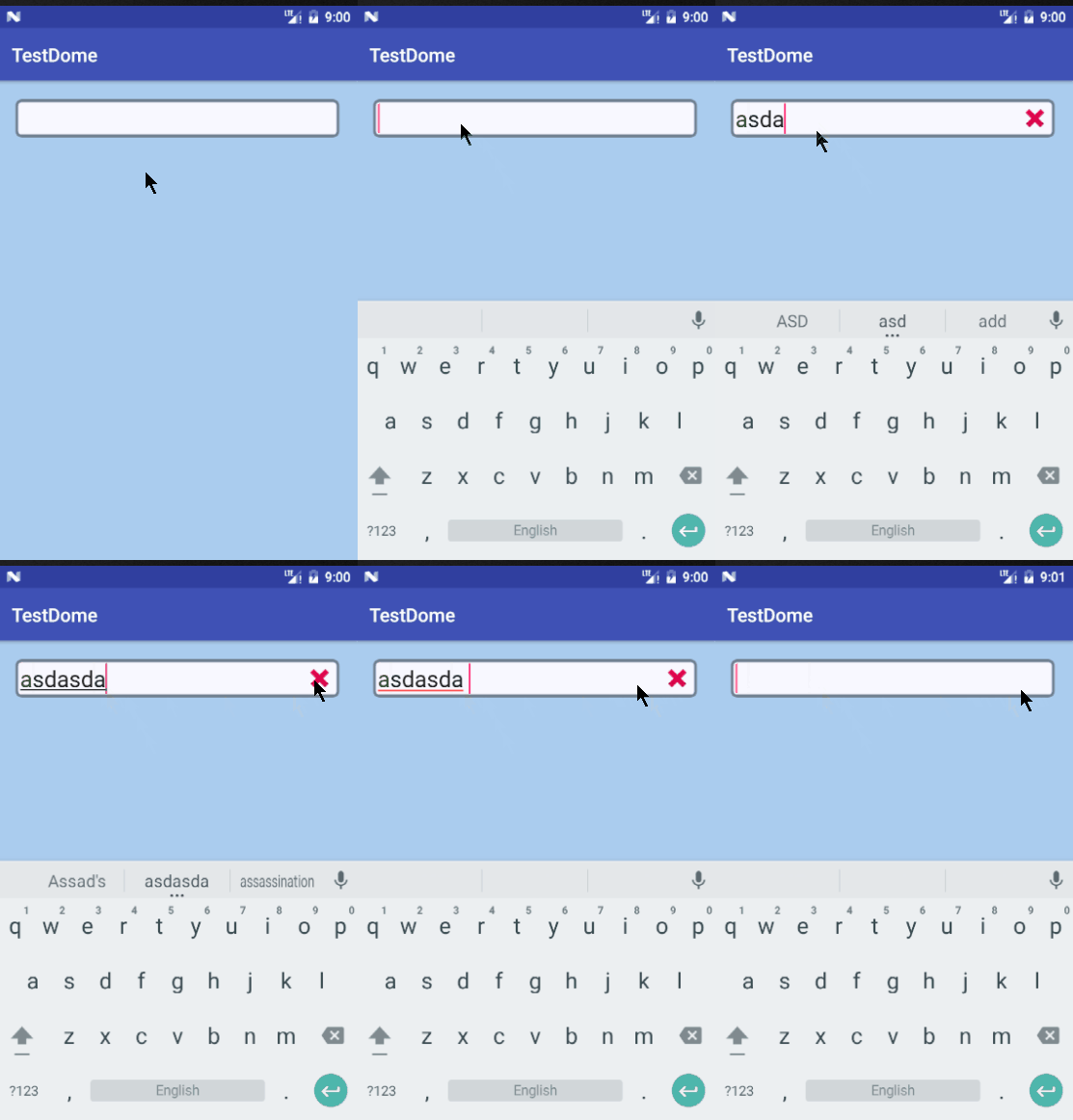
在輸入框中加上刪除按鈕,是常見的互動設計。實作方式可以自訂一個繼承自 EditText 的類別,並在文字不為空時顯示刪除圖示。
public class EditTextWithDel extends EditText {

    private final static String TAG = "EditTextWithDel";
    private Drawable imgInable;
    private Context mContext;

    public EditTextWithDel(Context context) {
        this(context, null, 0);
    }

    public EditTextWithDel(Context context, AttributeSet attrs) {
        this(context, attrs, 0);
    }

    public EditTextWithDel(Context context, AttributeSet attrs, int defStyleAttr) {
        super(context, attrs, defStyleAttr);
        mContext = context;
        init();
    }

    private void init() {
        imgInable = mContext.getResources().getDrawable(android.R.drawable.ic_delete);

        addTextChangedListener(new TextWatcher() {
            @Override
            public void beforeTextChanged(CharSequence charSequence, int i, int i1, int i2) {
            }

            @Override
            public void onTextChanged(CharSequence charSequence, int i, int i1, int i2) {
            }

            @Override
            public void afterTextChanged(Editable editable) {
                setDrawable();
            }
        });

        setDrawable();
    }

    private void setDrawable() {
        if (length() < 1) {
            setCompoundDrawablesWithIntrinsicBounds(null, null, null, null);
        } else {
            setCompoundDrawablesWithIntrinsicBounds(null, null, imgInable, null);
        }
    }

    @Override
    public boolean onTouchEvent(MotionEvent event) {
        if (imgInable != null && event.getAction() == MotionEvent.ACTION_UP) {
            int eventX = (int) event.getRawX();
            int eventY = (int) event.getRawY();

            Rect rect = new Rect();
            getGlobalVisibleRect(rect);
            rect.left = rect.right - 70;

            if (rect.contains(eventX, eventY)) {
                setText("");
            }
        }

        return super.onTouchEvent(event);
    }
}setCompoundDrawablesWithIntrinsicBounds() 可用來設定控制項四周的圖示。此範例只設定右側刪除圖示。
在處理觸碰事件時,getRawX() 與 getRawY() 是相對於螢幕座標,而 getX() 與 getY() 是相對於父容器座標。若使用 getGlobalVisibleRect() 取得控制項在螢幕上的位置,就應搭配 getRawX() 與 getRawY() 判斷是否點擊到刪除圖示。
若改用 getLocalVisibleRect(),則可搭配 getX() 與 getY(),依座標系統調整即可。
 使用 AsyncTask 下載檔案並更新進度
AsyncTask 是 Android 早期常用於簡化背景任務與介面更新的工具類別。它適合處理不需要過於複雜背景邏輯的場景,例如下載檔案、更新進度條或執行短時間的非同步工
 用自訂註解取代 findViewById:Android 中的注解與反射實戰
在 Java 裡,注解(Annotation)又叫「元數據」,它提供了一種形式化的方式,讓我們把資訊寫進原始碼,之後再由程式在別的時間點讀取使用。更精確地說,注解是把資料
 Android 網路快取實戰:Retrofit + OkHttp + RxJava 三件套打造離線可用架構
先把依賴準備好 要讓 RxJava 與 Retrofit 攜手合作,第一步當然是處理好 build.gradle。以下是本文範例使用的依賴清單: dependencies
 自定義 Dialog:讓彈窗從標題欄位置彈出
先看效果圖: 標題欄的佈局如下: 彈出式 dialog 的佈局: