

編輯:關於 Android 程式設計
一、原理其實很簡單
斷點續傳與一般 HTTP 下載的唯一差別,就在請求標頭裡多帶一個「從哪裡開始」。
一般的請求長這樣(假設域名為 www.jizhuomi.com/android,檔案為 down.zip):
GET /down.zip HTTP/1.1
accept: image/gif, image/x-xbitmap, image/jpeg, application/msword, */*
accept-language: zh-cn
accept-encoding: gzip, deflate
user-agent: mozilla/4.0
connection: keep-alive
伺服器回應:
200
content-length=106786028
accept-ranges=bytes
etag=w/"02ca57e173c11:95b"
content-type=application/octet-stream
last-modified=mon, 30 apr 2001 12:56:11 gmt
注意這裡的 accept-ranges=bytes,它代表伺服器支援按位元組區間回應——這正是斷點續傳的基礎。
而續傳的請求多一行 Range:
GET /down.zip HTTP/1.0
user-agent: netfox
range: bytes=2000070-
accept: */*; q=.2
這行的意思是:down.zip 從第 2000070 個位元組開始傳,前面的不用重傳。伺服器回應:
206
content-length=106786028
content-range=bytes 2000070-106786027/106786028
etag=w/"02ca57e173c11:95b"
content-type=application/octet-stream
狀態碼從 200 變成 206 Partial Content,並多出一行 content-range 描述實際回傳的區間。掌握這兩個關鍵,就可以開始寫程式了。
二、Java 端的兩個關鍵點
第一,怎麼送出 Range 標頭?不必自己刻 socket,HttpURLConnection 就支援:
URL url = new URL("https://www.jizhuomi.com/android/down.zip");
HttpURLConnection conn = (HttpURLConnection) url.openConnection();
conn.setRequestProperty("user-agent", "netfox");
conn.setRequestProperty("range", "bytes=2000070");   // 斷點位置
InputStream input = conn.getInputStream();
// 此時讀到的就是 down.zip 從 2000070 起的位元組流
第二,怎麼把資料寫進檔案的正確位置?用 RandomAccessFile 的 seek:
RandomAccessFile savedFile = new RandomAccessFile("down.zip", "rw");
long npos = 2000070;
savedFile.seek(npos);                       // 定位檔案指針
byte[] b = new byte[1024];
int nread;
while ((nread = input.read(b, 0, 1024)) > 0) {
    savedFile.write(b, 0, nread);
}
兩段加起來,斷點續傳的骨架就完成了。剩下的是把它包成多執行緒下載。
三、多執行緒版本的結構
主要用 6 個類:
・SiteFileFetch:整體下載調度,負責取得檔案大小、切割區段、啟動子執行緒;
・FileSplitterFetch:負責單一區段的下載;
・FileAccess:負責檔案寫入(重點是 synchronized,避免多執行緒互相踩位);
・SiteInfoBean:下載任務的資訊載體(URL、存檔路徑、檔名、切分段數);
・Utility:日誌與 sleep 等小工具;
・TestMethod:測試入口。
3.1 SiteFileFetch
package netfox;

import java.io.*;
import java.net.*;

public class SiteFileFetch extends Thread {
    SiteInfoBean siteInfoBean = null;      // 檔案資訊
    long[] nStartPos;                      // 各段起始位置
    long[] nEndPos;                        // 各段結束位置
    FileSplitterFetch[] fileSplitterFetch; // 子執行緒
    long nFileLength;                      // 檔案總長
    boolean bFirst = true;                 // 是否首次下載
    boolean bStop = false;                 // 停止標誌
    File tmpFile;                          // 進度檔
    DataOutputStream output;

    public SiteFileFetch(SiteInfoBean bean) throws IOException {
        siteInfoBean = bean;
        tmpFile = new File(bean.getsFilePath() + File.separator
                + bean.getsFileName() + ".info");
        if (tmpFile.exists()) {
            bFirst = false;
            read_npos();                   // 續傳:讀回上次進度
        } else {
            nStartPos = new long[bean.getnSplitter()];
            nEndPos = new long[bean.getnSplitter()];
        }
    }

    public void run() {
        try {
            if (bFirst) {
                nFileLength = getFileSize();
                if (nFileLength == -1) {
                    System.err.println("file length is not known!");
                } else if (nFileLength == -2) {
                    System.err.println("file is not access!");
                } else {
                    for (int i = 0; i < nStartPos.length; i++) {
                        nStartPos[i] = (long) (i * (nFileLength / nStartPos.length));
                    }
                    for (int i = 0; i < nEndPos.length - 1; i++) {
                        nEndPos[i] = nStartPos[i + 1];
                    }
                    nEndPos[nEndPos.length - 1] = nFileLength;
                }
            }
            // 啟動子執行緒
            fileSplitterFetch = new FileSplitterFetch[nStartPos.length];
            for (int i = 0; i < nStartPos.length; i++) {
                fileSplitterFetch[i] = new FileSplitterFetch(
                        siteInfoBean.getsSiteUrl(),
                        siteInfoBean.getsFilePath() + File.separator
                                + siteInfoBean.getsFileName(),
                        nStartPos[i], nEndPos[i], i);
                Utility.log("thread " + i + " , nStartPos = " + nStartPos[i]
                        + ", nEndPos = " + nEndPos[i]);
                fileSplitterFetch[i].start();
            }
            // 等待所有子執行緒結束
            boolean breakWhile = false;
            while (!bStop) {
                write_npos();              // 週期性落盤進度
                Utility.sleep(500);
                breakWhile = true;
                for (int i = 0; i < nStartPos.length; i++) {
                    if (!fileSplitterFetch[i].bDownOver) {
                        breakWhile = false;
                        break;
                    }
                }
                if (breakWhile) break;
            }
            System.err.println("文件下載結束!");
        } catch (Exception e) {
            e.printStackTrace();
        }
    }

    /** 取得檔案長度 */
    public long getFileSize() {
        int nFileLength = -1;
        try {
            URL url = new URL(siteInfoBean.getsSiteUrl());
            HttpURLConnection conn = (HttpURLConnection) url.openConnection();
            conn.setRequestProperty("user-agent", "netfox");
            int responseCode = conn.getResponseCode();
            if (responseCode >= 400) {
                processErrorCode(responseCode);
                return -2;                 // -2 代表存取失敗
            }
            String sHeader;
            for (int i = 1; ; i++) {
                sHeader = conn.getHeaderFieldKey(i);
                if (sHeader != null) {
                    if (sHeader.equals("content-length")) {
                        nFileLength = Integer.parseInt(
                                conn.getHeaderField(sHeader));
                        break;
                    }
                } else break;
            }
        } catch (Exception e) {
            e.printStackTrace();
        }
        Utility.log(nFileLength);
        return nFileLength;
    }

    /** 寫入進度(各段指針位置) */
    private void write_npos() {
        try {
            output = new DataOutputStream(new FileOutputStream(tmpFile));
            output.writeInt(nStartPos.length);
            for (int i = 0; i < nStartPos.length; i++) {
                output.writeLong(fileSplitterFetch[i].nStartPos);
                output.writeLong(fileSplitterFetch[i].nEndPos);
            }
            output.close();
        } catch (Exception e) {
            e.printStackTrace();
        }
    }

    /** 讀取已存的進度 */
    private void read_npos() {
        try {
            DataInputStream input =
                    new DataInputStream(new FileInputStream(tmpFile));
            int nCount = input.readInt();
            nStartPos = new long[nCount];
            nEndPos = new long[nCount];
            for (int i = 0; i < nStartPos.length; i++) {
                nStartPos[i] = input.readLong();
                nEndPos[i] = input.readLong();
            }
            input.close();
        } catch (Exception e) {
            e.printStackTrace();
        }
    }

    private void processErrorCode(int nErrorCode) {
        System.err.println("error code : " + nErrorCode);
    }

    /** 停止下載 */
    public void siteStop() {
        bStop = true;
        for (int i = 0; i < nStartPos.length; i++) {
            fileSplitterFetch[i].splitterStop();
        }
    }
}
3.2 FileSplitterFetch
package netfox;

import java.io.*;
import java.net.*;

public class FileSplitterFetch extends Thread {
    String sUrl;                 // 檔案 URL
    long nStartPos;              // 區段起點
    long nEndPos;                // 區段終點
    int nThreadId;               // 執行緒編號
    boolean bDownOver = false;   // 該段是否完成
    boolean bStop = false;       // 停止標誌
    FileAccessI fileAccessI = null;

    public FileSplitterFetch(String sUrl, String sName,
                             long nStart, long nEnd, int id) throws IOException {
        this.sUrl = sUrl;
        this.nStartPos = nStart;
        this.nEndPos = nEnd;
        nThreadId = id;
        fileAccessI = new FileAccessI(sName, nStartPos);
    }

    public void run() {
        while (nStartPos < nEndPos && !bStop) {
            try {
                URL url = new URL(sUrl);
                HttpURLConnection conn = (HttpURLConnection) url.openConnection();
                conn.setRequestProperty("user-agent", "netfox");
                String sProperty = "bytes=" + nStartPos + "-";
                conn.setRequestProperty("range", sProperty);
                Utility.log(sProperty);
                InputStream input = conn.getInputStream();
                byte[] b = new byte[1024];
                int nRead;
                while ((nRead = input.read(b, 0, 1024)) > 0
                        && nStartPos < nEndPos && !bStop) {
                    nStartPos += fileAccessI.write(b, 0, nRead);
                }
                Utility.log("thread " + nThreadId + " is over!");
                bDownOver = true;
            } catch (Exception e) {
                e.printStackTrace();
            }
        }
    }

    public void splitterStop() {
        bStop = true;
    }
}
3.3 FileAccess(寫檔,注意 synchronized)
package netfox;

import java.io.*;

public class FileAccessI implements Serializable {
    RandomAccessFile oSavedFile;
    long nPos;

    public FileAccessI() throws IOException {
        this("", 0);
    }

    public FileAccessI(String sName, long nPos) throws IOException {
        oSavedFile = new RandomAccessFile(sName, "rw");
        this.nPos = nPos;
        oSavedFile.seek(nPos);
    }

    public synchronized int write(byte[] b, int nStart, int nLen) {
        int n = -1;
        try {
            oSavedFile.write(b, nStart, nLen);
            n = nLen;
        } catch (IOException e) {
            e.printStackTrace();
        }
        return n;
    }
}
3.4 SiteInfoBean 與 Utility
package netfox;

public class SiteInfoBean {
    private String sSiteUrl;    // 下載位址
    private String sFilePath;   // 存檔目錄
    private String sFileName;   // 存檔名稱
    private int nSplitter;      // 切成幾段

    public SiteInfoBean() {
        this("", "", "", 5);    // 預設切 5 段
    }

    public SiteInfoBean(String sUrl, String sPath, String sName, int nSplitter) {
        sSiteUrl = sUrl;
        sFilePath = sPath;
        sFileName = sName;
        this.nSplitter = nSplitter;
    }

    // getter / setter 略
}
package netfox;

public class Utility {
    public static void sleep(int nSecond) {
        try {
            Thread.sleep(nSecond);
        } catch (Exception e) {
            e.printStackTrace();
        }
    }

    public static void log(String sMsg) {
        System.err.println(sMsg);
    }

    public static void log(int sMsg) {
        System.err.println(sMsg);
    }
}
3.5 測試入口
package netfox;

public class TestMethod {
    public TestMethod() {
        try {
            SiteInfoBean bean = new SiteInfoBean(
                    "https://localhost/xx/weblogic60b2_win.exe",
                    "l:\\temp", "weblogic60b2_win.exe", 5);
            SiteFileFetch fileFetch = new SiteFileFetch(bean);
            fileFetch.start();
        } catch (Exception e) {
            e.printStackTrace();
        }
    }

    public static void main(String[] args) {
        new TestMethod();
    }
}
四、實務上的補充
上面這份程式是理解原理用的骨架,正式專案至少還要補上:下載前先確認伺服器回應 206 而非 200(若回 200 代表不支援區間,需退回單執行緒整檔下載);伺服器端檔案若有變動(比對 ETag 或 Last-Modified)應作廢舊進度重新下載;進度檔寫入建議採用「先寫暫存檔再 rename」以確保完整性;以及在 Android 上改用 OkHttp 或 DownloadManager 會省下大量連線管理與重試的工。
以上就是斷點續傳的完整整理,後續會再補充相關資料。
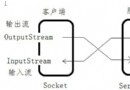 Android 網路編程之 Socket 通信總結
建立伺服器端的步驟: 1. 指定埠號,實例化一個 ServerSocket。 2. 呼叫 ServerSocket 的 accept 方法,等待連線期間會阻塞。 3. 取
 View.measure 實戰:動態量取評論高度並排版分頁
需求 應用詳情頁有一塊評論區,最多展示 5 條,每條限 140 字。由於字數不同,每條評論實際佔的高度也不一樣——可能一行,也可能三四行,並且支持翻頁。 效果如下:
 Android 編譯系統(二):使用 mm 編譯單一模組
Android 編譯系統與傳統 Makefile 遞歸編譯不同,它將各模組視為相對獨立的單元。mm 指令可用來編譯目前目錄下對應的單一模組,大幅縮短開發時的編譯時間。 m
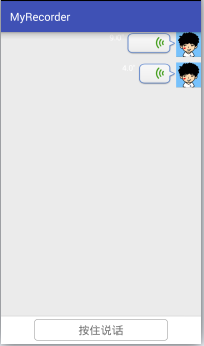 Android 仿微信錄製音頻並發送的完整實現
MyRecorder(仿微信,錄製音頻並發送功能)① 布局實現(activity_main.xml)整體採用線性布局,上方是一個 ListView,下方是一個自定義 Bu