

編輯:關於 Android 程式設計
桌面快捷方式本質上就是一個「程序入口」,安裝完成後系統自動生成的那個圖標就是最典型的例子。不過很多場景需要更進一步:像 QQ 會話那樣,為某個好友或某條數據動態生成名稱與圖標都不同的快捷方式。本文把完整流程梳理一遍。
沒有這個權限,後面的廣播會被系統直接忽略:
<uses-permission android:name="com.android.launcher.permission.INSTALL_SHORTCUT" />
<activity android:name="com.easemob.chatuidemo.activity.ChatActivity" >
    <intent-filter>
        <category android:name="android.intent.category.LAUNCHER" />
        <action android:name="android.intent.action.CREATE_SHORTCUT" />
    </intent-filter>
</activity>
這裡配置的 ChatActivity,就是點擊快捷方式後要跳轉到的目標頁面。
public void CreateShotCut(final Context context, final Class<?> clazz,
                          final String name, final String userId) {
    Intent shortcutIntent = new Intent(Intent.ACTION_MAIN);
    // 加上這兩個屬性,卸載應用時桌面圖標才會被一併清除
    shortcutIntent.addCategory(Intent.CATEGORY_LAUNCHER);
    shortcutIntent.setClass(context, clazz);

    // 攜帶業務參數,例如會話 ID
    Bundle bundle = new Bundle();
    bundle.putString("userId", userId);
    shortcutIntent.putExtras(bundle);

    shortcutIntent.setFlags(Intent.FLAG_ACTIVITY_CLEAR_TOP);

    Intent shortcut = new Intent(Intent.ACTION_CREATE_SHORTCUT);
    shortcut.putExtra("duplicate", false);                              // 不允許重複創建
    shortcut.putExtra(Intent.EXTRA_SHORTCUT_INTENT, shortcutIntent);     // 點擊後啟動的 Intent
    shortcut.putExtra(Intent.EXTRA_SHORTCUT_NAME, name);                 // 圖標下方顯示的名稱
    Parcelable icon = Intent.ShortcutIconResource.fromContext(
            getApplicationContext(), R.drawable.ic_launcher);
    shortcut.putExtra(Intent.EXTRA_SHORTCUT_ICON_RESOURCE, icon);        // 圖標資源
    shortcut.setAction("com.android.launcher.action.INSTALL_SHORTCUT");
    context.sendBroadcast(shortcut);
}
第一,不要漏掉 FLAG_ACTIVITY_CLEAR_TOP。缺少這行時,點擊快捷方式往往會直接跳到任務棧頂,而不是指定的 Activity;如果目標 Activity 恰好已在棧頂,系統甚至可能只是複用並銷毀重來,表現非常奇怪。加上這個 flag 之後行為才符合預期。
第二,需要動態網絡圖標時換用另一個 key。ShortcutIconResource 只接受本地資源 ID,如果想使用下載得到的圖片,應改用 Bitmap 版本:
// Intent.EXTRA_SHORTCUT_ICON 對應 Bitmap 對象
shortcut.putExtra(Intent.EXTRA_SHORTCUT_ICON, bitmap);
先把網絡圖片請求回來並轉成 Bitmap,再傳入即可。
補充一點:部分定制 ROM 的桌面對 INSTALL_SHORTCUT 廣播做了限制,若測試時圖標不出現,可以先確認權限是否申請成功,以及更換設備排除 ROM 差異。若要卸載快捷方式,發送 action 為 UNINSTALL_SHORTCUT 的廣播並攜帶相同 Intent 即可。
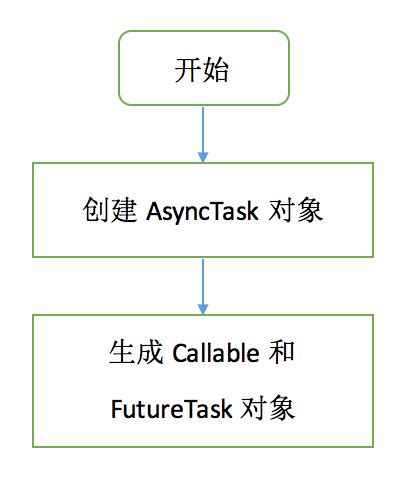 AsyncTask 源碼解析:原理與執行機制
AsyncTask 原理簡介 AsyncTask 透過 Handler 實現異步消息處理。它是一個抽象類,使用時必須實作抽象方法 doInBackground(Param
 Android 手機衛士實戰:綁定 SIM 卡序列號與防盜攔截
接著處理導航流程中的第二個引導頁——SIM 卡綁定。 這個功能的思路是:把當前 SIM 卡的序列號存進 SharedPreferences,日後一旦換卡,就能對比出異常
 Android View 源碼剖析:requestLayout、invalidate 與 postInvalidate 的差異
requestLayout:請求重新布局當 View 的大小、位置或可見狀態可能改變時,可以呼叫 requestLayout。它會從目前 View 開始,沿著父容器層層向
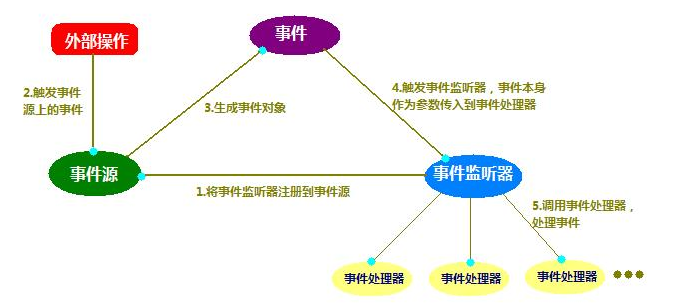 Android 廣播接收器監聽電話狀態與來電攔截
監聽機制的概念Android 的事件處理有監聽與回呼兩種常見模式。若要監聽電話狀態,通常會使用 BroadcastReceiver。系統在撥打電話、來電、接聽與掛斷時,會