

編輯:關於 Android 程式設計
本文要實作的是一種頗具質感的照片裁剪效果:
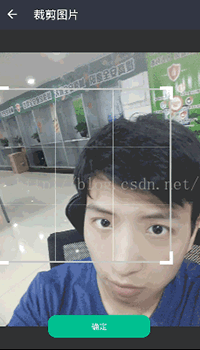
右上角放了個裁剪框,按下確定後,就能把方框內的正方形區域裁下來,並顯示在右上角。
<?xml version="1.0" encoding="utf-8"?> <LinearLayout xmlns:android="https://schemas.android.com/apk/res/android" android:layout_width="match_parent" android:layout_height="match_parent" android:orientation="vertical" > <RelativeLayout android:layout_width="match_parent" android:layout_height="55dp" android:background="#323441"> <ImageButton android:id="@+id/certification_returnbtn" android:layout_width="55dp" android:layout_height="55dp" android:background="@android:color/transparent" android:padding="15dp" android:scaleType="fitCenter" android:src="@drawable/topbar_returnbtn"/> <TextView android:layout_width="wrap_content" android:layout_height="match_parent" android:layout_marginLeft="10dp" android:layout_toRightOf="@id/certification_returnbtn" android:gravity="center_vertical" android:text="裁剪圖片" android:textColor="@android:color/white" android:textSize="20sp"/> <!-- <ImageButton android:layout_width="55dp" android:layout_height="55dp" android:layout_alignParentRight="true" android:layout_marginRight="10dp" android:background="@android:color/transparent" android:padding="16dp" android:scaleType="fitCenter" android:src="@drawable/ic_rotate_24dp"/>--> <ImageView android:id="@+id/testimg" android:layout_alignParentRight="true" android:layout_marginRight="10dp" android:layout_width="55dp" android:layout_height="55dp"/> </RelativeLayout> <RelativeLayout android:layout_width="match_parent" android:layout_height="0dp" android:layout_weight="1"> <com.whale.nangua.pubuliuzhaopianqiang.ZoomImageView android:id="@+id/zoom_image_view" android:layout_width="match_parent" android:layout_height="match_parent" android:background="#303030"/> <com.whale.nangua.pubuliuzhaopianqiang.ChoiceBorderView android:id="@+id/zoom_choiceborder_view" android:layout_width="match_parent" android:layout_height="match_parent"/> <Button android:id="@+id/image_details_subbtn" android:text="確定" android:background="@drawable/image_details_submitbtn_shape" android:layout_marginBottom="20dp" android:layout_width="180dp" android:layout_height="40dp" android:layout_alignParentBottom="true" android:layout_centerHorizontal="true"/> </RelativeLayout> </LinearLayout>
布局並不複雜,兩個 View 互相層疊即可。
這個 View 負責把圖片以適當比例居中顯示,程式碼註解已相當詳細:
package com.whale.nangua.pubuliuzhaopianqiang; import android.content.Context; import android.graphics.Bitmap; import android.graphics.Canvas; import android.graphics.Matrix; import android.util.AttributeSet; import android.util.Log; import android.view.MotionEvent; import android.view.View; /** * Created by nangua on 2016/7/20. */ public class ZoomImageView extends View { /** * 初始化狀態常量 */ public static final int STATUS_INIT = 1; /** * 用於對圖片進行移動和縮放變換的矩陣 */ private Matrix matrix = new Matrix(); /** * 待展示的Bitmap對象 */ private Bitmap sourceBitmap; /** * 記錄當前操作的狀態,可選值為STATUS_INIT、STATUS_ZOOM_OUT、STATUS_ZOOM_IN和STATUS_MOVE */ private int currentStatus; /** * ZoomImageView控件的寬度 */ private int width; /** * ZoomImageView控件的高度 */ private int height; /** * ZoomImageView構造函數,將當前操作狀態設為STATUS_INIT。 * * @param context * @param attrs */ public ZoomImageView(Context context, AttributeSet attrs) { super(context, attrs); currentStatus = STATUS_INIT; } /** * 將待展示的圖片設置進來。 * * @param bitmap 待展示的Bitmap對象 */ public void setImageBitmap(Bitmap bitmap) { sourceBitmap = bitmap; invalidate(); } @Override protected void onLayout(boolean changed, int left, int top, int right, int bottom) { super.onLayout(changed, left, top, right, bottom); if (changed) { // 分別獲取到ZoomImageView的寬度和高度 width = getWidth(); height = getHeight(); } } /** * 根據currentStatus的值來決定對圖片進行什麼樣的繪制操作。 */ @Override protected void onDraw(Canvas canvas) { super.onDraw(canvas); initBitmap(canvas); canvas.drawBitmap(sourceBitmap, matrix, null); } float translateY;//Y軸偏移量 float translateX;//X軸偏移量 /** * @param canvas * @autohr nangua * 對圖片進行初始化操作,包括讓圖片居中,以及當圖片大於屏幕寬高時對圖片進行壓縮。 * <p> * 1.當圖片寬度大於顯示寬度、圖片高度小於顯示寬度: * 設置圖片寬度為顯示寬度,高度縮放*(圖片寬度/顯示寬度) * <p> * 2.當圖片寬度小於顯示寬度、圖片高度大於顯示寬度: * 設置圖片高度為顯示高度,寬度縮放*(圖片高度/顯示高 度) * <p> * 3.當圖片寬度大於顯示寬度,圖片高度大於顯示寬度: * 選取差度更大的一邊進行壓縮,另一邊等比縮放 * <p> * 4.當圖片寬度小於顯示寬度,圖片高度小於顯示寬度: * 選取差度更大的一邊進行壓縮,另一邊等比縮放 */ private void initBitmap(Canvas canvas) { if (sourceBitmap != null) { matrix.reset(); //重置矩陣 int bitmapWidth = sourceBitmap.getWidth(); //得到源圖片寬 int bitmapHeight = sourceBitmap.getHeight(); //得到源圖片高 //如果原圖片大小大於控件寬高 if (bitmapWidth > width || bitmapHeight > height) { //如果寬和高都比屏幕大,選擇差度大的一邊縮小,另一邊等比縮小 if (bitmapWidth > width && bitmapHeight > height) { int distanceX = Math.abs(width - bitmapWidth); int distanceY = Math.abs(height - bitmapHeight); float ratio; //找出差值大的一邊,進行縮小 if (distanceX >= distanceY) { ratio = width / (bitmapWidth * 1.0f); matrix.postScale(ratio, ratio); //此時橫軸鋪滿,只需要對豎軸進行平移 translateY = (height - sourceBitmap.getHeight() * ratio) / 2f; matrix.postTranslate(0, translateY); } else { ratio = height / (bitmapHeight * 1.0f); matrix.postScale(ratio, ratio); //此時豎軸鋪滿,只需要對橫軸進行平移 translateX = (width - sourceBitmap.getWidth() * ratio) / 2f; matrix.postTranslate(translateX, 0); //在橫縱軸上進行平移 } //當圖片寬度大於顯示寬度、圖片高度小於顯示寬度: } else if (bitmapWidth > width) { // 當圖片寬度大於屏幕寬度時,將圖片等比例壓縮,使它可以完全顯示出來 float ratio = width / (bitmapWidth * 1.0f); //壓縮比例 matrix.postScale(ratio, ratio); translateY = (height - (bitmapHeight * ratio)) / 2f; // 在縱坐標方向上進行偏移,以保證圖片居中顯示 matrix.postTranslate(0, translateY); //當圖片寬度小於顯示寬度、圖片高度大於顯示寬度: } else if (bitmapHeight > height) { // 當圖片高度大於屏幕高度時,將圖片等比例壓縮,使它可以完全顯示出來 float ratio = height / (bitmapHeight * 1.0f); //壓縮比例 matrix.postScale(ratio, ratio); translateX = (width - (bitmapWidth * ratio)) / 2f; // 在橫坐標方向上進行偏移,以保證圖片居中顯示 matrix.postTranslate(translateX, 0); } } else { // 當圖片的寬高都小於屏幕寬高時,選擇差度小的一邊鋪滿,另一邊等比擴大 //計算長和寬的差值 int distanceX = Math.abs(width - bitmapWidth); int distanceY = Math.abs(height - bitmapHeight); float ratio; //找出差值小的一邊,進行擴大 if (distanceX <= distanceY) { ratio = width / (bitmapWidth * 1.0f); matrix.postScale(ratio, ratio); //此時橫軸鋪滿,只需要對豎軸進行平移 translateY = (height - sourceBitmap.getHeight() * ratio) / 2f; matrix.postTranslate(0, translateY); } else { ratio = height / (bitmapHeight * 1.0f); matrix.postScale(ratio, ratio); //此時豎軸鋪滿,只需要對橫軸進行平移 translateX = (width - sourceBitmap.getWidth() * ratio) / 2f; matrix.postTranslate(translateX, 0); //在橫縱軸上進行平移 } } //進行繪制 canvas.drawBitmap(sourceBitmap, matrix, null); } } }
重點來了,這個 View 負責裁剪框的繪製與互動:
package com.whale.nangua.pubuliuzhaopianqiang; import android.content.Context; import android.graphics.Canvas; import android.graphics.Color; import android.graphics.Paint; import android.util.AttributeSet; import android.util.Log; import android.view.MotionEvent; import android.view.View; import android.widget.Toast; /** * 相冊選擇框的View * Created by nangua on 2016/7/21. */ public class ChoiceBorderView extends View { private int scale = (int) this.getResources().getDisplayMetrics().density; //屏幕像素密度 private float borderHeight; //總高 private float borderWith; //總寬 private float borderLength = 200 * scale; //邊框長度 private int RECT_BORDER_WITH = 3 * scale; //長方形框框粗 private int RECT_CORNER_WITH = 6 * scale; //四個角的粗 private int RECT_CORNER_HEIGHT = 20 * scale; //四個角的長度 //四個點坐標 private static float[][] four_corner_coordinate_positions; private static int NOW_MOVE_STATE = 1; //移動狀態,默認為1,Y軸=1,X軸=2 private static boolean MOVE_OR_ZOOM_STATE = true; //移動或縮放狀態, true 為移動 public ChoiceBorderView(Context context, AttributeSet attrs) { super(context, attrs); this.setFocusable(true); this.setFocusableInTouchMode(true); init(); } /** * 初始化布局 * @param changed * @param left * @param top * @param right * @param bottom */ @Override protected void onLayout(boolean changed, int left, int top, int right, int bottom) { super.onLayout(changed, left, top, right, bottom); borderHeight = this.getHeight(); borderWith = this.getWidth(); //初始化四個點的坐標 four_corner_coordinate_positions = new float[][]{ {(borderWith - borderLength) / 2, (borderHeight - borderLength) / 2}, //左上 {(borderWith + borderLength) / 2, (borderHeight - borderLength) / 2}, //右上 {(borderWith - borderLength) / 2, (borderHeight + borderLength) / 2}, //左下 {(borderWith + borderLength) / 2, (borderHeight + borderLength) / 2}, //右上 }; } private void init() { } private int temp1 = (RECT_CORNER_WITH - RECT_BORDER_WITH) / 2; //長方形的粗半距 private int temp2 = (RECT_CORNER_WITH + RECT_BORDER_WITH) / 2; //四個角的粗半距 /** * RECT_CORNER_WITH = 6 * RECT_BORDER_WITH =3 * * @param canvas */ @Override protected void onDraw(Canvas canvas) { Paint paintRect = new Paint(); //初始化畫筆 //畫邊框的畫筆 paintRect.setColor(getResources().getColor(R.color.bordercolor)); //顏色 paintRect.setStrokeWidth(RECT_BORDER_WITH); //寬度 paintRect.setAntiAlias(true); //抗鋸齒 paintRect.setStyle(Paint.Style.STROKE); //設置空心 canvas.drawRect(four_corner_coordinate_positions[0][0], four_corner_coordinate_positions[0][1], four_corner_coordinate_positions[3][0], four_corner_coordinate_positions[3][1], paintRect); //畫四個角的畫筆 paintRect.setColor(Color.WHITE); paintRect.setStrokeWidth(RECT_CORNER_WITH); paintRect.setAntiAlias(true); //左上角的兩根 canvas.drawLine(four_corner_coordinate_positions[0][0] - temp2, four_corner_coordinate_positions[0][1] - temp1, four_corner_coordinate_positions[0][0] - temp1 + RECT_CORNER_HEIGHT, four_corner_coordinate_positions[0][1] - temp1, paintRect); canvas.drawLine(four_corner_coordinate_positions[0][0] - temp1, four_corner_coordinate_positions[0][1] - temp2, four_corner_coordinate_positions[0][0] - temp1, four_corner_coordinate_positions[0][1] - temp1 + RECT_CORNER_HEIGHT, paintRect); //左下角的兩根 canvas.drawLine(four_corner_coordinate_positions[2][0] - temp2, four_corner_coordinate_positions[2][1] + temp1, four_corner_coordinate_positions[2][0] - temp1 + RECT_CORNER_HEIGHT, four_corner_coordinate_positions[2][1] + temp1, paintRect); canvas.drawLine(four_corner_coordinate_positions[2][0] - temp1, four_corner_coordinate_positions[2][1] + temp1, four_corner_coordinate_positions[2][0] - temp1, four_corner_coordinate_positions[2][1] + temp1 - RECT_CORNER_HEIGHT, paintRect); //右上角的兩根 canvas.drawLine(four_corner_coordinate_positions[1][0] + temp1, four_corner_coordinate_positions[1][1] - temp1, four_corner_coordinate_positions[1][0] + temp1 - RECT_CORNER_HEIGHT, four_corner_coordinate_positions[1][1] - temp1, paintRect); canvas.drawLine(four_corner_coordinate_positions[1][0] + temp1, four_corner_coordinate_positions[1][1] - temp2, four_corner_coordinate_positions[1][0] + temp1, four_corner_coordinate_positions[1][1] - temp1 + RECT_CORNER_HEIGHT , paintRect); //右下角的兩根 canvas.drawLine(four_corner_coordinate_positions[3][0] + temp2, four_corner_coordinate_positions[3][1] + temp1, four_corner_coordinate_positions[3][0] + temp1 - RECT_CORNER_HEIGHT, four_corner_coordinate_positions[3][1] + temp1, paintRect); canvas.drawLine(four_corner_coordinate_positions[3][0] + temp1, four_corner_coordinate_positions[3][1] + temp1, four_corner_coordinate_positions[3][0] + temp1, four_corner_coordinate_positions[3][1] + temp1 - RECT_CORNER_HEIGHT, paintRect); //畫掃描線 if (IF_SCANNING_SHOW) { paintRect.setColor(Color.WHITE); paintRect.setStrokeWidth(1); paintRect.setAntiAlias(true); paintRect.setStyle(Paint.Style.STROKE); //共四根線 //豎1 canvas.drawLine(four_corner_coordinate_positions[0][0] + borderLength / 3, four_corner_coordinate_positions[0][1] + temp1, four_corner_coordinate_positions[2][0] + borderLength / 3, four_corner_coordinate_positions[2][1] - temp1, paintRect); //豎2 canvas.drawLine(four_corner_coordinate_positions[1][0] - borderLength / 3, four_corner_coordinate_positions[1][1] + temp1, four_corner_coordinate_positions[3][0] - borderLength / 3, four_corner_coordinate_positions[3][1] - temp1, paintRect); //橫1 canvas.drawLine(four_corner_coordinate_positions[0][0] + temp1, four_corner_coordinate_positions[0][1] + borderLength / 3, four_corner_coordinate_positions[1][0] - temp1, four_corner_coordinate_positions[1][1] + borderLength / 3, paintRect); //橫2 canvas.drawLine(four_corner_coordinate_positions[2][0] + temp1, four_corner_coordinate_positions[2][1] - borderLength / 3, four_corner_coordinate_positions[3][0] - temp1, four_corner_coordinate_positions[3][1] - borderLength / 3, paintRect); } } private boolean IF_SCANNING_SHOW = false; private int lastX = 0; //上次按下的X位置 private int lastY = 0; //上次按下的Y位置 private int offsetX = 0; //X軸偏移量 private int offsetY = 0; //Y軸偏移量 static int point = -1;// 用戶按下的點 private int POINT_STATE = -1; //判斷用戶是縮小還是放大 0放大 1縮小 @Override public boolean onTouchEvent(MotionEvent event) { int x = (int) event.getX(); int y = (int) event.getY(); switch (event.getAction()) { case MotionEvent.ACTION_DOWN: IF_SCANNING_SHOW = true;//顯示掃描線 if (isInTheCornerCircle(event.getX(), event.getY()) != -1) { //開始縮放操作 MOVE_OR_ZOOM_STATE = false; //設置false為縮放狀態 point = isInTheCornerCircle(event.getX(), event.getY()); } lastX = x; lastY = y; invalidate(); break; case MotionEvent.ACTION_MOVE: offsetX = x - lastX; offsetY = y - lastY; //判斷當前是擴大還是縮小操作 judgementXandY(); //限定移動范圍 //移動狀態:只有在移動狀態下才能移動 if (MOVE_OR_ZOOM_STATE) { getoffsetXandoffsetY(); //四個點的坐標信息也要隨之改變 for (int i = 0; i < four_corner_coordinate_positions.length; i++) { four_corner_coordinate_positions[i][0] += offsetX; four_corner_coordinate_positions[i][1] += offsetY; //更新回調接口 onImageDetailsSizeChanggedl.onBorderSizeChangged( (int) four_corner_coordinate_positions[0][0], (int) four_corner_coordinate_positions[0][1], (int) borderLength ); invalidate(); } // this.scrollBy(-offsetX, -offsetY); //這裡棄用,後面改用了四點坐標移動代替背景移動 } //在縮放狀態下 else { //按住某一個點,該點的坐標改變,其他2個點坐標跟著改變,對點坐標不變 max = Math.abs(offsetX) >= Math.abs(offsetY) ? Math.abs(offsetX) : Math.abs(offsetY); //只有在擴大操作才進行邊界范圍判斷 if (POINT_STATE == 0) { getoffsetXandoffsetY(); //邊界范圍判斷 } //縮小操作時進行邊界不能太小判斷 else if (POINT_STATE == 1) { //如果邊長+max太小,直接返回 if (borderLength - max <= RECT_CORNER_HEIGHT*2-temp2) { max = 0; } } //改變坐標 changgeFourCoodinatePosition(point, offsetX, offsetY); //更新邊長 notifyNowborderLength(); //更新回調接口 onImageDetailsSizeChanggedl.onBorderSizeChangged( (int) four_corner_coordinate_positions[0][0], (int) four_corner_coordinate_positions[0][1], (int) borderLength ); invalidate(); } lastX = x; lastY = y; break; case MotionEvent.ACTION_UP: IF_SCANNING_SHOW = false; //不顯示掃描線 MOVE_OR_ZOOM_STATE = true; //回歸為默認的移動狀態 invalidate(); break; } return true; } /** * 更新矩形框邊長的方法 */ private void notifyNowborderLength() { float a = four_corner_coordinate_positions[0][0]; float b = four_corner_coordinate_positions[0][1]; float c = four_corner_coordinate_positions[1][0]; float d = four_corner_coordinate_positions[1][1]; float temp1 = (float) Math.pow(a - c, 2); float temp2 = (float) Math.pow(b - d, 2); borderLength = (float) Math.sqrt(temp1 + temp2); } /** * POINT_STATE 為0放大, 1縮小 */ private void judgementXandY() { switch (point) { case 0: if ((offsetX <= 0 && offsetY <= 0) || (offsetX <= 0 && offsetY >= 0)) { POINT_STATE = 0;//擴大 } else { POINT_STATE = 1;//縮小 } break; case 1: if ((offsetX >= 0 && offsetY <= 0) || (offsetX >= 0 && offsetY >= 0)) { POINT_STATE = 0; } else { POINT_STATE = 1; } break; case 2: if ((offsetX <= 0 && offsetY >= 0) || (offsetX <= 0 && offsetY <= 0)) { POINT_STATE = 0; } else { POINT_STATE = 1; } break; case 3: if ((offsetX >= 0 && offsetY >= 0) || (offsetX >= 0 && offsetY <= 0)) { POINT_STATE = 0; } else { POINT_STATE = 1; } break; } } /** * 防止X和Y溢出邊界的算法 */ private void getoffsetXandoffsetY() { //如果是移動狀態 if (MOVE_OR_ZOOM_STATE) { if ((four_corner_coordinate_positions[0][0] + offsetX <= 0) || (four_corner_coordinate_positions[1][0] + offsetX >= borderWith) ) { offsetX = 0; } if ((four_corner_coordinate_positions[0][1] + offsetY <= 0) || (four_corner_coordinate_positions[2][1] + offsetY >= borderHeight) ) { offsetY = 0; } } //如果是縮放狀態 else { switch (point) { case 0: if ((four_corner_coordinate_positions[0][0] - max <= 0) || (four_corner_coordinate_positions[0][1] - max <= 0) ) { max = 0; } break; case 1: if ((four_corner_coordinate_positions[1][0] + max >= borderWith) || (four_corner_coordinate_positions[1][1] - max <= 0) ) { max = 0; } break; case 2: if ((four_corner_coordinate_positions[2][0] - max <= 0) || (four_corner_coordinate_positions[2][1] + max >= borderHeight) ) { max = 0; } break; case 3: if ((four_corner_coordinate_positions[3][0] + max >= borderWith) || (four_corner_coordinate_positions[3][1] + max >= borderHeight) ) { max = 0; } break; } } } static int max; /** * 擴大縮放方法 * 根據用戶傳來的點改變其他點的坐標 * 按住某一個點,該點的坐標改變,其他2個點坐標跟著改變,對點坐標不變 * 點陣示意: * 0 1 * 2 3 * * @param point 用戶按的點 * @param offsetX X軸偏移量 * @param offsetY Y軸偏移量 */ private void changgeFourCoodinatePosition(int point, int offsetX, int offsetY) { switch (point) { case 0: if (offsetX > 0 && offsetY < 0) { //變化0點的位置 suoxiao four_corner_coordinate_positions[0][0] += max; four_corner_coordinate_positions[0][1] += max; //變化1點的Y軸 four_corner_coordinate_positions[1][1] += max; //變化2點的X軸 four_corner_coordinate_positions[2][0] += max; } else if (offsetX < 0 && offsetY > 0) { //變化0點的位置 kuoda four_corner_coordinate_positions[0][0] -= max; four_corner_coordinate_positions[0][1] -= max; //變化1點的Y軸 four_corner_coordinate_positions[1][1] -= max; //變化2點的X軸 four_corner_coordinate_positions[2][0] -= max; } else if (offsetX < 0 && offsetY < 0) { //變化0點的位置 kuoda four_corner_coordinate_positions[0][0] -= max; four_corner_coordinate_positions[0][1] -= max; //變化1點的Y軸 four_corner_coordinate_positions[1][1] -= max; //變化2點的X軸 four_corner_coordinate_positions[2][0] -= max; } else if (offsetX > 0 && offsetY > 0) { //變化0點的位置 suoxiao four_corner_coordinate_positions[0][0] += max; four_corner_coordinate_positions[0][1] += max; //變化1點的Y軸 four_corner_coordinate_positions[1][1] += max; //變化2點的X軸 four_corner_coordinate_positions[2][0] += max; } break; case 1: if (offsetX > 0 && offsetY < 0) { //變化1點的位置 four_corner_coordinate_positions[1][0] += max; four_corner_coordinate_positions[1][1] -= max; //變化0點的Y軸 four_corner_coordinate_positions[0][1] -= max; //變化3點的X軸 four_corner_coordinate_positions[3][0] += max; } else if (offsetX < 0 && offsetY > 0) { //變化1點的位置 four_corner_coordinate_positions[1][0] -= max; four_corner_coordinate_positions[1][1] += max; //變化0點的Y軸 four_corner_coordinate_positions[0][1] += max; //變化3點的X軸 four_corner_coordinate_positions[3][0] -= max; } else if (offsetX < 0 && offsetY < 0) { //變化1點的位置 four_corner_coordinate_positions[1][0] -= max; four_corner_coordinate_positions[1][1] += max; //變化0點的Y軸 four_corner_coordinate_positions[0][1] += max; //變化3點的X軸 four_corner_coordinate_positions[3][0] -= max; } else if (offsetX > 0 && offsetY > 0) { //變化1點的位置 four_corner_coordinate_positions[1][0] += max; four_corner_coordinate_positions[1][1] -= max; //變化0點的Y軸 four_corner_coordinate_positions[0][1] -= max; //變化3點的X軸 four_corner_coordinate_positions[3][0] += max; } break; case 2: if (offsetX > 0 && offsetY < 0) { //變化2點的位置 suoxiao four_corner_coordinate_positions[2][0] += max; four_corner_coordinate_positions[2][1] -= max; //變化0點的X軸 four_corner_coordinate_positions[0][0] += max; //變化3點的Y軸 four_corner_coordinate_positions[3][1] -= max; } else if (offsetX < 0 && offsetY > 0) { //變化2點的位置 kuoda four_corner_coordinate_positions[2][0] -= max; four_corner_coordinate_positions[2][1] += max; //變化0點的X軸 four_corner_coordinate_positions[0][0] -= max; //變化3點的Y軸 four_corner_coordinate_positions[3][1] += max; } else if (offsetX < 0 && offsetY < 0) { //變化2點的位置 kuoda four_corner_coordinate_positions[2][0] -= max; four_corner_coordinate_positions[2][1] += max; //變化0點的X軸 four_corner_coordinate_positions[0][0] -= max; //變化3點的Y軸 four_corner_coordinate_positions[3][1] += max; } else if (offsetX > 0 && offsetY > 0) { //變化2點的位置 suoxiao four_corner_coordinate_positions[2][0] += max; four_corner_coordinate_positions[2][1] -= max; //變化0點的X軸 four_corner_coordinate_positions[0][0] += max; //變化3點的Y軸 four_corner_coordinate_positions[3][1] -= max; } break; case 3: if (offsetX > 0 && offsetY < 0) { //變化3點的位置 kuoda four_corner_coordinate_positions[3][0] += max; four_corner_coordinate_positions[3][1] += max; //變化1點的X軸 four_corner_coordinate_positions[1][0] += max; //變化2點的Y軸 four_corner_coordinate_positions[2][1] += max; } else if (offsetX < 0 && offsetY > 0) { //變化3點的位置 suoxiao four_corner_coordinate_positions[3][0] -= max; four_corner_coordinate_positions[3][1] -= max; //變化1點的X軸 four_corner_coordinate_positions[1][0] -= max; //變化2點的Y軸 four_corner_coordinate_positions[2][1] -= max; } else if (offsetX < 0 && offsetY < 0) { //變化3點的位置 suoxiao four_corner_coordinate_positions[3][0] -= max; four_corner_coordinate_positions[3][1] -= max; //變化1點的X軸 four_corner_coordinate_positions[1][0] -= max; //變化2點的Y軸 four_corner_coordinate_positions[2][1] -= max; } else if (offsetX > 0 && offsetY > 0) { //變化3點的位置 kuoda four_corner_coordinate_positions[3][0] += max; four_corner_coordinate_positions[3][1] += max; //變化1點的X軸 four_corner_coordinate_positions[1][0] += max; //變化2點的Y軸 four_corner_coordinate_positions[2][1] += max; } break; } } /** * 判斷按下的點在圓圈內 * * @param x 按下的X坐標 * @param y 按下的Y坐標 * @return 返回按到的是哪個點, 沒有則返回-1 * 點陣示意: * 0 1 * 2 3 */ private int isInTheCornerCircle(float x, float y) { for (int i = 0; i < four_corner_coordinate_positions.length; i++) { float a = four_corner_coordinate_positions[i][0]; float b = four_corner_coordinate_positions[i][1]; float temp1 = (float) Math.pow((x - a), 2); float temp2 = (float) Math.pow((y - b), 2); if (((float) RECT_CORNER_HEIGHT) >= Math.sqrt(temp1 + temp2)) { return i; } } return -1; } public interface onImageDetailsSizeChangged { void onBorderSizeChangged(int x, int y, int length); } public onImageDetailsSizeChangged onImageDetailsSizeChanggedl; public void setonImageDetailsSizeChangged(onImageDetailsSizeChangged onImageDetailsSizeChangged) { this.onImageDetailsSizeChanggedl = onImageDetailsSizeChangged; } }
以上就是本次分享的 Android 自訂 View 實現照片裁剪框與裁剪功能的完整做法。若有疑問歡迎留言討論。
 Android 滾動公告欄實作:ViewFlipper 與點擊事件
下圖展示公告欄持續滾動且可點擊的效果。 自定義 MarqueeTextView 實作時可以把 TextView 放入 ViewFlipper,讓多則公告輪流顯示。透過自
 Android 學習教程(6):可動態合併單元的 GridView 實作
本文分享一個可變尺寸的 GridView(StaggeredGridView)實作範例,重點在於每個單元格可以透過 LayoutParams.span 動態指定佔用的欄數
 Android App 自動更新功能實作指南
Android 市集眾多,若每次更新都要手動到處發布,會增加不少負擔。因此,為 App 加入自動更新機制,是提升維護效率的重要做法。 先準備版本資訊 自動更新的第一步,是
 動手做一個 Android 注解框架:用反射與自訂註解消滅 findViewById
前言 在我們的專案裡,幾乎每天都在跟一些固定樣板打交道。比如在 Activity 中你得寫 findViewById(int) 去找控制項,這樣的程式碼對一個稍有經驗的開