

編輯:關於 Android 程式設計
問題描述:當 SwipeRefreshLayout 中放入了 ViewPager 控制項,兩者的滑動就會相互衝突。具體表現為 ViewPager 的左右滑動變得不順暢,容易被 SwipeRefreshLayout 攔截,進而誤觸發下拉刷新的動畫。
問題根源:ViewPager 本身已經處理了滾動事件的衝突,它在橫向滑動時會呼叫 requestDisallowInterceptTouchEvent() 方法,讓父控制項不再攔截當前的 Touch 事件序列。然而 SwipeRefreshLayout 的 requestDisallowInterceptTouchEvent() 方法卻什麼都沒做,所以仍舊會攔截當前的 Touch 事件序列。
深入分析:那麼,為什麼 SwipeRefreshLayout 的 requestDisallowInterceptTouchEvent() 方法選擇不做任何處理呢?
首先,SwipeRefreshLayout 繼承自 ViewGroup。在這個方法不做任何處理的情況下,使用者可以從底部下拉一次就拉出 LoadingView。
如果讓該方法去呼叫 ViewGroup 的 requestDisallowInterceptTouchEvent(),確實能解決 ViewPager 的相容問題,但副作用是:當使用者在介面底部下拉到頂部後,將無法繼續下拉,必須先鬆開手指一次才能拉出 LoadingView。
目標分析:為了讓滾動更加順滑,理想效果是一次性就能拉出 LoadingView。既然 ViewPager 只有在左右滑動時才會呼叫 requestDisallowInterceptTouchEvent(),那麼 SwipeRefreshLayout 就應該只在上下滑動時才攔截 Touch 事件。
具體邏輯如下:
記錄是否呼叫了 requestDisallowInterceptTouchEvent() 方法,並將其標記為 true。
在 SwipeRefreshLayout 中判斷是否為上下滑動。
若同時滿足上述兩個條件,則呼叫 super.requestDisallowInterceptTouchEvent(true)。
否則呼叫 super.requestDisallowInterceptTouchEvent(false)。
特別注意:由於 ViewGroup 的 requestDisallowInterceptTouchEvent 方法在設為 true 後,Touch 事件會在 dispatchTouchEvent() 中被攔截,因此需要在 dispatchTouchEvent() 方法中判斷是否為上下滑動。
實作程式碼(部分):
//非法按鍵 private static final int INVALID_POINTER = -1; //dispatch方法記錄第一次按下的x private float mInitialDisPatchDownX; //dispatch方法記錄第一次按下的y private float mInitialDisPatchDownY; //dispatch方法記錄的手指 private int mActiveDispatchPointerId = INVALID_POINTER; //是否請求攔截 private boolean hasRequestDisallowIntercept = false; @Override public void requestDisallowInterceptTouchEvent(boolean b) { hasRequestDisallowIntercept = b; // Nope. } @Override public boolean dispatchTouchEvent(MotionEvent ev) { switch (ev.getAction()) { case MotionEvent.ACTION_DOWN: mActiveDispatchPointerId = MotionEventCompat.getPointerId(ev, 0); final float initialDownX = getMotionEventX(ev, mActiveDispatchPointerId); if (initialDownX != INVALID_POINTER) { mInitialDisPatchDownX = initialDownX; } final float initialDownY = getMotionEventY(ev, mActiveDispatchPointerId); if (mInitialDisPatchDownY != INVALID_POINTER) { mInitialDisPatchDownY = initialDownY; } break; case MotionEvent.ACTION_MOVE: if (hasRequestDisallowIntercept) { //解決viewPager滑動沖突問題 final float x = getMotionEventX(ev, mActiveDispatchPointerId); final float y = getMotionEventY(ev, mActiveDispatchPointerId); if (mInitialDisPatchDownX != INVALID_POINTER && x != INVALID_POINTER && mInitialDisPatchDownY != INVALID_POINTER && y != INVALID_POINTER) { final float xDiff = Math.abs(x - mInitialDisPatchDownX); final float yDiff = Math.abs(y - mInitialDisPatchDownY); if (xDiff > mTouchSlop && xDiff * 0.7f > yDiff) { //橫向滾動不需要攔截 super.requestDisallowInterceptTouchEvent(true); } else { super.requestDisallowInterceptTouchEvent(false); } } else { super.requestDisallowInterceptTouchEvent(false); } } break; case MotionEvent.ACTION_UP: case MotionEvent.ACTION_CANCEL: if (ev.getAction() == MotionEvent.ACTION_UP || ev.getAction() == MotionEvent.ACTION_CANCEL) { hasRequestDisallowIntercept = false; } break; } return super.dispatchTouchEvent(ev); } private float getMotionEventY(MotionEvent ev, int activePointerId) { final int index = MotionEventCompat.findPointerIndex(ev, activePointerId); if (index < 0) { return -1; } return MotionEventCompat.getY(ev, index); } private float getMotionEventX(MotionEvent ev, int activePointerId) { final int index = MotionEventCompat.findPointerIndex(ev, activePointerId); if (index < 0) { return -1; } return MotionEventCompat.getX(ev, index); }
 SwipeLayout 源碼解析:用 ViewDragHelper 實現側滑顯示底層菜單
專案需要讓列表條目左滑時露出「收藏」按鈕。原本打算直接採用成熟開源庫 AndroidSwipeLayout,但翻過 issue 後發現累積了不少未修的問題,作者似乎也已停
 熱修補框架完結篇:自動產生帶簽章的補丁包並重構整個專案
關於前面四篇 整個系列的前兩篇談原理與方案:從 Dex 分包機制一路講到 CLASS_ISPREVERIFIED 問題;後兩篇則是實作,包含用 Javassist 注入位
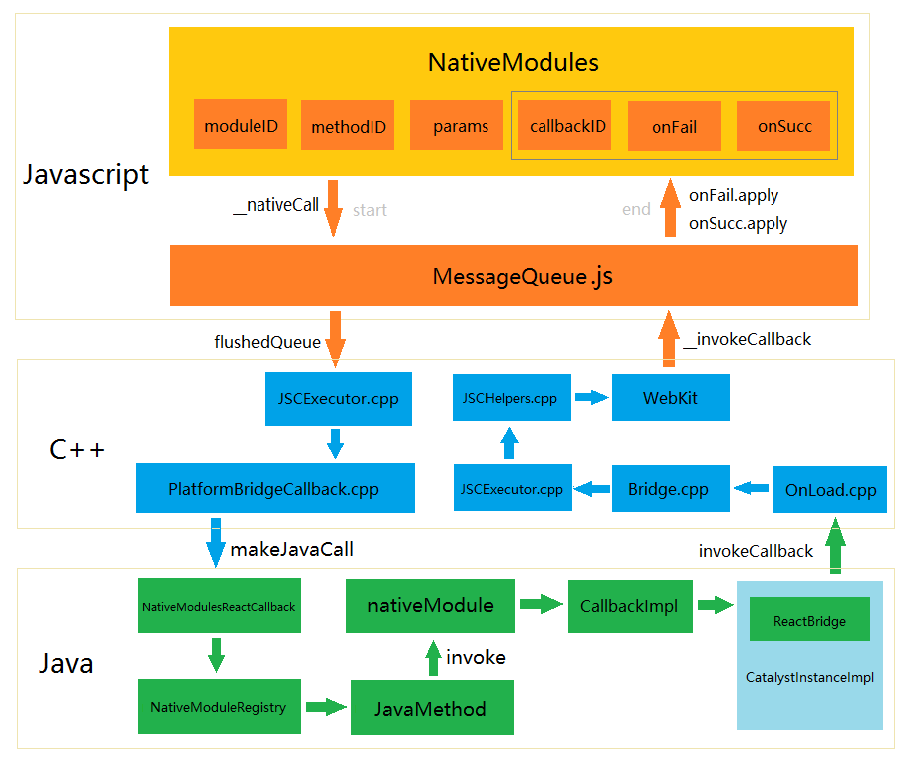 React-Native 通信原理(三):Native 被動應答 Javascript 的 callbackID 之旅
前面兩篇我們已詳細剖析了 Native 與 Javascript 的通信過程,足以應對絕大多數相互調用場景,但仍有一塊拼圖缺席——當 Javascript 需要實時獲取
 Android ContentProvider 完全總結
ContentProvider 是 Android 四大組件中最容易被忽略、卻又無處不在的一個。你的聯絡人、相簿、簡訊、通話紀錄,幾乎都是透過它對外開放的。 一、適用場