

編輯:關於 Android 程式設計
資料來源
https://webservice.webxml.com.cn/WebServices/MobileCodeWS.asmx
該服務除了 HTTP GET/POST,也支援 SOAP 等其他呼叫方式。
先做介面
功能單純,佈局也就簡單:一個輸入框、一顆查詢鈕、一行結果。
<?xml version="1.0" encoding="utf-8"?> <LinearLayout xmlns:android="https://schemas.android.com/apk/res/android" android:orientation="vertical" android:layout_width="fill_parent" android:layout_height="fill_parent" android:paddingTop="5dip" android:paddingLeft="5dip" android:paddingRight="5dip" > <TextView android:layout_width="fill_parent" android:layout_height="wrap_content" android:text="手機號碼:" /> <EditText android:id="@+id/phone_sec" android:layout_width="fill_parent" android:layout_height="wrap_content" android:inputType="textPhonetic" android:singleLine="true" android:hint="至少輸入前七位" /> <Button android:id="@+id/query_btn" android:layout_width="wrap_content" android:layout_height="wrap_content" android:layout_gravity="right" android:text="查詢" /> <TextView android:id="@+id/result_text" android:layout_width="wrap_content" android:layout_height="wrap_content" android:layout_gravity="center_horizontal|center_vertical" /> </LinearLayout>
MainActivity.java
package com.sphere.guishudi; import java.util.ArrayList; import java.util.List; import org.apache.http.HttpResponse; import org.apache.http.HttpStatus; import org.apache.http.NameValuePair; import org.apache.http.client.HttpClient; import org.apache.http.client.entity.UrlEncodedFormEntity; import org.apache.http.client.methods.HttpPost; import org.apache.http.impl.client.DefaultHttpClient; import org.apache.http.message.BasicNameValuePair; import org.apache.http.protocol.HTTP; import org.apache.http.util.EntityUtils; import android.app.Activity; import android.app.ProgressDialog; import android.os.Bundle; import android.os.Handler; import android.os.Message; import android.view.Menu; import android.view.View; import android.view.View.OnClickListener; import android.widget.Button; import android.widget.EditText; import android.widget.TextView; /** 手機號碼歸屬地查詢 */ public class MainActivity extends Activity { private EditText phoneSecEditText; private TextView resultView; private Button queryButton; private ProgressDialog proDialog; private Thread thread; private static final int NUMBER_FORMAT_ERROR = 0; private static final int QUERY_SUCCESS_MSG = 1; @Override protected void onCreate(Bundle savedInstanceState) { super.onCreate(savedInstanceState); setContentView(R.layout.main); phoneSecEditText = (EditText) findViewById(R.id.phone_sec); resultView = (TextView) findViewById(R.id.result_text); queryButton = (Button) findViewById(R.id.query_btn); proDialog = new ProgressDialog(MainActivity.this); proDialog.setMessage("正在查詢,請您耐心等待..."); queryButton.setOnClickListener(new QueryOnClickListener()); } Handler handler = new Handler(){ @Override public void handleMessage(Message msg) { super.handleMessage(msg); switch (msg.what) { case NUMBER_FORMAT_ERROR: phoneSecEditText.setText(""); resultView.setText("您輸入的號碼格式有誤"); break; case QUERY_SUCCESS_MSG: resultView.setText(msg.obj.toString()); proDialog.dismiss(); break; default: break; } } }; String phoneSec; class QueryOnClickListener implements OnClickListener{ @Override public void onClick(View arg0) { phoneSec = phoneSecEditText.getText().toString().trim(); if("".equals(phoneSec)||phoneSec.length()<7){ handler.sendEmptyMessage(NUMBER_FORMAT_ERROR); phoneSecEditText.requestFocus(); return; } thread = new Thread(new QueryThread()); thread.start(); proDialog.onStart(); proDialog.show(); } } class QueryThread implements Runnable{ @Override public void run() { getRemoteInfo(phoneSec); } } /** 手機號段歸屬地查詢 */ private void getRemoteInfo(String phoneSec) { String requestUrl = "https://webservice.webxml.com.cn/WebServices/MobileCodeWS.asmx/getMobileCodeInfo"; HttpClient client = new DefaultHttpClient(); HttpPost post = new HttpPost(requestUrl); List<NameValuePair> params = new ArrayList<NameValuePair>(); params.add(new BasicNameValuePair("mobileCode", phoneSec)); params.add(new BasicNameValuePair("userId", "")); try { post.setEntity(new UrlEncodedFormEntity(params, HTTP.UTF_8)); HttpResponse response = client.execute(post); if (response.getStatusLine().getStatusCode() == HttpStatus.SC_OK) { String result = EntityUtils.toString(response.getEntity()); Message msg = new Message(); msg.what = QUERY_SUCCESS_MSG; msg.obj = filterHtml(result); handler.sendMessage(msg); } } catch (Exception e) { e.printStackTrace(); } } /** 使用正則表達式過濾HTML標記 */ private String filterHtml(String source) { if(null == source){ return ""; } return source.replaceAll("</?[^>]+>","").trim(); } @Override public boolean onCreateOptionsMenu(Menu menu) { getMenuInflater().inflate(R.menu.main, menu); return true; } }
别忘了在 AndroidManifest.xml 中加上 <uses-permission android:name="android.permission.INTERNET" />,否則程式根本連不上網。
整段邏輯的骨架是:子執行緒負責發請求,Handler 負責把結果回丟主執行緒更新 UI。這是網絡請求不能寫在主執行緒那個年代的標準寫法。
需要補充的是,上面示範的只是 HttpClient 最基礎的能力——發起 POST 請求。瀏覽器客戶端裡的大多數行為它都能模擬:提交表單、查詢資料、上傳下載檔案、頁面跳轉、Session 保存等。
getMobileCodeInfo 介面說明
取得中國大陸手機號碼的省份、城市與卡種資訊
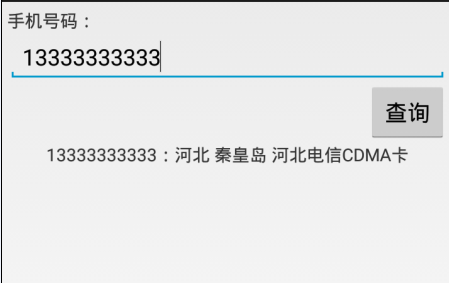
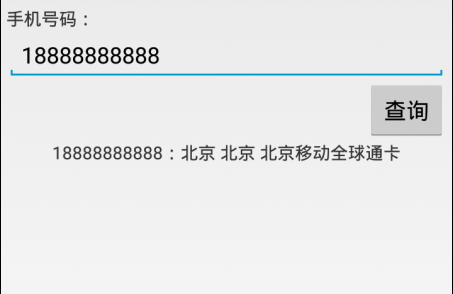
輸入參數:mobileCode = 字串(手機號碼,至少前 7 位數字),userId = 字串(商業使用者 ID,免費用戶傳空字串);回傳資料:字串(手機號碼:省份 城市 手機卡類型)。
實測結果如下:
需要提醒的是,這套寫法依賴 Apache HttpClient,在較新的 Android 版本中已被移除,新專案建議改用 HttpURLConnection 或 OkHttp;正則過濾返回的 XML 也只是省事的做法,正式環境更適合用解析器處理。
 安卓手機撥號盤裡,那些維修師傅才知道的功能
如果你有過送修手機的經驗,大概看過維修人員在撥號盤裡敲一串數字字母,螢幕上突然跳出你從沒見過的選單。那其實就是手機的工程模式。除了工程模式之外,撥號盤還藏了不少入口,下面
 360奇酷手機刷機教學 Recovery與工具兩種方案
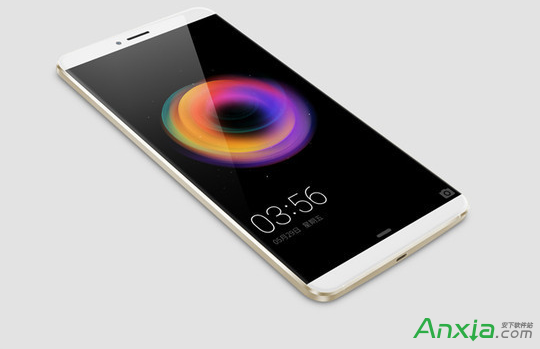
360奇酷手機出自酷派與360的合資公司,奇酷與酷派均採用安卓系統。那麼奇酷、酷派手機該怎麼刷機?下面小編提供兩種思路。 手機出現異常時,可以先嘗試恢復出廠設定。需特別注
 徹底搞懂 Android AIDL:為什麼需要它,以及怎麼用
一、為什麼要有 AIDL 學任何東西之前,先想清楚它為什麼存在。關於 AIDL,很多人腦中的印象是「可以跨進程呼叫其他應用」。但能做到這件事的技術並不少: 廣播:A 在
 Android 自定義 DatePickerDialog 樣式並隱藏「年」的實現
項目裡自帶的 DatePickerDialog 樣式往往顯得笨重,與整體設計風格格格不入。所幸我們可以通過指定主題更換外觀,再配合反射把不需要的「年」這一欄隱藏起來。整個