

編輯:關於 Android 程式設計
「下載完 APK 直接跳安裝程式」和「一鍵卸載」這兩個需求,本質上都是發出一個 Intent 交給系統處理。程式碼不長,但權限和 MIME type 這兩個細節最容易出錯。
String fileName = Environment.getExternalStorageDirectory() + "/myApp.apk";

Intent intent = new Intent(Intent.ACTION_VIEW);
intent.setDataAndType(Uri.parse("file://" + fileName),
        "application/vnd.android.package-archive");
startActivity(intent);
也可以用 Uri.fromFile() 取代字串拼接:
intent.setDataAndType(Uri.fromFile(new File(fileName)),
        "application/vnd.android.package-archive");
startActivity(intent);
Intent intent = new Intent();
intent.addFlags(Intent.FLAG_ACTIVITY_NEW_TASK);
intent.setAction(Intent.ACTION_VIEW);

// 依副檔名判斷 MIME type
String type = getMIMEType(f);
intent.setDataAndType(Uri.fromFile(f), type);
startActivity(intent);
輔助的 MIME type 判斷方法:
private String getMIMEType(File f) {
    String type = "";
    String fName = f.getName();
    String end = fName.substring(fName.lastIndexOf(".") + 1,
            fName.length()).toLowerCase();

    if ("m4a".equals(end) || "mp3".equals(end) || "wav".equals(end)) {
        type = "audio";
    } else if ("3gp".equals(end) || "mp4".equals(end) || "rmvb".equals(end)) {
        type = "video";
    } else if ("jpg".equals(end) || "gif".equals(end) || "png".equals(end)
            || "jpeg".equals(end) || "bmp".equals(end)) {
        type = "image";
    } else if ("apk".equals(end)) {
        type = "application/vnd.android.package-archive";
    } else {
        type = "*";
    }
    return type;
}
<uses-permission android:name="android.permission.INTERNET" />
<uses-permission android:name="android.permission.INSTALL_PACKAGES" />
<uses-permission android:name="android.permission.MOUNT_UNMOUNT_FILESYSTEMS" />
<uses-permission android:name="android.permission.WRITE_EXTERNAL_STORAGE" />
Uri packageURI = Uri.parse("package:com.android.myapp");
Intent uninstallIntent = new Intent(Intent.ACTION_DELETE, packageURI);
startActivity(uninstallIntent);
若想直接跳轉到系統的「應用程式資訊」頁面讓使用者自行選擇,改用 Settings.ACTION_APPLICATION_DETAILS_SETTINGS 會更友善。
上面這套寫法在 Android 7.0 之後會失效,務必注意:
file:// URI 傳給其他 App,必須改用 FileProvider 產生 content:// URI,並在 Intent 加上 FLAG_GRANT_READ_URI_PERMISSION。INSTALL_PACKAGES 是系統應用專用權限,一般 App 拿不到。另外,Uri.parse("file://" + path) 這種字串拼接若路徑含空格或中文會出錯,建議一律用 Uri.fromFile() 或 FileProvider.getUriForFile()。
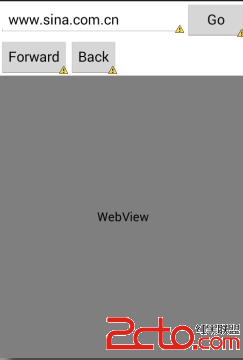 Android WebView 使用大全:loadUrl、loadData 與 JavaScript 雙向通信
WebView 是 Android 提供的網頁瀏覽元件,能載入遠端網頁,也能渲染本地 HTML。它本質上是一個完整的瀏覽器引擎,理解這一點,很多進階玩法就顺理成章了。以下
 解決 ListView 項目點擊無回應的問題
在 ListView 中,如果項目布局內包含 Button、CheckBox 或其他可取得焦點的子控制項,整個項目可能無法正常接收點擊事件。這是因為子控制項搶走了焦點。
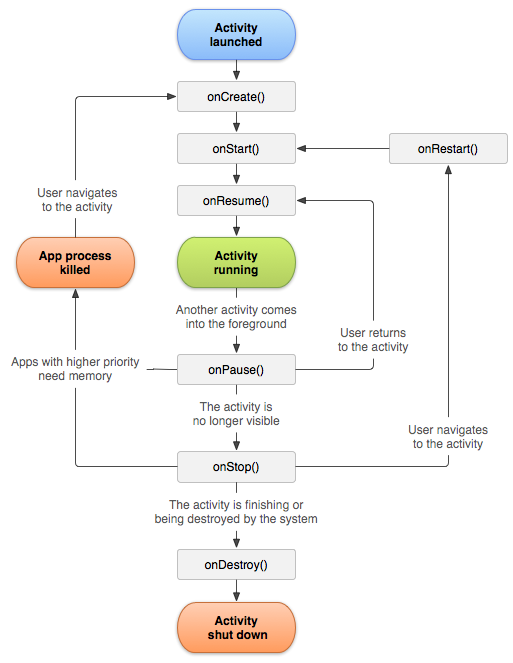 Android Activity 基礎全解:從生命周期到狀態保存
一、Activity 簡介Activity 是一種應用組件,用戶可以與它所提供的屏幕進行交互,從而完成撥打電話、拍攝照片、發送郵件或查看地圖等操作。每個 Activity
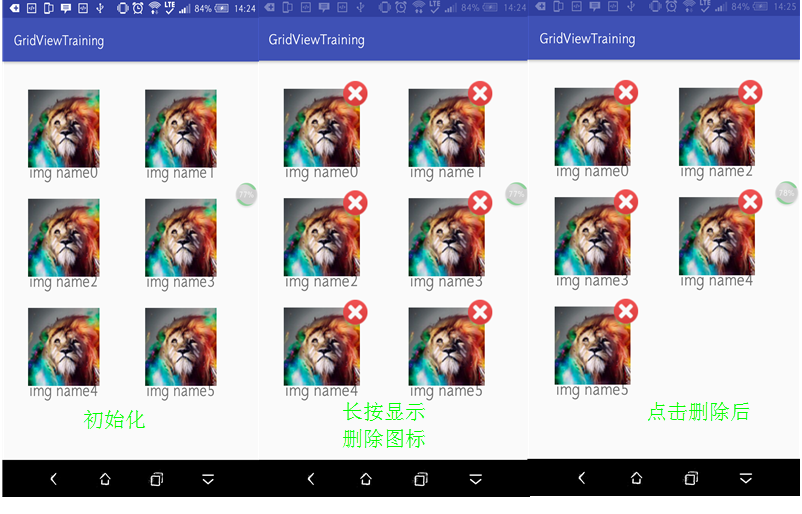 Android GridView 進階:長按顯示刪除圖標
GridView 適合用來呈現網格式列表。本文以一個常見需求為例:長按某個項目後,在項目右上角顯示刪除圖標,點擊圖標即可移除該項目。 GridView 的概念 Grid