

編輯:關於 Android 程式設計
本文以實例說明 Android 開發中加載圖片的方法,供需要的朋友參考,分析如下。
要加載網路圖片,需要在 manifest 中設定存取網路的權限,如下:
<uses-permission android:name="android.permission.INTERNET" />
若不設定這個權限,就會報錯:unknown host exception。
package com.example.loadimgfromweb; import java.io.InputStream; import android.app.Activity; import android.graphics.Bitmap; import android.graphics.BitmapFactory; import android.os.AsyncTask; import android.os.Bundle; import android.view.Menu; import android.widget.ImageView; public class MainActivity extends Activity { @Override protected void onCreate(Bundle savedInstanceState) { super.onCreate(savedInstanceState); setContentView(R.layout.activity_main); ImageView v = (ImageView) findViewById(R.id.imageView1); String url = "https://minimg.hexun.com/i1.hexunimg.cn/2011-11-07/134970028_200x150.jpg"; new DownLoadImage(v).execute(url); } @Override public boolean onCreateOptionsMenu(Menu menu) { // Inflate the menu; this adds items to the action bar if it is present. getMenuInflater().inflate(R.menu.activity_main, menu); return true; } public class DownLoadImage extends AsyncTask<String, Void, Bitmap> { ImageView imageView; public DownLoadImage(ImageView imageView) { this.imageView = imageView; } @Override protected Bitmap doInBackground(String... urls) { String url = urls[0]; Bitmap tmpBitmap = null; try { InputStream is = new java.net.URL(url).openStream(); tmpBitmap = BitmapFactory.decodeStream(is); } catch (Exception e) { e.printStackTrace(); } return tmpBitmap; } @Override protected void onPostExecute(Bitmap result) { imageView.setImageBitmap(result); } } }
上面的例子使用 AsyncTask 來與前端使用者介面互動,避免加載時間過長而影響介面的操作流暢度。
如果是加載本地圖片,直接這樣即可:
ImageView v = (ImageView) findViewById(R.id.imageView1); v.setImageResource(R.drawable.apic);
在使用 AsyncTask 加載圖片時,也可以順便把圖片存到本地:
@Override protected Bitmap doInBackground(String... urls) { String url = urls[0]; Bitmap tmpBitmap = null; try { InputStream is = new java.net.URL(url).openStream(); URL u = new URL(url); HttpURLConnection conn = (HttpURLConnection) u.openConnection(); Bitmap bitmap = BitmapFactory.decodeStream(is); // 判斷是否有內存卡 if (Environment.getExternalStorageState().equals( Environment.MEDIA_MOUNTED)) { // 保存圖片到本地 File sdCardDir = Environment.getExternalStorageDirectory(); String fileName = "a.jpg"; String filePath = sdCardDir + "/" + fileName; FileOutputStream fos = new FileOutputStream(filePath); bitmap.compress(Bitmap.CompressFormat.PNG, 100, fos); } // 關閉流 is.close(); conn.disconnect(); return bitmap; } catch (Exception e) { e.printStackTrace(); } return tmpBitmap; }
希望本文所述能對大家的 Android 開發有所幫助。
 AOSP 原始碼倉庫與 Repo 工具原理剖析:Repo 倉庫、Manifest 倉庫與子專案同步
軟體專案需要持續疊代,因此必須做版本管理,Android 原始碼(AOSP)也不例外,它採用 Git。但 AOSP 是個龐大的開放原始碼工程,由數百個子專案組成(Andr
 Android Notification 通知用法總整理
手機來了短信而我還沒點開時,狀態列上方會出現一個小圖示提示——這就是 Notification。本文把不同 Android 版本的通知寫法一次整理清楚。 主要程式碼
 Android 工程師進階:《Android 開發進階:從小工到專家》上市
本書面向希望從初級、中級工程師走向更高層次的 Android 開發者。寫作初衷來自面試與社區交流中發現的問題:不少開發者停留在「會用」層面,對原理、測試、重構、架構與代碼
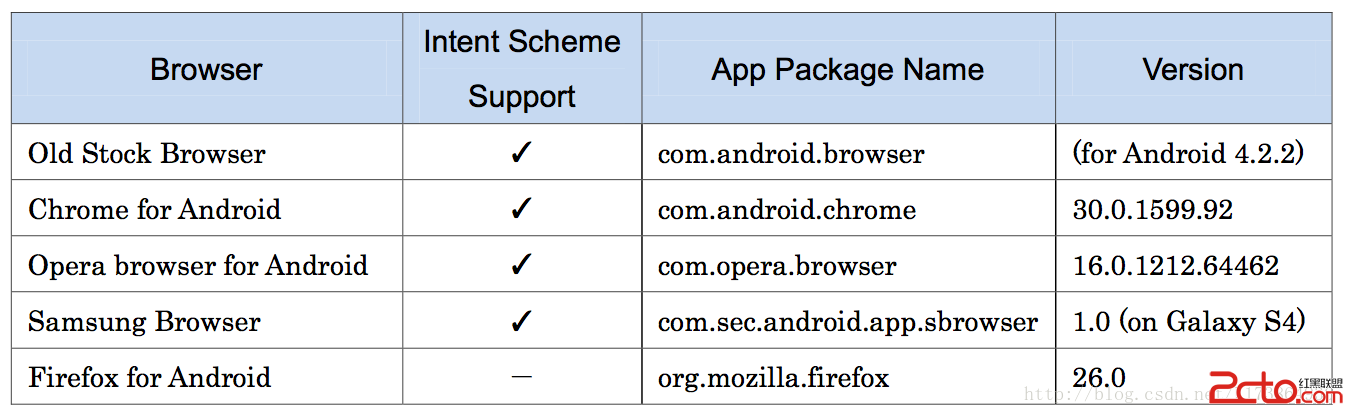 Android Intent Scheme URL 攻擊手法與防禦解析
本文分析的是一類已被公開揭露並修補的 Android 瀏覽器安全性問題,重點放在「攻擊為何成立」以及「防禦端該怎麼寫」。理解這個案例,對撰寫任何會解析外部輸入的元件都有直