

編輯:關於 Android 程式設計
Android 中常見的 HTTP 網路請求方式,包括 HttpURLConnection 與 Apache 的 HttpClient。兩者都能處理 GET 與 POST 請求,但使用方式略有不同。
HttpURLConnection 基本用法
使用 GET 請求時,可先建立 URL 物件,再開啟連線並讀取輸入流。
URL url = new URL("https://www.xxx.com/index.jsp");
HttpURLConnection urlConn = (HttpURLConnection) url.openConnection();
InputStreamReader in = new InputStreamReader(urlConn.getInputStream());
BufferedReader buffer = new BufferedReader(in);
String inputLine;
while ((inputLine = buffer.readLine()) != null) {
    resultData += inputLine;
}
in.close();
urlConn.disconnect();
使用 POST 傳送參數
URL url = new URL("https://www.xxx.com/getUser.jsp");
HttpURLConnection urlConn = (HttpURLConnection) url.openConnection();
urlConn.setDoOutput(true);
urlConn.setRequestMethod("POST");
urlConn.setRequestProperty("Content-Type", "application/x-www-form-urlencoded");
urlConn.connect();

DataOutputStream out = new DataOutputStream(urlConn.getOutputStream());
String content = "name=" + URLEncoder.encode("張三", "UTF-8");
out.writeBytes(content);
out.flush();
out.close();
HttpClient GET 請求
HttpGet httpRequest = new HttpGet("https://www.xxx.com/getUser.jsp");
HttpClient httpclient = new DefaultHttpClient();
HttpResponse httpResponse = httpclient.execute(httpRequest);
if (httpResponse.getStatusLine().getStatusCode() == HttpStatus.SC_OK) {
    String strResult = EntityUtils.toString(httpResponse.getEntity());
}
HttpClient POST 請求
HttpPost httpRequest = new HttpPost("https://www.xxx.com/getUser.jsp");
List<NameValuePair> params = new ArrayList<NameValuePair>();
params.add(new BasicNameValuePair("userId", "123"));
HttpEntity httpentity = new UrlEncodedFormEntity(params, "UTF-8");
httpRequest.setEntity(httpentity);

HttpClient httpclient = new DefaultHttpClient();
HttpResponse httpResponse = httpclient.execute(httpRequest);
實務上,網路請求應避免在主執行緒執行,並妥善處理例外、逾時與資源釋放。
 Android 進階:用反射機制挖掘並調用藍牙隱藏 API
之前的文章已經把 Android 藍牙的基本用法講清楚了,這一篇我們再往裡面挖一層,聊聊那些沒有寫進 SDK 的藍牙隱藏 API。 凡是用過 Android 系統設定(
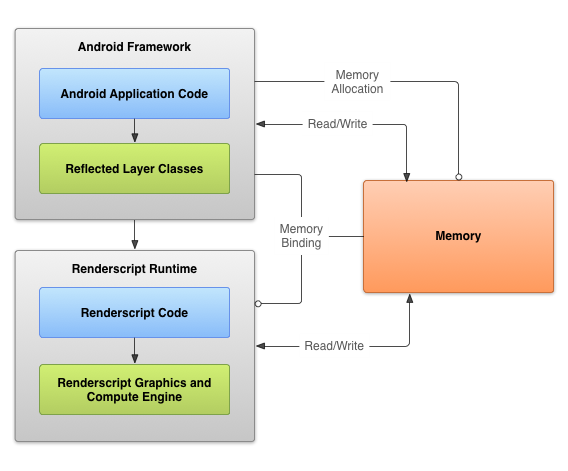 Android RenderScript 高效計算入門:概念、環境與工作流程
RenderScript 的核心價值 RenderScript 是 Android 早期用於高效能運算的框架,目標是把計算任務分配到可用的 CPU、GPU 或 DSP 等
 Android 效能隨手記:揪出高 CPU 佔用與避免浪費記憶體
App 寫完、老化測試也跑完,資料收發都正常,看似可以收工。但丟一句 adb shell top -m 5 之後會發現:自己的 App 佔的 CPU 居然最高。 寫出一個
 Android 技術精髓:Timing Activity 即時顯示當前時間
Timing Activity 顧名思義,Timing Activity 是在 Activity 中透過執行緒通信即時顯示當前時間的範例,主要運用到 Handler 與