

編輯:關於 Android 程式設計
以下為一段可直接參考的 Android 檔案下載完整範例程式碼,對正在學習與研究 Android 程式的讀者會有不小幫助,對初學者尤其具參考價值。
完整功能程式碼如下:
package com.test; import java.io.File; import java.io.FileOutputStream; import java.io.InputStream; import java.net.URL; import java.net.URLConnection; import android.app.Activity; import android.content.Intent; import android.net.Uri; import android.os.Bundle; import android.util.Log; import android.view.View; import android.webkit.URLUtil; import android.widget.Button; import android.widget.EditText; import android.widget.TextView; public class Main extends Activity { private TextView mTextView01; private EditText mEditText01; private Button mButton01; private static final String TAG = "DOWNLOADAPK"; private String currentFilePath = ""; private String currentTempFilePath = ""; private String strURL=""; private String fileEx=""; private String fileNa=""; public void onCreate(Bundle savedInstanceState) { super.onCreate(savedInstanceState); setContentView(R.layout.main); mTextView01 = (TextView)findViewById(R.id.myTextView1); mButton01 = (Button)findViewById(R.id.myButton1); mEditText01 =(EditText)findViewById(R.id.myEditText1); mButton01.setOnClickListener(new Button.OnClickListener() { public void onClick(View v) { // 文件會下載至local端 mTextView01.setText("下載中..."); strURL = mEditText01.getText().toString(); /*取得欲安裝程序之文件名稱*/ fileEx = strURL.substring(strURL.lastIndexOf(".") +1,strURL.length()).toLowerCase(); fileNa = strURL.substring(strURL.lastIndexOf("/") +1,strURL.lastIndexOf(".")); getFile(strURL); } } ); mEditText01.setOnClickListener(new EditText.OnClickListener() { public void onClick(View arg0){ mEditText01.setText(""); mTextView01.setText("遠程安裝程序(請輸入URL)"); } }); } /* 處理下載URL文件自定義函數 */ private void getFile(final String strPath) { try { if (strPath.equals(currentFilePath) ) { getDataSource(strPath); } currentFilePath = strPath; Runnable r = new Runnable() { public void run() { try { getDataSource(strPath); } catch (Exception e) { Log.e(TAG, e.getMessage(), e); } } }; new Thread(r).start(); } catch(Exception e) { e.printStackTrace(); } } /*取得遠程文件*/ private void getDataSource(String strPath) throws Exception { if (!URLUtil.isNetworkUrl(strPath)) { mTextView01.setText("錯誤的URL"); } else { /*取得URL*/ URL myURL = new URL(strPath); /*創建連接*/ URLConnection conn = myURL.openConnection(); conn.connect(); /*InputStream 下載文件*/ InputStream is = conn.getInputStream(); if (is == null) { throw new RuntimeException("stream is null"); } /*創建臨時文件*/ File myTempFile = File.createTempFile(fileNa, "."+fileEx); /*取得站存盤案路徑*/ currentTempFilePath = myTempFile.getAbsolutePath(); /*將文件寫入暫存盤*/ FileOutputStream fos = new FileOutputStream(myTempFile); byte buf[] = new byte[128]; do { int numread = is.read(buf); if (numread <= 0) { break; } fos.write(buf, 0, numread); }while (true); /*打開文件進行安裝*/ openFile(myTempFile); try { is.close(); } catch (Exception ex) { Log.e(TAG, "error: " + ex.getMessage(), ex); } } } /* 在手機上打開文件的method */ private void openFile(File f) { Intent intent = new Intent(); intent.addFlags(Intent.FLAG_ACTIVITY_NEW_TASK); intent.setAction(android.content.Intent.ACTION_VIEW); /* 調用getMIMEType()來取得MimeType */ String type = getMIMEType(f); /* 設置intent的file與MimeType */ intent.setDataAndType(Uri.fromFile(f),type); startActivity(intent); } /* 判斷文件MimeType的method */ private String getMIMEType(File f) { String type=""; String fName=f.getName(); /* 取得擴展名 */ String end=fName.substring(fName.lastIndexOf(".") +1,fName.length()).toLowerCase(); /* 依擴展名的類型決定MimeType */ if(end.equals("m4a")||end.equals("mp3")||end.equals("mid")|| end.equals("xmf")||end.equals("ogg")||end.equals("wav")) { type = "audio"; } else if(end.equals("3gp")||end.equals("mp4")) { type = "video"; } else if(end.equals("jpg")||end.equals("gif")||end.equals("png")|| end.equals("jpeg")||end.equals("bmp")) { type = "image"; } else if(end.equals("apk")) { /* android.permission.INSTALL_PACKAGES */ type = "application/vnd.android.package-archive"; } else { type="*"; } /*如果無法直接打開,就跳出軟件列表給用戶選擇 */ if(end.equals("apk")) { } else { type += "/*"; } return type; } /*自定義刪除文件方法*/ private void delFile(String strFileName) { File myFile = new File(strFileName); if(myFile.exists()) { myFile.delete(); } } /*當Activity處於onPause狀態時,更改TextView文字狀態*/ protected void onPause() { mTextView01 = (TextView)findViewById(R.id.myTextView1); mTextView01.setText("下載成功"); super.onPause(); } /*當Activity處於onResume狀態時,刪除臨時文件*/ protected void onResume() { /* 刪除臨時文件 */ delFile(currentTempFilePath); super.onResume(); } }
讀者可以在此範例的基礎上自由修改與擴充,讓它更貼近自身專案的實際需求。
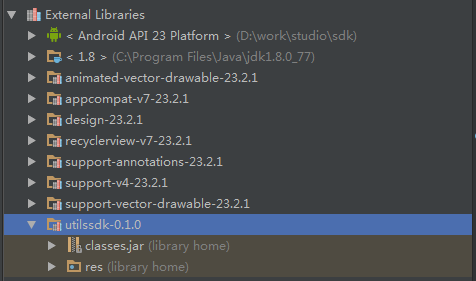 實戰:把 Android Library 發佈到 JCenter
網路的變化實在很快,剛適應 Eclipse 的用法,它就已經退場了。這篇不談兩者的優劣,只談一件在 SDK 開發中一定會遇到的事:如何讓別人用一行 compile 就能引
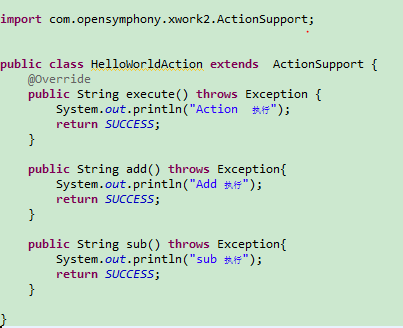 Struts2 動態方法調用:三種方式與實踐踩坑記錄
原本不打算為 Struts2 寫學習筆記——它的理論部分實在算不上複雜。但在 Myeclipse 裡實際敲代碼時遇到了一些問題,折騰了一輪之後我改變了主意:還是邊學邊記吧
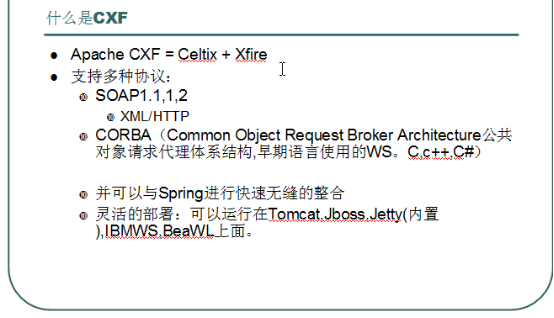 CXF 發布 WebService 實戰,搭配 Ant 建置工具完整整理
Ant 建置工具:為什麼還要認識它 在 Maven、Gradle 大行其道的今天,Ant 依然是許多老專案與教學範例裡的常客。它歷史悠久、語法直觀,最大的特色是「用
 手機數字鎖屏如何清除螢幕鎖屏密碼
智慧型手機預設情況下不會有密碼鎖屏,但若你設定了螢幕鎖定,Flyme 系統預設採用數字鎖定,需輸入正確的數字密碼解鎖。由於輸入數字容易出錯,有些時候會覺得數字鎖屏很麻煩,