

編輯:關於 Android 程式設計
SQLite 是一款輕量級、嵌入式的關系型數據庫,如今已被廣泛應用於 iOS、Android 等移動系統。它可移植性極好,體積極小,性能高效且穩定可靠。
它最特別的一點是「嵌入」:SQLite 與宿主應用共享同一個進程空間,而非獨立進程。從外部看它並不像一個完整的 RDBMS,但在進程內部,它是一個自包含、功能完備的數據庫引擎。這種設計讓移動端應用無需額外守護進程即可獲得完整的 SQL 能力。
在 Android 中操作 SQLite,需要一個 SQLiteOpenHelper 實例。它是抽象類,使用時必須繼承並實現相關回調。
1. 繼承後可用的兩個關鍵方法:
getReadableDatabase()——創建或打開一個可讀數據庫;
getWritableDatabase()——創建或打開一個可寫數據庫。
兩者都返回 SQLiteDatabase 物件,後續所有操作都基於它進行。
2. 需要覆蓋的回調:
onCreate(SQLiteDatabase)——數據庫首次創建時調用,通常在這裡建表。
onUpgrade(SQLiteDatabase, int, int)——數據庫版本升級時由系統主動調用,通常在這裡處理表結構遷移。
onOpen(SQLiteDatabase)——每次打開數據庫時回調,一般較少使用。
1. 構造函數必須調用 super。
public DatabaseHelper(Context context, String name,
                      CursorFactory factory, int version) {
    super(context, name, factory, version);
}
為方便使用,可以再額外提供兩參或三參的構造函數。
2. onCreate 的觸發時機。它並非在 new Helper 時執行,而是在第一次調用 getReadableDatabase()/getWritableDatabase()、真正拿到 SQLiteDatabase 實例時才執行。
public void onCreate(SQLiteDatabase db) {
    System.out.println("create a Database");
    // execSQL 用於直接執行 SQL 語句
    db.execSQL("create table user(id int, name varchar(20))");
}public class DBHelper {
private static DatabaseHelper mDbHelper;
private static SQLiteDatabase mDb;
private static final String DATABASE_NAME = "life";
private static final int DATABASE_VERSION = 1;
private Context mCtx;
private static class DatabaseHelper extends SQLiteOpenHelper {
DatabaseHelper(Context context) {
super(context, DATABASE_NAME, null, DATABASE_VERSION);
}
@Override
public void onCreate(SQLiteDatabase db) {
db.execSQL("CREATE TABLE life_history ("
+ "id INTEGER PRIMARY KEY AUTOINCREMENT,"
+ "type TEXT, city TEXT, company TEXT,"
+ "pucNum TEXT, pucName TEXT);");
}
@Override
public void onUpgrade(SQLiteDatabase db, int oldVersion, int newVersion) {
// 依實際需求處理表結構變更
}
}
public DBHelper(Context ctx) throws SQLException {
this.mCtx = ctx;
mDbHelper = new DatabaseHelper(mCtx);
mDb = mDbHelper.getWritableDatabase();
}
/** 關閉數據源 */
public void closeConnection() {
if (mDb != null && mDb.isOpen()) mDb.close();
if (mDbHelper != null) mDbHelper.close();
}
/** 插入數據 */
public long insert(String tableName, ContentValues initialValues) {
return mDb.insert(tableName, null, initialValues);
}
/** 刪除數據;deleteCondition 中的 ? 由 deleteArgs 依次填充 */
public boolean delete(String tableName, String deleteCondition, String[] deleteArgs) {
return mDb.delete(tableName, deleteCondition, deleteArgs) > 0;
}
/** 更新數據 */
public boolean update(String tableName, ContentValues initialValues,
String selection, String[] selectArgs) {
return mDb.update(tableName, initialValues, selection, selectArgs) > 0;
}
/** 查詢列表 */
public Cursor findList(boolean distinct, String tableName, String[] columns,
String selection, String[] selectionArgs,
String groupBy, String having,
String orderBy, String limit) {
return mDb.query(distinct, tableName, columns, selection,
selectionArgs, groupBy, having, orderBy, limit);
}
/** 查詢單行 */
public Cursor findOne(boolean distinct, String tableName, String[] columns,
String selection, String[] selectionArgs,
String groupBy, String having,
String orderBy, String limit) throws SQLException {
Cursor mCursor = findList(distinct, tableName, columns, selection,
selectionArgs, groupBy, having, orderBy, limit);
if (mCursor != null) {
mCursor.moveToFirst();
}
return mCursor;
}
/** 執行帶參數的 SQL */
public void execSQL(String sql, Object[] args) {
mDb.execSQL(sql, args);
}
/** 執行 SQL */
public void execSQL(String sql) {
mDb.execSQL(sql);
}
/** 判斷表是否存在 */
public boolean isTableExist(String tableName) {
boolean result = false;
if (tableName == null) return false;
try {
Cursor cursor = null;
String sql = "select count(1) as c from sqlite_master "
+ "where type ='table' and name ='"
+ tableName.trim() + "'";
cursor = mDb.rawQuery(sql, null);
if (cursor.moveToNext()) {
result = cursor.getInt(0) > 0;
}
cursor.close();
} catch (Exception e) {
// 忽略並返回 false
}
return result;
}
/** 判斷表中是否存在某字段(需與 isTableExist 配合使用) */
public boolean isColumnExist(String tableName, String columnName) {
boolean result = false;
if (tableName == null) return false;
try {
Cursor cursor = null;
String sql = "select count(1) as c from sqlite_master "
+ "where type ='table' and name ='"
+ tableName.trim() + "' and sql like '%"
+ columnName.trim() + "%'";
cursor = mDb.rawQuery(sql, null);
if (cursor.moveToNext()) {
result = cursor.getInt(0) > 0;
}
cursor.close();
} catch (Exception e) {
// 忽略並返回 false
}
return result;
}
}查詢條件優先用參數綁定。上面 isTableExist 這類拼接 SQL 的寫法僅適合表名、列名這種不可參數化的場景;凡是涉及外部輸入的條件值,都應該用 selectionArgs 傳參,避免 SQL 注入與引號轉義問題。
onUpgrade 要認真寫。示例中留空只在第一版可行。上線後一旦改表,直接清空重建會丟用戶數據,需要按 oldVersion 逐級遷移。
記得關閉 Cursor。示例中已逐一 close,實戰中更推薦用 try-with-resources 或 startManagingCursor 之外的手動 finally 來保證釋放,否則內存洩漏與「Cursor 未關閉」的告警會一直困擾你。
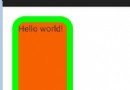 Android Shape Drawable 形狀資源教學
什麼是 Shape DrawableShape Drawable 是 Android 中常見的形狀資源,可用 XML 定義矩形、圓角、漸層、邊框與內距等樣式。它非常適合用
 源碼剖析(五):KeyboardFragment 打造文字與表情評論發表面板
說白了就是這個大家都很熟悉的功能: 這個功能牽扯到不少類別,我一個一個來拆解。 KeyboardFragment 類別 /** 底部帶 emotion 面板的文字和表
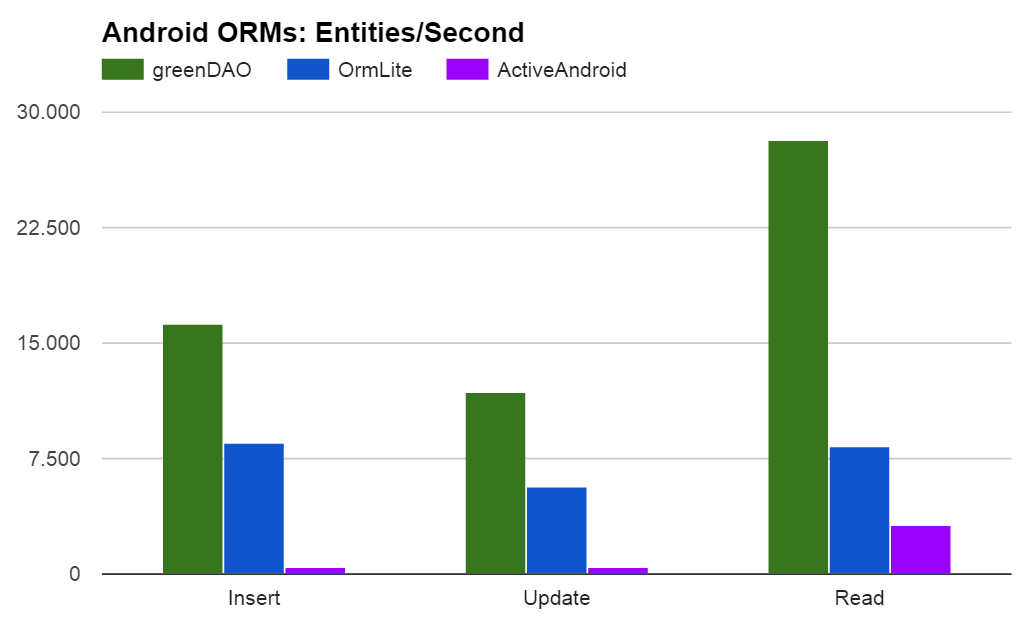 Android ORM 框架 GreenDao 快速入門與實戰指南
在 Android 開發中,資料持久化幾乎是每個專案都會碰到的課題。GreenDao 是一套輕量、高效且易於使用的 ORM 框架,它能夠把資料表映射成 Java 物件,讓
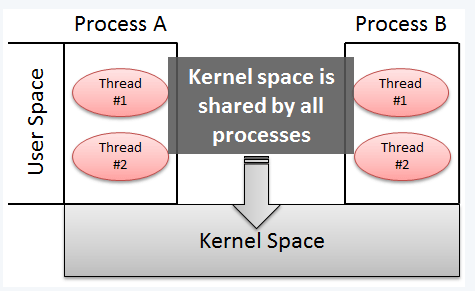 Android 7.0 Binder 通信入門:ServiceManager 的啟動與核心流程
Binder 為何存在 Android 是基於 Linux 的系統,應用與系統服務通常運行於不同進程。為了讓這些進程能高效通信,Android 引入了 Binder 機制