

編輯:關於 Android 程式設計
ToggleButton 是 Android 中常見的兩態切換控件,它只有「選中」與「未選中」兩種狀態,並且可以為這兩種狀態分別指定不同的顯示文字,非常適合用來製作開關類型的交互效果。
下面透過一個「開燈 / 關燈」的實例,帶你完整掌握 ToggleButton 的使用方式。
專案目錄結構
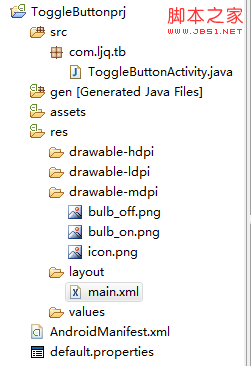
復制代碼 代碼如下:
<?xml version="1.0" encoding="utf-8"?>
<LinearLayout xmlns:android="https://schemas.android.com/apk/res/android"
android:orientation="vertical"
android:layout_width="fill_parent"
android:layout_height="fill_parent">
<ImageView android:id="@+id/imageView"
android:layout_width="wrap_content"
android:layout_height="wrap_content"
android:src="@drawable/bulb_off"
android:layout_gravity="center_horizontal" />
<ToggleButton android:id="@+id/toggleButton"
android:layout_width="140dip"
android:layout_height="wrap_content"
android:textOn="開燈"
android:textOff="關燈"
android:layout_gravity="center_horizontal" />
</LinearLayout>
其中 android:textOn 對應選中時顯示的文字,android:textOff 則對應未選中時顯示的文字。
復制代碼 代碼如下:
package com.ljq.tb;
import android.app.Activity;
import android.os.Bundle;
import android.widget.CompoundButton;
import android.widget.ImageView;
import android.widget.ToggleButton;
import android.widget.CompoundButton.OnCheckedChangeListener;
public class ToggleButtonActivity extends Activity {
private ImageView imageView=null;
private ToggleButton toggleButton=null;
@Override
public void onCreate(Bundle savedInstanceState) {
super.onCreate(savedInstanceState);
setContentView(R.layout.main);
imageView=(ImageView) findViewById(R.id.imageView);
toggleButton=(ToggleButton)findViewById(R.id.toggleButton);
toggleButton.setOnCheckedChangeListener(new OnCheckedChangeListener(){
public void onCheckedChanged(CompoundButton buttonView,
boolean isChecked) {
toggleButton.setChecked(isChecked);
imageView.setImageResource(isChecked?R.drawable.bulb_on:R.drawable.bulb_off);
}
});
}
}
透過為 ToggleButton 掛上 OnCheckedChangeListener 監聽器,就能在狀態切換時即時取得 isChecked 的布爾值,進而切換圖片資源,實現燈泡的亮滅效果。
運行效果:

 Android 技巧:如何開啟應用程式的「詳細資訊」頁面
在 Android 系統的設定功能裡,進入應用程式列表後,點擊某個項目就會進入該應用的詳細資訊頁。那麼,我們能否自己寫一個程式來開啟這個頁面呢?答案是可行的,下面就一起來
 紅米3S和華為榮耀5A哪個好?紅米3S與榮耀5A對比分析
紅米3S與榮耀5A對比 紅米3S與榮耀5A都是千元內熱門機型,但定位與配置略有差異。 榮耀暢玩5A 榮耀5A採用5.5英寸屏幕,搭載驍龍617八核處理器、2GB內存、1
 Android Studio 學習筆記(十九):Handler 訊息傳遞機制全面解析
一、為什麼需要 Handler Android 制定了一條簡單的原則:只允許 UI 執行緒(亦即主執行緒)修改 Activity 中的 UI 元件。當一個程式第一次啟動時
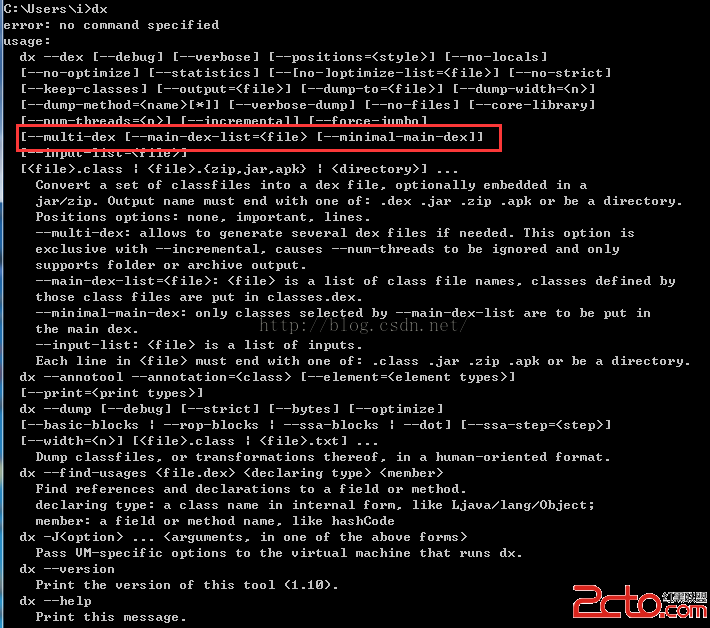 Android MultiDex 分包實戰:從 dx 拆包到 aapt 組包與 DexClassLoader 動態加載
一、為什麼要談分包 MultiDex 不算新技術,網上原理文章一大把,但多數停在「理論說明」,缺少可跟著做的完整案例。這篇就把它從原理到落地走一遍。 二、問題背景 專案做