

編輯:關於 Android 程式設計
Android 客戶端基礎框架做個筆記
本文記錄一套完整的藍牙通信客戶端基礎框架。它基於 HandlerThread 構建獨立的工作線程,透過狀態機管理藍牙的開啟、連接、讀寫與關閉流程,並以異步方式同時嘗試 Secure 與 Insecure 兩種 RFCOMM Socket 連接,最後透過監聽器接口將狀態變化與數據回調給上層。
核心類 BBC 的設計要點包括:狀態常量劃分(開始、連接中、已連接、關閉)、雙 HandlerThread 分別處理狀態變化與數據讀取、以及 ConnectManagerThread 透過線程池並發建立連接。
 public class BBC {
 private static final UUID MY_UUID_SECURE = UUID.fromString("fa87c0d0-afac-11de-8a39-0800200c9a66");
 private static final UUID MY_UUID_INSECURE = UUID.fromString("8ce255c0-200a-11e0-ac64-0800200c9a66");
 private static final int MSG_BLUETOOTH_START = 0;
 private static final int MSG_BLUETOOTH_CONNECT = 1;
 private static final int MSG_BLUETOOTH_CONNECTED = 2;
 private static final int MSG_BLUETOOTH_CONNECT_TIMEOUT = 3;
 private static final int MSG_BLUETOOTH_CLOSE = 4;
 private final BluetoothAdapter mBluetoothAdapter;
 private ConnectManagerThread mConnectManagerThread;
 private BluetoothStatusChangeHandler mBluetoothStatusChangeHandler;
 private BluetoothReadHandler mBluetoothReadHandler;
 private volatile ConnectedHandler mConnectedHandler;
 private BluetoothDevice device;

 public BBC() {
  mBluetoothAdapter = BluetoothAdapter.getDefaultAdapter();
  HandlerThread handlerThread1 = new HandlerThread("BluetoothStatusChangeHandler");
  handlerThread1.start();
  mBluetoothStatusChangeHandler = new BluetoothStatusChangeHandler(handlerThread1.getLooper());
  HandlerThread handlerThread2 = new HandlerThread("BluetoothReadHandler");
  handlerThread2.start();
  mBluetoothReadHandler = new BluetoothReadHandler(handlerThread2.getLooper());
 }
 public synchronized void switchDevice(BluetoothDevice device) { this.device = device; }

 private class BluetoothReadHandler extends Handler {
  private AtomicBoolean isOpen = new AtomicBoolean(false);
  BluetoothReadHandler(Looper looper) { super(looper); }
  @Override public void handleMessage(Message msg) {
   if (isOpen.get() && onPushListener != null) {
    try {
     if (mConnectedHandler != null) { mConnectedHandler.read(); }
     sendEmptyMessage(0);
    } catch (Exception e) {
     e.printStackTrace();
     if (mConnectedHandler != null) { mConnectedHandler.cancel(); }
     close();
     bluetoothErrorHandler(ERROR_BLUETOOTH_READ, e);
    }
   }
  }
  public void open() { isOpen.set(true); sendEmptyMessage(0); }
  public void close() { isOpen.set(false); removeMessages(0); }
 }

 private boolean openBluetoothDeviceHandler() {
  if (mBluetoothAdapter == null) { return false; }
  if (!mBluetoothAdapter.isEnabled()) {
   mBluetoothAdapter.enable();
   int MAX_COUNT = 10;
   int tryCount = 0;
   boolean enable = false;
   while (!enable) {
    enable = mBluetoothAdapter.isEnabled();
    if (tryCount > MAX_COUNT) { return false; }
    try { tryCount++; Thread.sleep(500); } catch (InterruptedException e) { e.printStackTrace(); }
   }
  }
  return true;
 }
 public void closeBluetoothDeviceHandler() {
  if (mConnectedHandler != null) { mConnectedHandler.cancel(); mConnectedHandler = null; }
  if (mConnectManagerThread != null) { mConnectManagerThread.cancel(); mConnectManagerThread = null; }
  mBluetoothReadHandler.close();
 }
 public synchronized void connectBluetoothDeviceHandler() {
  closeBluetoothDeviceHandler();
  mConnectManagerThread = new ConnectManagerThread();
  mConnectManagerThread.start();
 }
 public void open() { mBluetoothStatusChangeHandler.sendEmptyMessage(MSG_BLUETOOTH_START); }
 public void close() { mBluetoothStatusChangeHandler.sendEmptyMessage(MSG_BLUETOOTH_CLOSE); }

 private static final ExecutorService pool = Executors.newFixedThreadPool(2);
 private class ConnectManagerThread extends Thread {
  private final ConnectThread mSecureThread;
  private final ConnectThread mInSecureThread;
  ConnectManagerThread() {
   mSecureThread = new ConnectThread(device, true);
   mInSecureThread = new ConnectThread(device, false);
  }
  public void cancel() { mSecureThread.cancel(); mInSecureThread.cancel(); }
  @Override public void run() {
   Future f1 = pool.submit(mSecureThread);
   Future f2 = pool.submit(mInSecureThread);
   try {
    BluetoothSocket socket1 = f1.get();
    BluetoothSocket socket2 = f2.get();
    if (socket1 != null || socket2 != null) {
     Message message = Message.obtain();
     message.obj = f1.get() != null ? f1.get() : f2.get();
     message.what = MSG_BLUETOOTH_CONNECTED;
     mBluetoothStatusChangeHandler.sendMessage(message);
    } else {
     bluetoothErrorHandler(ERROR_BLUETOOTH_CONNECT, new RuntimeException("藍牙服務建立失敗!"));
    }
   } catch (Exception e) {
    e.printStackTrace();
    bluetoothErrorHandler(ERROR_BLUETOOTH_CONNECT, e);
   }
  }
 }

 private class ConnectThread implements Callable {
  private final BluetoothSocket mmSocket;
  private String mSocketType;
  public ConnectThread(BluetoothDevice device, boolean secure) {
   BluetoothSocket tmp = null;
   mSocketType = secure ? "Secure" : "Insecure";
   try {
    if (secure) {
     tmp = device.createRfcommSocketToServiceRecord(MY_UUID_SECURE);
    } else {
     tmp = device.createInsecureRfcommSocketToServiceRecord(MY_UUID_INSECURE);
    }
   } catch (IOException e) { }
   mmSocket = tmp;
  }
  public void cancel() {
   try { mmSocket.close(); } catch (IOException e) { }
  }
  @Override public BluetoothSocket call() throws Exception {
   mBluetoothAdapter.cancelDiscovery();
   try {
    mmSocket.connect();
    return mmSocket;
   } catch (IOException e) {
    e.printStackTrace();
    cancel();
    return null;
   }
  }
 }

 private class ConnectedHandler {
  private static final int READ_MAX = 256;
  private final byte[] bytes = new byte[READ_MAX];
  private final BluetoothSocket mmSocket;
  private final InputStream mmInStream;
  private final OutputStream mmOutStream;
  private final String mmDevice;
  public ConnectedHandler(BluetoothSocket socket) {
   mmSocket = socket;
   mmDevice = socket.getRemoteDevice().getName();
   InputStream tmpIn = null;
   OutputStream tmpOut = null;
   try { tmpIn = socket.getInputStream(); tmpOut = socket.getOutputStream(); } catch (Exception e) { e.printStackTrace(); }
   mmInStream = tmpIn;
   mmOutStream = tmpOut;
  }
  public boolean connectedSuccess() { return mmInStream != null && mmOutStream != null; }
  public void read() throws Exception {
   int readCount = mmInStream.read(bytes);
   if (onPushListener != null) {
    byte[] datas = new byte[readCount];
    System.arraycopy(bytes, 0, datas, 0, readCount);
    onPushListener.onDecode(datas);
   }
  }
  public void write(byte[] buffer) throws Exception {
   mmOutStream.write(buffer);
   if (onBluetoothStatusChangeListener != null) { onBluetoothStatusChangeListener.bluetoothSendSuccess(buffer); }
  }
  public void cancel() {
   try { mmOutStream.close(); mmInStream.close(); mmSocket.close(); } catch (Exception e) { e.printStackTrace(); }
  }
  public String getMmDevice() { return mmDevice; }
 }

 public void write(byte[] out) {
  try {
   if (mConnectedHandler != null) { mConnectedHandler.write(out); }
  } catch (Exception e) {
   e.printStackTrace();
   if (mConnectedHandler != null) { mConnectedHandler.cancel(); }
   bluetoothErrorHandler(ERROR_BLUETOOTH_WRITE, e);
  }
 }
 }
上層只需實作 OnBluetoothStatusChangeListener、OnBluetoothErrorListener 與 OnPushListener 三個接口,即可接收藍牙狀態變化、錯誤通知與接收數據。而 BBCCommander 則以單例模式對 BBC 進行二次封裝,對外暴露更為簡潔的 open、close、write 等方法,並將底層的三類監聽統一轉發給業務層自訂的 OnBluetoothStatusChangeListener:
 public class BBCCommander implements BBC.OnBluetoothStatusChangeListener, BBC.OnBluetoothErrorListener, BBC.OnPushListener {
 private static final BBC BBC = new BBC();
 private static class SingletonInstance {
  private static final BBCCommander mInstance = new BBCCommander();
 }
 public static BBCCommander getInstance() { return SingletonInstance.mInstance; }
 public void init() {
  BBC.setOnBluetoothStatusChangeListener(this);
  BBC.setOnBluetoothErrorListener(this);
  BBC.setOnPushListener(this);
 }
 public void switchDevice(BluetoothDevice device) { BBC.switchDevice(device); }
 public void open() { BBC.open(); }
 public void close() { BBC.close(); }
 public void write(byte[] bytes) { BBC.write(bytes); }
 @Override public void onDecode(byte[] datas) {
  if (mOnDecoder != null) { mOnDecoder.onDecode(datas); }
 }
 public interface OnBluetoothStatusChangeListener {
  void bluetoothUnable(Exception e);
  void bluetoothError(Exception e);
  void bluetoothOpened(String message);
  void bluetoothConnected(String message);
  void bluetoothClosed(String message);
  void bluetoothSendSuccess(byte[] b);
 }
 public interface OnDecoder { void onDecode(byte[] bytes); }
 }
總的來說,這套框架透過 HandlerThread 隔離了狀態管理與數據讀取,避免阻塞主線程;並發嘗試雙 Socket 連接提升了兼容性;而分層的監聽器設計則讓業務代碼與藍牙底層邏輯徹底解耦,非常適合需要與藍牙外設通訊的場景參考借鑑。
 Android ViewPager 畫廊效果實作
一般 ViewPager 每次只顯示一頁,但透過 clipChildren 與邊距設定,可以做出類似畫廊的預覽效果,讓使用者感受到左右還有內容可滑動。 關鍵屬性 將 V
 Android 快速上手高德地圖 SDK(附實戰項目)
近期的項目裡需要用到高德地圖與定位功能,學習過程中我翻了不少文檔和 Demo 代碼,也踩了一些坑(部分文檔著實讓人費解,示例代碼連註釋都欠奉,上下文還對不上)。因此乾脆把
 安卓自定義刪除空間是什麼 新功能使用說明
安卓系統近日正在測試一項新功能:當設備存儲空間不足時,系統會主動找出佔空間的元兇,並給出刪除建議。那麼這項功能該怎麼用?下面小編一併說明。 據外媒報導,谷歌正為Andro
 自定義控件實戰:帶下拉刷新與上拉加載的 DropDownListView
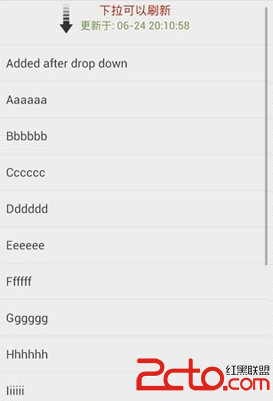
本文記錄一個自定義 ListView 的實現過程,它在原生 ListView 基礎上擴展了下拉刷新與滾動到底部加載更多的能力,同時保留 ListView 本身的性能特性。