

編輯:關於 Android 程式設計
在 4G 甚至更快的網路環境下,頁面載入速度越來越快,但行動數據與流量始終是稀缺資源。如果你的 App 沒有任何緩存,使用者往回滑動時又得重新抓一次資料,體驗與流量都是雙重浪費。
Android 官方提供的記憶體層方案是 LruCache——LRU 是 Least Recently Used 的縮寫,也就是「最近最少使用」演算法:當容量達上限時,淘汰最久沒被存取的項目。磁碟層官方沒有現成類別,社群普遍採用 Google 工程師開源的 DiskLruCache。
於是我們想要的載入順序就是:記憶體 → 磁碟 → 網路,而寫入則是網路抓回來之後同時填進記憶體與磁碟。
public class LruCacheUtils {

    private static LruCacheUtils instance;
    private LruCache<String, Bitmap> lruCache;
    private Context context;
    private DiskLruCache diskLruCache;

    private LruCacheUtils() {}

    public static LruCacheUtils getInstance() {
        if (instance == null) {
            instance = new LruCacheUtils();
        }
        return instance;
    }

    /** 初始化記憶體與磁碟緩存 */
    public void open(Context context, String diskCacheSubdir, int diskCacheSize) {
        this.context = context;
        ActivityManager am = (ActivityManager) context.getSystemService(Context.ACTIVITY_SERVICE);
        int memoryClass = am.getMemoryClass();

        // 記憶體緩存取可用記憶體的 1/8
        lruCache = new LruCache<>((memoryClass / 8) * 1024 * 1024);

        try {
            // getAppVersion() 會在版本更新時使舊緩存失效
            // 1 代表每個 key 對應幾個檔案
            diskLruCache = DiskLruCache.open(
                    getCacheDir(diskCacheSubdir), getAppVersion(), 1, diskCacheSize);
        } catch (IOException e) {
            e.printStackTrace();
        }
    }

    /** 有外部儲存空間就放外部快取,否則退回內部快取 */
    private File getCacheDir(String name) {
        String cachePath =
                (Environment.getExternalStorageState() == Environment.MEDIA_MOUNTED
                        || !Environment.isExternalStorageRemovable()
                        ? context.getExternalCacheDir().getPath()
                        : context.getCacheDir().getPath());
        return new File(cachePath + File.separator + name);
    }

    private int getAppVersion() {
        try {
            return context.getPackageManager()
                    .getPackageInfo(context.getPackageName(), 0).versionCode;
        } catch (PackageManager.NameNotFoundException e) {
            e.printStackTrace();
        }
        return 1;
    }

    /** 用 URL 的 MD5 當磁碟快取的 key */
    public String hashKeyForDisk(String url) {
        try {
            MessageDigest digest = MessageDigest.getInstance("MD5");
            digest.update(url.getBytes());
            return bytesToHexString(digest.digest());
        } catch (NoSuchAlgorithmException e) {
            return String.valueOf(url.hashCode());
        }
    }

    private String bytesToHexString(byte[] digests) {
        StringBuilder sb = new StringBuilder();
        for (byte digest : digests) {
            String hex = Integer.toHexString(0xFF & digest);
            if (hex.length() == 1) sb.append("0");
            sb.append(hex);
        }
        return sb.toString();
    }

    /** 從網路下載並同時寫入記憶體與磁碟 */
    public void fromNetToCache(String url, int reqWidth, int reqHeight, Callback callback) {
        new AsyncTask<String, Void, Bitmap>() {
            @Override
            protected Bitmap doInBackground(String... params) {
                String key = hashKeyForDisk(params[0]);
                DiskLruCache.Editor editor = null;
                try {
                    URL url = new URL(params[0]);
                    HttpURLConnection conn = (HttpURLConnection) url.openConnection();
                    conn.setConnectTimeout(30000);
                    conn.setReadTimeout(30000);

                    if (conn.getResponseCode() == HttpURLConnection.HTTP_OK) {
                        BufferedInputStream bis = new BufferedInputStream(conn.getInputStream());
                        ByteArrayOutputStream baos = new ByteArrayOutputStream();
                        byte[] buffer = new byte[1024];
                        int len;
                        while ((len = bis.read(buffer)) != -1) {
                            baos.write(buffer, 0, len);
                        }
                        bis.close();

                        Bitmap bitmap = decodeSampleBitmapFromStream(
                                baos.toByteArray(), reqWidth, reqHeight);
                        addBitmapToCache(params[0], bitmap);

                        editor = diskLruCache.edit(key);
                        // 100 表示不壓縮
                        bitmap.compress(Bitmap.CompressFormat.JPEG, 100, editor.newOutputStream(0));
                        editor.commit();
                        conn.disconnect();
                        return bitmap;
                    }
                } catch (IOException e) {
                    if (editor != null) {
                        try { editor.abort(); } catch (IOException ignored) { }
                    }
                }
                return null;
            }

            @Override
            protected void onPostExecute(Bitmap bitmap) {
                super.onPostExecute(bitmap);
                // 回呼給呼叫方
            }
        }.execute(url);
    }

    /** 從磁碟讀取 */
    public InputStream getDiskCache(String url) {
        try {
            DiskLruCache.Snapshot snapshot = diskLruCache.get(hashKeyForDisk(url));
            if (snapshot != null) {
                return snapshot.getInputStream(0);
            }
        } catch (IOException e) {
            e.printStackTrace();
        }
        return null;
    }

    /** 按需求尺寸取樣,避免把大圖整個解碼進記憶體 */
    public Bitmap decodeSampleBitmapFromStream(byte[] bytes, int reqWidth, int reqHeight) {
        BitmapFactory.Options options = new BitmapFactory.Options();
        options.inJustDecodeBounds = true;   // 只讀尺寸,不真正配置像素
        BitmapFactory.decodeByteArray(bytes, 0, bytes.length, options);
        options.inSampleSize = calculateInSampleSize(options, reqWidth, reqHeight);
        options.inJustDecodeBounds = false;
        return BitmapFactory.decodeByteArray(bytes, 0, bytes.length, options);
    }

    private int calculateInSampleSize(BitmapFactory.Options options, int reqWidth, int reqHeight) {
        int height = options.outHeight;
        int width = options.outWidth;
        int inSampleSize = 1;
        if (height > reqHeight || width > reqWidth) {
            inSampleSize = width > height
                    ? Math.round((float) height / reqHeight)
                    : Math.round((float) width / reqWidth);
        }
        return inSampleSize;
    }

    public void addBitmapToCache(String url, Bitmap bitmap) {
        String key = hashKeyForDisk(url);
        if (getBitmapFromCache(key) == null) {
            lruCache.put(key, bitmap);
        }
    }

    public Bitmap getBitmapFromCache(String url) {
        return lruCache.get(hashKeyForDisk(url));
    }

    public void close() {
        if (diskLruCache != null && !diskLruCache.isClosed()) {
            try { diskLruCache.close(); } catch (IOException e) { e.printStackTrace(); }
        }
    }

    public void flush() {
        if (diskLruCache != null) {
            try { diskLruCache.flush(); } catch (IOException e) { e.printStackTrace(); }
        }
    }

    public interface Callback {
        void response(Bitmap bitmap);
    }
}
private void loadBitmap(String url, int reqWidth, int reqHeight) {
    // 1. 先問記憶體
    Bitmap bitmap = instance.getBitmapFromCache(url);

    if (bitmap == null) {
        // 2. 再問磁碟
        InputStream is = instance.getDiskCache(url);
        if (is == null) {
            // 3. 最後走網路,成功後會同時寫入兩層緩存
            instance.fromNetToCache(url, reqWidth, reqHeight, entity -> {
                imageView.setImageBitmap(entity);
            });
        } else {
            bitmap = BitmapFactory.decodeStream(is);
            instance.addBitmapToCache(url, bitmap);   // 回填記憶體
            imageView.setImageBitmap(bitmap);
        }
    } else {
        imageView.setImageBitmap(bitmap);
    }
}
取樣率是效能關鍵。列表裡顯示 100dp 的縮圖,不需要把 2000px 的 original 完整解碼進記憶體。inJustDecodeBounds 先讀尺寸再決定 inSampleSize,是 OOM 問題最有效的第一道防線。
key 的設計。把 URL 做 MD5 當作磁碟檔名,是因為 URL 常帶有無法作為檔名的字元。若同一張圖會有多種尺寸,記得把尺寸參數一起放進 key,否則會互相覆蓋。
記得 flush 與 close。DiskLruCache 的寫入需要 flush() 才會落盤,Activity 生命週期結束或應用進入背景時呼叫一次;close() 則在不再使用時釋放。
最後,這個封裝只是教學用的骨架。若要在正式專案中使用,建議直接採用成熟方案(Glide、Fresco、Coil 等),它們在執行緒調度、請求取消、生命週期綁定與快取策略上都處理得比手工版完善得多。理解三級緩存的原理,目的在於當你遇到圖片相關的效能問題時,知道該往哪裡查。
 Android 三種定位方式實作與比較
近來研究了 Android 的定位方式,查閱了不少資料並實際拿手機測試,以下是我的整理。 Android 一共有三種定位方式:GPS 定位、網路定位,以及基於基站的定位。
 Android JSON 資料解析入門教學
JSON 是一種輕量級的資料交換格式,因為格式簡單、易於閱讀,所以在 Android 開發中經常被用來傳輸資料。本文說明 JSON 的基本結構,並示範如何在伺服器端產生
 Android ImageView 圓角與圓形圖片實作:Xfermode 與自訂 View
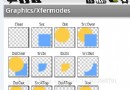
在 Android 介面設計中,頭像、卡片圖示常需要圓形或圓角效果。常見做法有兩種:利用 Xfermode 進行圖層合成,或透過 BitmapShader 搭配自訂 Vi
 點九圖(.9.png)的「內容顯示區域」到底在說什麼
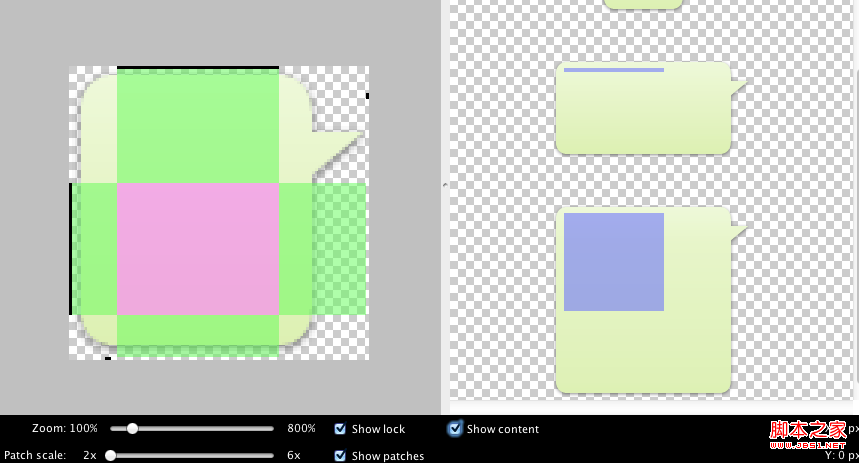
點九圖的拉伸區域很好理解,但「顯示內容區域」常讓人一頭霧水。以下用一個具體例子把它講清楚。 先說 .9.png 是什麼 .9 是 Android 平台特有的一種圖片格式