

編輯:關於 Android 程式設計
這個專案示範了如何把考題放進本地的 SQLite 資料庫,再由 App 讀出來動態產生答題畫面,並支援上一題/下一題切換、作答後顯示解析,以及把答錯的題目抽出來複習。
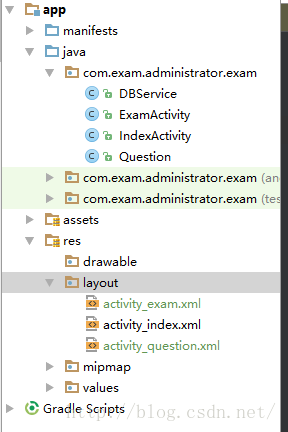
畫面主要由兩組 layout 構成:起始頁 activity_index.xml 與作答頁 activity_question.xml。邏輯則拆成四個類別:
DBService:負責資料庫的讀取。Question:自訂的資料載體,對應一筆考題。IndexActivity:建立資料庫、寫入題目,並處理「開始測驗」的跳轉。ExamActivity:把題目逐題呈現,處理作答、換題與結果統計。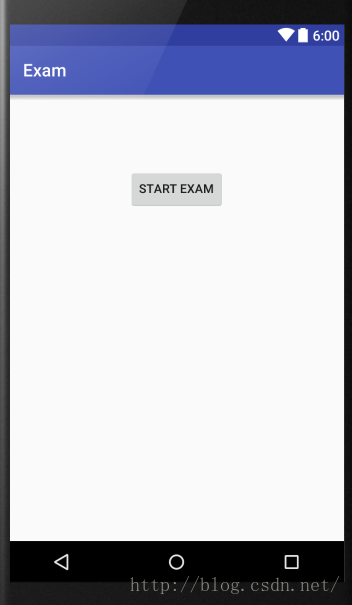
<RelativeLayout xmlns:android="https://schemas.android.com/apk/res/android"
    android:layout_width="match_parent"
    android:layout_height="match_parent"
    android:paddingBottom="@dimen/activity_vertical_margin"
    android:paddingLeft="@dimen/activity_horizontal_margin"
    android:paddingRight="@dimen/activity_horizontal_margin"
    android:paddingTop="@dimen/activity_vertical_margin">

    <Button
        android:id="@+id/button"
        android:layout_width="wrap_content"
        android:layout_height="wrap_content"
        android:layout_alignParentTop="true"
        android:layout_centerHorizontal="true"
        android:layout_marginTop="68dp"
        android:text="Start Exam" />
</RelativeLayout>
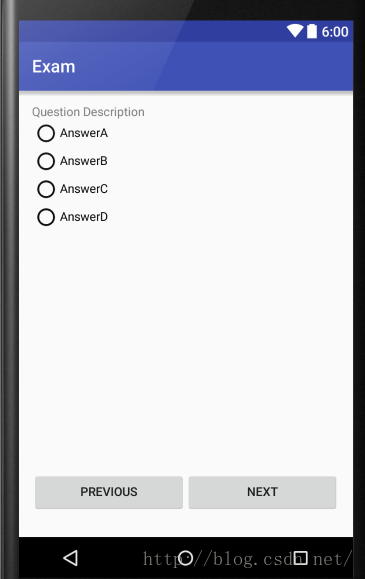
題幹放進 ScrollView,避免長題目被裁掉;下方是四個 RadioButton 與一個預設隱藏的解析欄位,最底部則是上一題/下一題。
<LinearLayout xmlns:android="https://schemas.android.com/apk/res/android"
    android:layout_width="match_parent"
    android:layout_height="match_parent"
    android:orientation="vertical"
    android:paddingBottom="@dimen/activity_vertical_margin"
    android:paddingLeft="@dimen/activity_horizontal_margin"
    android:paddingRight="@dimen/activity_horizontal_margin"
    android:paddingTop="@dimen/activity_vertical_margin">

    <ScrollView
        android:layout_width="match_parent"
        android:layout_height="match_parent"
        android:layout_weight="1">

        <LinearLayout
            android:layout_width="match_parent"
            android:layout_height="wrap_content"
            android:orientation="vertical">

            <TextView
                android:id="@+id/question"
                android:layout_width="match_parent"
                android:layout_height="wrap_content"
                android:text="Question Description" />

            <RadioGroup
                android:id="@+id/radioGroup"
                android:layout_width="match_parent"
                android:layout_height="wrap_content">

                <RadioButton android:id="@+id/answerA" ... />
                <RadioButton android:id="@+id/answerB" ... />
                <RadioButton android:id="@+id/answerC" ... />
                <RadioButton android:id="@+id/answerD" ... />
            </RadioGroup>

            <TextView
                android:id="@+id/explanation"
                android:layout_width="match_parent"
                android:layout_height="wrap_content"
                android:text="Question Explanation"
                android:visibility="invisible" />
        </LinearLayout>
    </ScrollView>

    <LinearLayout
        android:layout_width="match_parent"
        android:layout_height="match_parent"
        android:layout_weight="7"
        android:orientation="horizontal">

        <Button
            android:id="@+id/previous"
            android:layout_width="match_parent"
            android:layout_height="wrap_content"
            android:layout_weight="1"
            android:text="previous" />

        <Button
            android:id="@+id/next"
            android:layout_width="match_parent"
            android:layout_height="wrap_content"
            android:layout_weight="1"
            android:text="next" />
    </LinearLayout>
</LinearLayout>
直接以絕對路徑開啟 app 私有目錄下的 question.db,用 rawQuery 把整張表讀成 List:
public class DBService {
    private SQLiteDatabase db;

    public DBService() {
        db = SQLiteDatabase.openDatabase(
            "/data/data/com.exam.administrator.exam/databases/question.db",
            null, SQLiteDatabase.OPEN_READWRITE);
    }

    public List<Question> getQuestion() {
        List<Question> list = new ArrayList<Question>();
        Cursor cursor = db.rawQuery("Select * from question", null);
        if (cursor.getCount() > 0) {
            int count = cursor.getCount();
            for (int i = 0; i < count; i++) {
                cursor.moveToPosition(i);
                Question q = new Question();
                q.question = cursor.getString(cursor.getColumnIndex("question"));
                q.answerA = cursor.getString(cursor.getColumnIndex("answerA"));
                q.answerB = cursor.getString(cursor.getColumnIndex("answerB"));
                q.answerC = cursor.getString(cursor.getColumnIndex("answerC"));
                q.answerD = cursor.getString(cursor.getColumnIndex("answerD"));
                q.answer = cursor.getInt(cursor.getColumnIndex("answer"));
                q.ID = cursor.getInt(cursor.getColumnIndex("ID"));
                q.explanation = cursor.getString(cursor.getColumnIndex("explanation"));
                q.selectedAnswer = -1;   // -1 代表尚未作答
                list.add(q);
            }
        }
        return list;
    }
}
作答狀態記錄在每個 Question 的 selectedAnswer 上,切題時再回填,因此來回翻頁不會遺失選擇。RadioGroup 的監聽器負責寫入:
radioGroup.setOnCheckedChangeListener(new RadioGroup.OnCheckedChangeListener() {
    @Override
    public void onCheckedChanged(RadioGroup group, int checkedId) {
        for (int j = 0; j < 4; j++) {
            if (radioButtons[j].isChecked()) {
                list.get(current).selectedAnswer = j + 1;
                break;
            }
        }
    }
});
換題時先 clearCheck(),再依 selectedAnswer 還原勾選狀態:
Question q = list.get(current);
tv_question.setText(q.question);
radioGroup.clearCheck();
radioButtons[0].setText(q.answerA);
radioButtons[1].setText(q.answerB);
radioButtons[2].setText(q.answerC);
radioButtons[3].setText(q.answerD);
tv_explanation.setText(q.explanation);
if (q.selectedAnswer != -1) {
    radioButtons[q.selectedAnswer].setChecked(true);
}
答題結束時比對答案,收集答錯的索引,再詢問使用者是否要複習:
private List<Integer> checkAnswer(List<Question> list) {
    List<Integer> wrongList = new ArrayList<Integer>();
    for (int i = 0; i < list.size(); i++) {
        if (list.get(i).answer != list.get(i).selectedAnswer) {
            wrongList.add(i);
        }
    }
    return wrongList;
}
若使用者選擇複習,就把答錯的題目組成新的 List 取代原本的題庫,並把 wrongMode 設為 true,避免無限循環重考。
這裡刻意簡化,每次啟動都先 DROP 再重建資料表,然後塞入三道示範題目:
SQLiteDatabase db = openOrCreateDatabase("question.db", Context.MODE_PRIVATE, null);
db.execSQL("DROP TABLE IF EXISTS question");
db.execSQL("CREATE TABLE `question` (`ID` INTEGER, `question` TEXT, `answerA` TEXT, "
    + "`answerB` TEXT, `answerC` TEXT, `answerD` TEXT, `answer` NUMERIC, "
    + "`explanation` TEXT, PRIMARY KEY(ID))");

Question question1 = new Question();
question1.question = "Oracle 中 VARCHAR2 型別的最大長度是";
question1.answerA = "4000";
question1.answerB = "3000";
question1.answerC = "1000";
question1.answerD = "2000";
question1.answer = 1;
question1.explanation = "4000";
question1.ID = 1;

db.execSQL("INSERT INTO question VALUES(?,?,?,?,?,?,?,?)",
    new Object[]{question1.ID, question1.question, question1.answerA,
        question1.answerB, question1.answerC, question1.answerD,
        question1.answer, question1.explanation});
db.close();
資料載體本身非常單純:
public class Question {
    public String question;
    public String answerA, answerB, answerC, answerD;
    public int answer;
    public String explanation;
    public int ID;
    public int selectedAnswer;
}
這份程式碼的骨架清楚,但仍有幾處值得優化:資料庫連線沒有關閉(DBService 缺 close)、每次啟動都重建資料表不適合正式環境、資料庫操作都在主執行緒上執行容易造成 ANR,另外直接寫死絕對路徑在部分裝置上會失敗,建議改用 getDatabasePath() 取得實際位置。
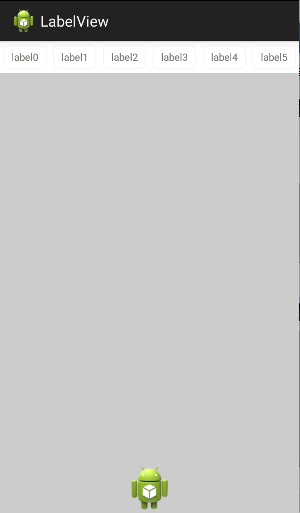 自訂標籤流式版面配置:單多行切換與單選互動實作
專案裡剛好需要這樣的標籤流式版面配置,做完就在這裡整理出來分享給大家。 效果預覽 要實現的功能 1、單行與多行之間切換顯示;2、單選與取消選擇。 完整源碼 /**
 Android 語音識別入門:RecognizerIntent 用法與注意事項
想給應用加一個「說話輸入」的入口,最省事的方式是直接調起系統自帶的語音識別。Android 中主要通過 RecognizerIntent 完成這件事,代碼量很少,但有几個
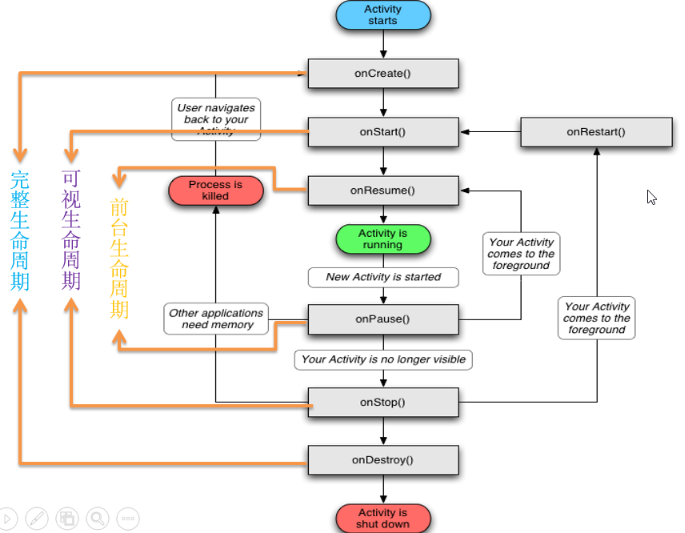 Activity 完全入門:創建、啟動、傳值與生命週期
一、Activity 是什麼 官方定義:Activity 是一個應用組件,用戶可與其提供的屏幕進行交互,以執行撥打電話、拍攝照片、發送電子郵件或查看地圖等操作。每個 A
 Android VectorDrawable 向量圖教學:路徑、填色與動畫
從位圖到向量圖 png、jpg 等位圖由像素組成,放大後容易失真。VectorDrawable 以點、線、路徑與填色描述圖形,可任意縮放而不影響清晰度,也能減少部分圖形資