

編輯:關於 Android 程式設計
從字面看,ImageButton 就是一個「圖片按鈕」,我們可以用它做出想要的圖形按鈕。但實踐中你會發現,它並不像想象中那樣一鍵即用——想實現「按下時換圖」的效果,還得多寫一點代碼或配置 XML。
ImageButton 還直接派生了 ZoomButton 組件。Android 默認提供了 btn_minus、btn_plus 兩個 Drawable 資源,只要為 ZoomButton 的 android:src 屬性分別指向這兩個系統資源,就能實現「放大」「縮小」按鈕。可以說 ZoomButton 只是默認用了系統的 src 資源,並額外添加了一些方法來支持放大縮小。
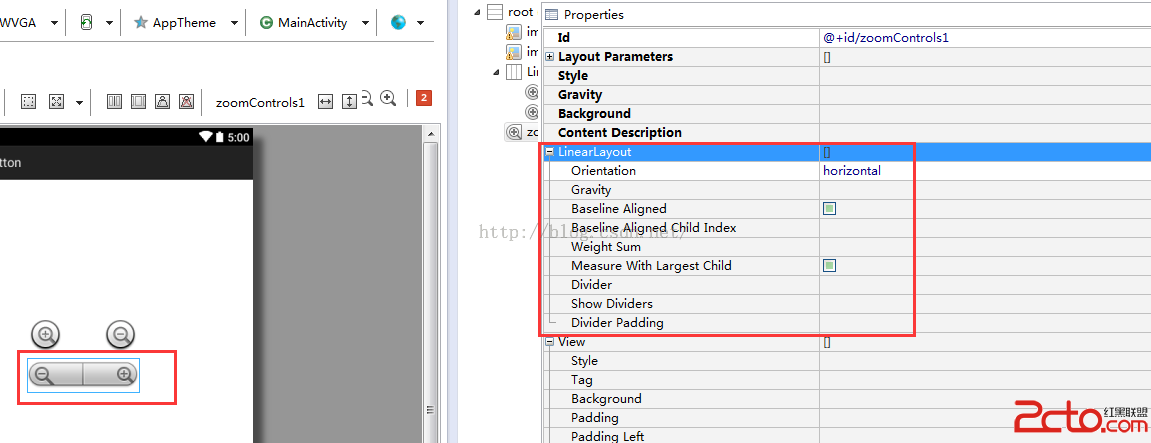
此外,Android 還提供了一個 ZoomControls 組件,它繼承自 LinearLayout,把「放大」「縮小」兩個按鈕水平線性地組合在一起,並允許分別為兩個按鈕綁定不同的事件監聽器。
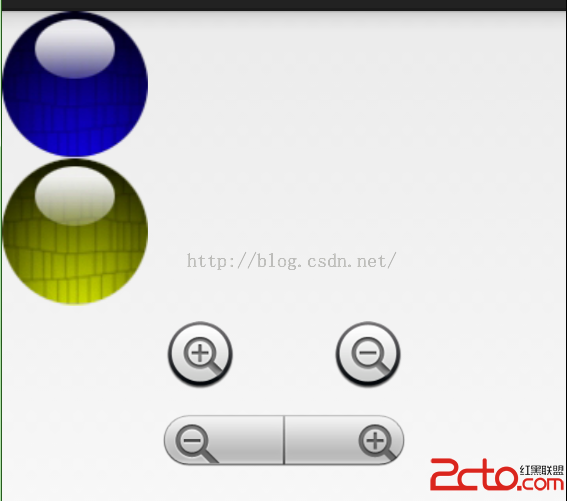
圖片按鈕正常狀態的效果:
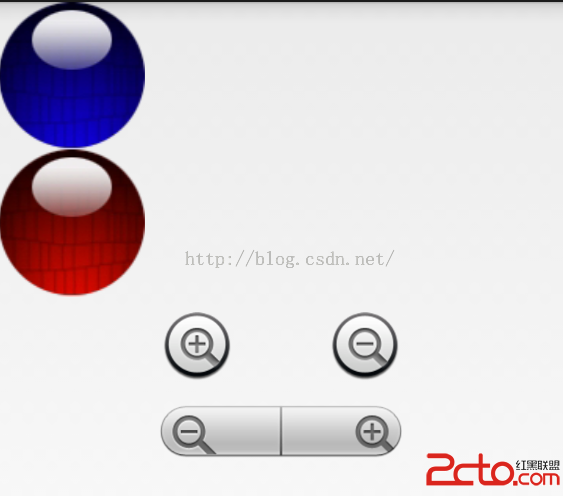
按鈕按下時的效果:
有兩種途徑:一是寫代碼,二是配置 XML。
一、在 Java 中為按鈕添加觸摸監聽,動態切換圖片
ImageButton btn = (ImageButton) findViewById(R.id.imageButton1);
btn.setOnTouchListener(new View.OnTouchListener() {
    @Override
    public boolean onTouch(View v, MotionEvent event) {
        if (event.getAction() == MotionEvent.ACTION_DOWN) {
            // 按下時換成另一張圖
            ((ImageButton) v).setImageDrawable(getResources().getDrawable(R.drawable.red));
        } else if (event.getAction() == MotionEvent.ACTION_UP) {
            // 抬起時恢復正常圖片
            ((ImageButton) v).setImageDrawable(getResources().getDrawable(R.drawable.purple));
        }
        return false;
    }
});
邏輯很直白:按下時替換背景圖片,抬起時再換回正常狀態。
二、通過 XML(selector)配置背景切換
新建一個 button_selector.xml,用 selector 標簽分別指定按下與鬆開時的圖片:
<selector xmlns:android="https://schemas.android.com/apk/res/android">
    <item android:state_pressed="true"
          android:drawable="@drawable/red" />
    <item android:drawable="@drawable/purple" />
</selector>
再在布局里把按鈕的 background 指向該 selector:
<ImageButton
    android:id="@+id/imageButton2"
    android:layout_width="wrap_content"
    android:layout_height="wrap_content"
    android:background="@drawable/button_selector" />
ZoomButton 與 ZoomControls 的用法則很簡單,直接在布局中引用即可:
<ZoomButton
    android:id="@+id/zoomButton1"
    android:layout_width="wrap_content"
    android:layout_height="wrap_content"
    android:src="@android:drawable/btn_plus" />

<ZoomButton
    android:id="@+id/zoomButton2"
    android:layout_width="wrap_content"
    android:layout_height="wrap_content"
    android:src="@android:drawable/btn_minus" />

<ZoomControls
    android:id="@+id/zoomControls1"
    android:layout_width="wrap_content"
    android:layout_height="wrap_content"
    android:layout_gravity="center_horizontal"
android:orientation="horizontal" />特別提醒:如果在 ImageButton 中用 XML(selector)來設置圖片效果,就不要再指定它的 android:src 屬性了,否則按下效果會失效。這兩種方法各有所長,實際開發中可根據需要靈活選用。
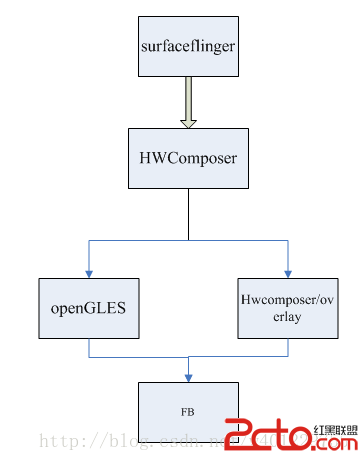 Android 4.4 Fence 機制分析:同步與緩衝區生命週期
為什麼需要 Fence在圖形系統中,生產者與消費者會反覆交換緩衝區。緩衝區的申請、填寫、排隊、顯示與釋放都需要同步機制,避免內容尚未準備完成就被讀取。Android 中的
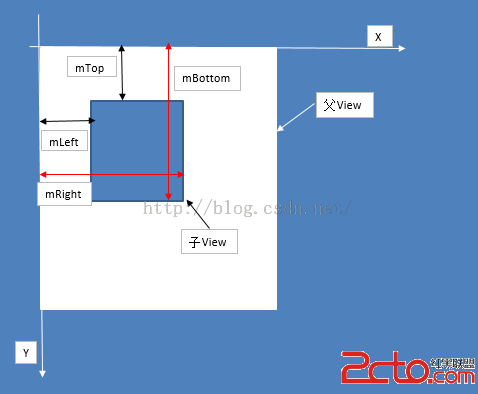 Android 自定義控件(二)——onLayout 詳解
先講個笑話:一個乞丐看程序員寫程式,程序員遇到一個怎麼都解決不了的問題,乞丐說「你少打了個分號」,程序員照做,問題果然解決了,於是問:「你怎麼知道?」乞丐笑笑說:「我以前
 Android 個人理財工具(四):添加賬單頁面(下)
本文把添加賬單介面的版面整理完成。動手前以為不會太難,實際做下去才發現排列版面配置的複雜程度甚至超過撰寫程式邏輯。上網搜尋時,這類版面的可用資料很少,官方範例用得最多的仍
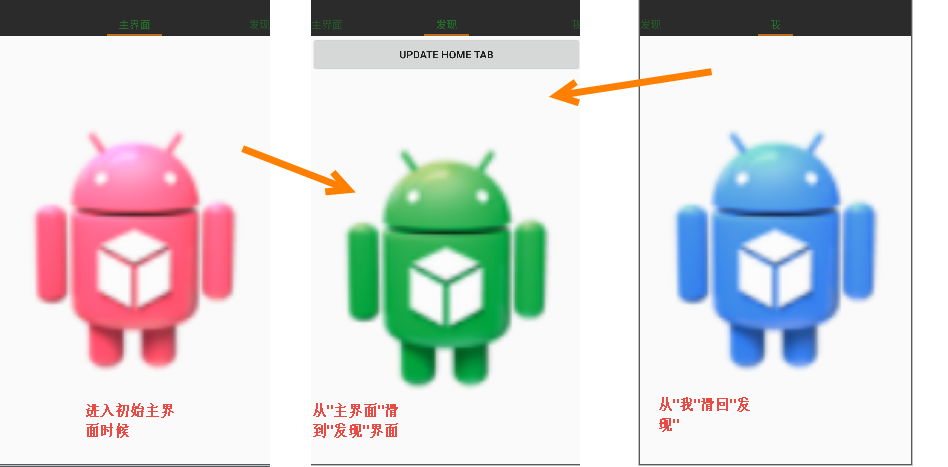 ViewPager 進階實戰(二):PagerAdapter 與 PagerTabStrip 的完整演練
引言 上一篇講了 ViewPager 與 PagerAdapter 的基本原理,但「光說不練空把式」——聽別人講時覺得都懂,自己從零寫一遍卻又處處卡住。所以建議初學者看完