

編輯:關於 Android 程式設計
WebView 好用但坑不少,以下把實作中反覆遇到的十五個問題與對應解法整理成清單。
WebView 預設背景是白色,放在深色頁面上特別突兀。在 2.X 時代,一般寫法是:
wvContent.setBackgroundColor(0);
但換到 4.0 上就失效了,背景照樣是白的。原因是 4.0 起預設開啟硬體加速,解法是針對這個 WebView 關掉硬體加速:
wvContent.setLayerType(View.LAYER_TYPE_SOFTWARE, null);
不過 setLayerType 是 API 11 才有的方法,minSdk 較低時編譯會過不去。這種情況改在布局檔中宣告即可:
android:layerType="software"
經實測,4.0 與 2.2 上都能正常運作,透明背景設定成功。
需要在 onDestroy() 中呼叫 webView.destroy()。但直接呼叫常常會看到這個錯誤:
E/webview(7502): java.lang.Throwable: Error: WebView.destroy() called while still attached!
    at android.webkit.WebViewClassic.destroy(WebViewClassic.java:4142)
    at android.webkit.WebView.destroy(WebView.java:707)
    at com.didi.taxi.ui.webview.OperatingWebViewActivity.onDestroy(OperatingWebViewActivity.java:236)
    ...
意思是 destroy 時 WebView 仍掛在 View 樹上。因為自訂 WebView 建構時傳入了 Activity 的 context,所以必須先從父容器摘掉再銷毀:
rootLayout.removeView(webView);
webView.destroy();
mWebView.getSettings().setSupportZoom(true);
mWebView.getSettings().setBuiltInZoomControls(true);
if (DeviceUtils.hasHoneycomb()) {
    mWebView.getSettings().setDisplayZoomControls(false);
}
其中 setDisplayZoomControls 是 API 11 才新增的,因此要做版本判斷。
覆寫 WebViewClient 的 onReceivedError(),用一個自訂 View 蓋在 WebView 上:
/** 顯示自訂錯誤頁:用一個 View 覆蓋 WebView */
protected void showErrorPage() {
    LinearLayout webParentView = (LinearLayout) mWebView.getParent();
    initErrorPage();
    while (webParentView.getChildCount() > 1) {
        webParentView.removeViewAt(0);
    }
    LinearLayout.LayoutParams lp = new LinearLayout.LayoutParams(
            LayoutParams.FILL_PARENT, LayoutParams.FILL_PARENT);
    webParentView.addView(mErrorView, 0, lp);
    mIsErrorPage = true;
}

protected void hideErrorPage() {
    LinearLayout webParentView = (LinearLayout) mWebView.getParent();
    mIsErrorPage = false;
    while (webParentView.getChildCount() > 1) {
        webParentView.removeViewAt(0);
    }
}

protected void initErrorPage() {
    if (mErrorView == null) {
        mErrorView = View.inflate(this, R.layout.online_error, null);
        Button button = (Button) mErrorView.findViewById(R.id.online_error_btn_retry);
        button.setOnClickListener(new OnClickListener() {
            public void onClick(View v) {
                mWebView.reload();
            }
        });
        mErrorView.setOnClickListener(null);
    }
}

@Override
public void onReceivedError(WebView view, int errorCode, String description, String failingUrl) {
    mErrorView.setVisibility(View.VISIBLE);
    super.onReceivedError(view, errorCode, description, failingUrl);
}
CookieSyncManager.createInstance(this);
CookieSyncManager.getInstance().startSync();
CookieManager.getInstance().removeSessionCookie();
但 CookieManager 已被標記為過時,官方文件也說明 WebView 現在會自行視需要同步 cookie,因此這段程式在新版本上多半不必再寫。
webView.clearCache(true);
webView.clearHistory();
m_webview.loadDataWithBaseURL(null, result, "text/html", "utf-8", null);
幾個方法的意義要先分清楚:getScrollY() 回傳目前可見區域頂端距頁面頂端的距離,也就是已捲動的距離;getHeight()/getBottom() 回傳的是 WebView 這個容器本身的高度;getContentHeight() 回傳 HTML 內容高度,但由於 WebView 有縮放,實際頁面高度還要乘上縮放比例。因此準確的判斷是:
if (webView.getContentHeight() * webView.getScale()
        == (webView.getHeight() + webView.getScrollY())) {
    // 已經在底部
}
WebView 攔不到頁面內的 fragment 跳轉。但若用 url 跳轉,又會觸發整頁刷新,H5 體驗就打了折扣。實務上只能透過注入 JS 來解決。
有些請求需要加上自訂 header,但 Ajax 這類非超連結請求沒辦法在 shouldOverrideUrlLoading 中攔下來再用 loadUrl(url, headers) 補上。目前採用的應急做法是:先在 url 中打上特殊標記,於 shouldInterceptRequest 攔到時把要加的參數以 query 形式拼上去。這個方法能攔下頁面中的所有資源請求,包含 JS、圖片與 Ajax。
@SuppressLint("NewApi")
@Override
public WebResourceResponse shouldInterceptRequest(WebView view, String url) {
    // 非超連結(如 Ajax)請求無法直接加 header,改拼到 url 後面,這裡以 imei 為例
    String ajaxUrl = url;
    // 標記:req=ajax
    if (url.contains("req=ajax")) {
        ajaxUrl += "&imei=" + imei;
    }
    return super.shouldInterceptRequest(view, ajaxUrl);
}
@Override
public void onLoadResource(WebView view, String url) {
    mEventListener.onWebViewEvent(CustomWebView.this,
            OnWebViewEventListener.EVENT_ON_LOAD_RESOURCE, url);
    if (url.indexOf(".jpg") > 0) {
        hideProgress(); // 開始載入圖片時就先把頁面顯示出來
        mEventListener.onWebViewEvent(CustomWebView.this,
                OnWebViewEventListener.EVENT_ON_HIDE_PROGRESS, view.getUrl());
    }
    super.onLoadResource(view, url);
}
長按 WebView 會跳出系統的複製選單,若不需要可以用空實作吃掉事件:
mWebView.setOnLongClickListener(new OnLongClickListener() {
    @Override
    public boolean onLongClick(View v) {
        return true;
    }
});
String temp = "<embed src=\"...\" height=\"90%\" scale=\"noscale\" "
        + "type=\"application/x-shockwave-flash\">";
web.loadDataWithBaseURL("null", temp, "text/html", "utf-8", "");
盡量不要在 onPageFinished() 裡寫業務邏輯,否則會重複觸發,甚至造成狀態錯亂。
給 WebView 掛上 WebChromeClient,在 onReceivedTitle() 中取用:
WebChromeClient webChromeClient = new WebChromeClient() {
    @Override
    public void onReceivedTitle(WebView view, String title) {
        super.onReceivedTitle(view, title);
        txtTitle.setText(title);
    }
};
但在部分機型(例如小米 3)上,透過 goBack() 回退時不會觸發 onReceivedTitle,標題會停留在上一個子頁面的文字。處理方式分兩種:
其一,若確定只有一層二級頁面,只要判斷是否為起始頁,能 goBack 時把標題設回預設值即可。
其二,若存在多層頁面或日後可能擴充,就得自己維護一份 url 堆疊與 url 到 title 的對應:用一個 List 記錄已載入的 url,一個 Map 存 url 與 title 的對應關係。正常載入時寫入,回退時移掉目前 url、取出目標 url 並套用對應標題。另外要注意,載入失敗(例如無網路)時,onReceivedTitle 拿到的會是「找不到該網頁」這類系統文案,因此觸發 onReceivedError 時不要採用這個 title。
這個 API 可能被惡意 JS 利用進行注入攻擊,在已取得 root 權限的裝置上尤其危險,攻擊者有機會藉此安裝或卸載應用。可行的替代方案是改用 onJsPrompt() 建構 JS 與原生之間的橋梁,並搭配非同步回呼,能相應地補強注入面的風險。相關實作可參考開源專案 https://github.com/pedant/safe-java-js-webview-bridge 。
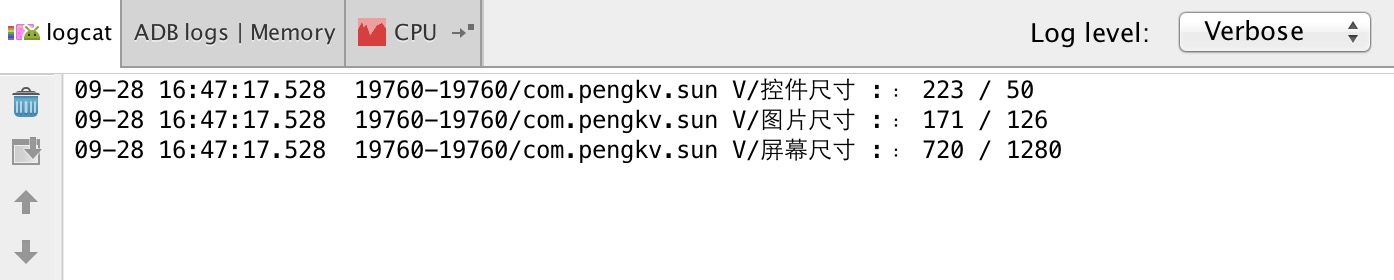 Android 開發速查:如何正確取得控件、圖片與螢幕尺寸
在 Android 開發中,取得各類尺寸是非常基礎卻又常用的操作。本文整理了三種最常見的情境:取得控件的長寬、取得圖片資源的固有尺寸,以及取得整個螢幕的解析度。 程式碼
 Fragment 入門談:Android 的創建與生命週期全解析
Fragment 是 Activity 介面中的一部分或一種行為。你可以把多個 Fragment 組合成一個 Activity 來打造多面板介面,也能在不同 Activi
 浮窗開發之窗口層級:浮窗為何能「浮」起來
最近項目裡遇到一個需求:要在其他應用的特定界面之上懸浮自己的 UI 交互(拖動、輸入等複雜操作),效果類似九游的浮窗,只是我們的體驗更好,越過了很多授權限制。 很多
 Android 照片色彩調整:用 ColorMatrix 做即時調色
要讓使用者即時調整照片的紅、綠、藍與整體飽和度,最直覺的做法是四個 SeekBar 搭配 ColorMatrix。 activity_main.xml <Lin