

編輯:關於 Android 程式設計
在佈局優化上,Android 官方特別推薦了 include、merge、ViewStub 這三種標籤,各自解決不同的問題。下面逐一說明它們的優勢與使用方式。
include 標籤能重用佈局檔,最簡單的寫法如下:
<LinearLayout android:background="@color/app_bg"
    android:gravity="center_horizontal"
    android:layout_height="match_parent"
    android:layout_width="match_parent"
    android:orientation="vertical"
    xmlns:android="https://schemas.android.com/apk/res/android">
    <include layout="@layout/titlebar" />
    <TextView android:layout_height="wrap_content"
        android:layout_width="match_parent"
        android:padding="10dp"
        android:text="@string/hello" />
</LinearLayout>
使用要點:
merge 標籤在優化 UI 結構時非常關鍵,它能刪減多餘的層級。當你的父佈局與被引入佈局方向一致時,被引入的 LinearLayout 就成了多餘的一層,這時用 merge 就能把它消除,提升渲染效能。
<merge xmlns:android="https://schemas.android.com/apk/res/android">
    <Button android:layout_height="wrap_content"
        android:layout_width="fill_parent"
        android:text="@string/add" />
    <Button android:layout_height="wrap_content"
        android:layout_width="fill_parent"
        android:text="@string/delete" />
</merge>
當你以 include 引入這份佈局時,系統會忽略 merge 節點,直接把兩個 Button 加入父容器。
ViewStub 最大的優勢是「用到才加載」,不影響初始化時的效能,特別適合進度條、錯誤提示等不常用到的佈局。它是一個不可見、大小為 0 的 View:
<ViewStub android:id="@+id/stub_import"
    android:inflatedId="@+id/panel_import"
    android:layout="@layout/progress_overlay"
    android:layout_gravity="bottom"
    android:layout_height="wrap_content"
    android:layout_width="fill_parent" />
想加載時,可用以下任一方式:
((ViewStub) findViewById(R.id.stub_import)).setVisibility(View.VISIBLE);
// 或
View importPanel = ((ViewStub) findViewById(R.id.stub_import)).inflate();
調用 inflate() 後,ViewStub 會被引用資源取代並回傳該 view,省去再次 findViewById 的麻煩。
最後提醒:ViewStub 目前仍不支援在自身內部使用 merge 標籤。
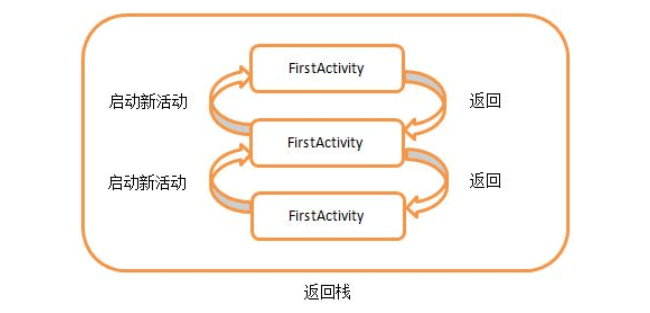 一次搞懂 Activity 的四種啟動模式
Activity 的啟動模式(launchMode)決定了「同一個頁面被開啟多次時,系統會建立新實例,還是重用舊的」。Android 一共提供四種模式:standard、
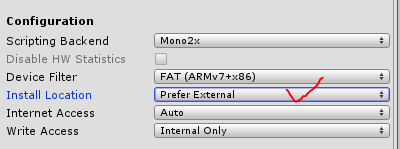 Unity3D 導出的 APK 在手機上安裝失敗怎麼辦
最近遇到一個狀況:用 Unity3D 導出的 Apk 起初能正常裝到手機上,但在電腦的模擬器上跑過幾次之後,同樣的檔案再往手機裝就一直失敗。 最後是在 Player S
 Android Service 在新進程中啟動的完整流程剖析
一、從 startService 說起 在〈Android 系統匿名共享內存(Anonymous Shared Memory)Java 調用接口分析〉一文中,Client
 使用 Android Studio 建立第一個 Hello World App
建立第一個 Android 專案 幾乎所有程式語言的第一個範例都是 Hello World,Android 也不例外。使用 Android Studio 建立新專案後,輸