

編輯:關於 Android 程式設計
關於資源下載與增量更新這類需求,最常見的實作就是打包成 Zip 丟到伺服器,用戶端下載後解壓覆蓋。這個流程牽涉下載進度回報、暫存檔管理、串流解壓與狀態回呼,每次重寫都很花時間,因此值得抽成一個獨立的幫助類。
下載的關鍵是不要整包讀進記憶體,而是用固定大小的 buffer 邊讀邊寫。進度則用「已下載百分比是否比上次回報值多 1%」來節流,避免每讀一個 byte 就發一次訊息把 UI 拖垮。
private void download(String down_url, File output, File tmpDir) {
    InputStream inputStream = null;
    OutputStream outputStream = null;
    File tmp = null;
    int down_step = 1;      // 進度提示間隔(1%)
    int totalSize = 0;
    int downloadCount = 0;  // 已下載大小
    int updateCount = 0;    // 已回報的進度
    try {
        tmp = File.createTempFile("download", ".tmp", tmpDir);
        URL url = new URL(down_url);
        HttpURLConnection conn = (HttpURLConnection) url.openConnection();
        conn.setConnectTimeout(30 * 1000);
        conn.setReadTimeout(30 * 1000);

        totalSize = conn.getContentLength();
        inputStream = conn.getInputStream();
        outputStream = new BufferedOutputStream(new FileOutputStream(tmp));

        byte[] buffer = new byte[BUFFER_SIZE];
        int readsize = 0;
        while ((readsize = inputStream.read(buffer)) != -1) {
            outputStream.write(buffer, 0, readsize);
            downloadCount += readsize;
            // 每增長 1% 才回報一次
            if (updateCount == 0
                    || (downloadCount * 100 / totalSize - down_step) >= updateCount) {
                updateCount += down_step;
                sendMessage(DOWN_UPDATA, updateCount);
            }
        }
        if (conn != null) conn.disconnect();
        tmp.renameTo(output);
        tmp = null;
    } catch (IOException e) {
        sendMessage(DOWN_ERROR, 0);
        throw new RuntimeException(e);
    } finally {
        // 清理暫存檔與串流
        if (tmp != null) tmp.delete();
        closeQuietly(inputStream);
        closeQuietly(outputStream);
        sendMessage(DOWN_FINISH, 0);
    }
}
寫到暫存檔再 renameTo() 是一個重要設計:如果下載中途斷網或程序被殺,目標檔案不會留著半包的殘缺內容。另外別忘了 totalSize 為 0 時(伺服器沒回 Content-Length)要做除零防護。
public Boolean unzip() {
    FileInputStream fin = null;
    ZipInputStream zin = null;
    OutputStream fout = null;
    File outputDir = new File(_location);
    File tmp = null;
    try {
        fin = new FileInputStream(_zipFile);
        zin = new ZipInputStream(fin);
        ZipEntry ze = null;
        while ((ze = zin.getNextEntry()) != null) {
            if (ze.isDirectory()) {
                dirChecker(ze.getName());
            } else {
                tmp = File.createTempFile("decomp", ".tmp", outputDir);
                fout = new BufferedOutputStream(new FileOutputStream(tmp));
                copyStream(zin, fout, _buffer, BUFFER_SIZE);
                zin.closeEntry();
                fout.close();
                fout = null;
                tmp.renameTo(new File(_location + ze.getName()));
                tmp = null;
            }
        }
        zin.close();
        zin = null;
    } catch (IOException e) {
        throw new RuntimeException(e);
    } finally {
        if (tmp != null) tmp.delete();
        closeQuietly(fout);
        closeQuietly(zin);
        closeQuietly(fin);
    }
    return true;
}

private void copyStream(InputStream is, OutputStream os,
                        byte[] buffer, int bufferSize) throws IOException {
    for (;;) {
        int count = is.read(buffer, 0, bufferSize);
        if (count == -1) break;
        os.write(buffer, 0, count);
    }
}下載與解壓都在子執行緒跑,UI 更新必須切回主執行緒,因此內部用 Handler 轉發訊息,對外則暴露一個 listener 介面,把「下載開始/進行中/完成/失敗」與「解壓開始/完成/失敗」七個節點交給呼叫方處理。
public interface OnZipDownLoadAndUnpackListener {
    void onDownLoadStart();
    void onDownLoading(int factor);
    void onDownLoadError();
    void onDownLoadFinish();
    void onZipUnpackStart();
    void onZipUnpackError();
    void onZipUnpackFinish();
}
啟動方式很簡單,一行帶過:
helper.setOnZipDownLoadAndUnpackListener(listener);
helper.startDownLoadAndZip("https://example.com/resource.zip");原始程式碼作者自己說了「沒有認真檢查,可能有 bug,使用的伙伴請自己 debug」。這倒是實話,正式使用前建議補上幾處防禦:totalSize 為 0 的除零保護、Zip 內檔案名稱的 ../ 路徑穿越檢查(Zip Slip)、下載檔案的雜湊校驗,以及 destroyThread() 中 Thread.stop() 已被標記為不建議使用,改用中斷旗標會更安全。這些補完之後,這個幫助類就能穩定地用在更新機制上了。
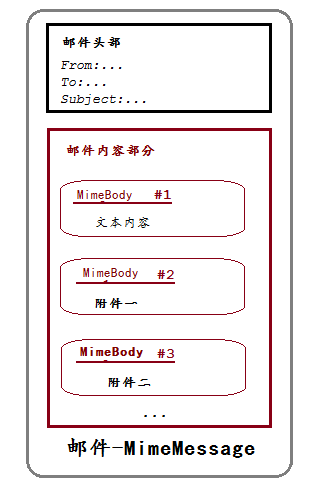 Android 寄送帶附件郵件:以 JavaMail 走 SMTP 的完整封裝
本文示範如何以 JavaMail 在 Android 上寄出帶附件的郵件,並附上一個可直接呼叫的封裝類別。 兩種實作路線 第一種:呼叫 Gmail 客戶端。好處是幾乎不
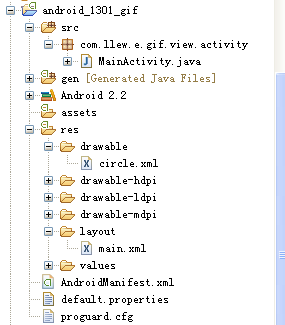 用 ImageView 搭配 AnimationDrawable 打造 ProgressBar 旋轉效果
ProgressBar 大家都不陌生,XML 裡一引用、加幾個屬性就能跑。但每個 App 都有自己的視覺調性,直接用系統預設那張轉圈圖,總覺得和整體風格不搭。 自定義 P
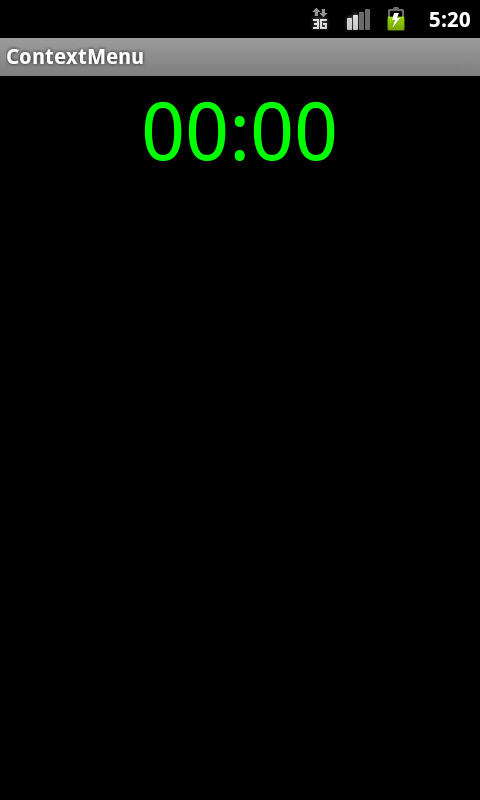 Android 簡單計時器實作:Chronometer 與上下文選單的搭配
計時器是許多應用中都會用到的功能。Android 提供了 Chronometer 這個現成的計時元件,再搭配上下文選單(ContextMenu),就能輕鬆做出一個具備開始
 在 Eclipse 中關聯 Android 專案的源碼路徑
在 Eclipse 開發 Android 時,若按住 F3 想跳進 android.jar 看實作,會發現只看到空的類別骨架,因為 SDK 附的是二進位檔。要讓 IDE