

編輯:關於 Android 程式設計
本文以 Android 5.0 為例,剖析系統字體配置文件的結構,以及 Typeface 是如何解析它的。
先來看 5.0 中 familyset version="22" 的格式片段:
<familyset version="22">
    <family name="sans-serif">
        <font weight="100">Roboto-Thin.ttf</font>
        <font weight="100">Roboto-ThinItalic.ttf</font>
        <font weight="300">Roboto-Light.ttf</font>
        <font weight="300">Roboto-LightItalic.ttf</font>
        <font weight="400">Roboto-Regular.ttf</font>
        <font weight="400">Roboto-Italic.ttf</font>
        <font weight="500">Roboto-Medium.ttf</font>
        <font weight="500">Roboto-MediumItalic.ttf</font>
        <font weight="900">Roboto-Black.ttf</font>
        <font weight="900">Roboto-BlackItalic.ttf</font>
        <font weight="700">Roboto-Bold.ttf</font>
        <font weight="700">Roboto-BoldItalic.ttf</font>
    </family>
    <!-- 別名必須放在其引用的字體之後 -->
</familyset>
可見每個 family 通過 name 標識字體族,內部多個 font 用 weight 描述字重、style 描述是否斜體,標籤內容則是 ttf 文件的路徑。
該文件存放於設備的 /system/etc/system_fonts.xml,解析工作由 Typeface 的靜態代碼完成。先了解兩個關鍵數據結構:
public static class Font {
    public String fontName;  // Font 文件所在路徑
    public int weight;       // 字體粗細(5.0 新增)
    public boolean isItalic; // 是否斜體
}

public static class Family {
    public String name;          // 對應 family 的名字,如 sans-serif
    public List<Font> fonts;     // 屬於該 family 的字體集合
    public String lang;          // 語言屬性
    public String variant;
}
初始化的入口如下,核心是打開配置文件後交給 FontListParser.parse 處理:
private static void init() {
    File systemFontConfigLocation = getSystemFontConfigLocation();
    File configFilename = new File(systemFontConfigLocation, FONTS_CONFIG);
    try {
        FileInputStream fontsIn = new FileInputStream(configFilename);
        FontListParser.Config fontConfig = FontListParser.parse(fontsIn);
        // ...
    } catch (RuntimeException e) {
        // ...
    }
}
/* 解析 fallback 列表(無名字) */
public static Config parse(InputStream in) throws XmlPullParserException, IOException {
    try {
        XmlPullParser parser = Xml.newPullParser();
        parser.setInput(in, null);
        parser.nextTag();
        return readFamilies(parser);
    } finally {
        in.close();
    }
}
parse 用輸入流構建了一個 XmlPullParser 解析器後,就把工作轉交給 readFamilies:
private static Config readFamilies(XmlPullParser parser) throws XmlPullParserException, IOException {
    Config config = new Config(); // 所有解析結果都存到這裡
    parser.require(XmlPullParser.START_TAG, null, "familyset");
    while (parser.next() != XmlPullParser.END_TAG) {
        if (parser.getEventType() != XmlPullParser.START_TAG) continue;
        // 只處理 family 與 alias 兩種標籤,其餘忽略
        if (parser.getName().equals("family")) {
            config.families.add(readFamily(parser));
        } else if (parser.getName().equals("alias")) {
            config.aliases.add(readAlias(parser));
        } else {
            skip(parser);
        }
    }
    return config;
}
由此可見,readFamilies 只針對 family 與 alias 標籤進行解析,其他內容一律跳過,最終結果都匯聚到 Config 對象中。
對 family 標籤的解析由 readFamily 完成,它會讀取 name、lang、variant 三個屬性,再循環讀取子 font 標籤的 weight、style 與文件路徑:
private static Family readFamily(XmlPullParser parser) throws XmlPullParserException, IOException {
    String name = parser.getAttributeValue(null, "name");
    String lang = parser.getAttributeValue(null, "lang");
    String variant = parser.getAttributeValue(null, "variant");

    List<Font> fonts = new ArrayList<Font>();
    while (parser.next() != XmlPullParser.END_TAG) {
        if (parser.getEventType() != XmlPullParser.START_TAG) continue;
        String tag = parser.getName();
        if (tag.equals("font")) {
            String weightStr = parser.getAttributeValue(null, "weight");
            // weight 缺省時默認為 400
            int weight = weightStr == null ? 400 : Integer.parseInt(weightStr);
            boolean isItalic = "italic".equals(parser.getAttributeValue(null, "style"));
            String filename = parser.nextText();
            String fullFilename = "/system/fonts/" + filename;
            fonts.add(new Font(fullFilename, weight, isItalic));
        } else {
            skip(parser);
        }
    }
    return new Family(name, fonts, lang, variant);
}
而 alias 標籤的作用是給已知的 family 起別名(只能引用在它之前出現的 family),解析相對簡單:
private static Alias readAlias(XmlPullParser parser) throws XmlPullParserException, IOException {
    Alias alias = new Alias();
    alias.name = parser.getAttributeValue(null, "name");
    alias.toName = parser.getAttributeValue(null, "to");
    String weightStr = parser.getAttributeValue(null, "weight");
    alias.weight = weightStr == null ? 400 : Integer.parseInt(weightStr);
    skip(parser); // alias 為空標籤,跳過內容並消耗結束標籤
    return alias;
}
至此,整個 system_fonts.xml 的解析流程就走完了:從打開文件,到用 XmlPullParser 逐個遞歸讀取 family 與 alias,最終把字體族、字重、斜體標記等資訊組織成內存中的數據結構,供後續字體查找與加載使用。
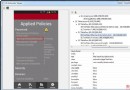 Android UI 自動化測試:UiObject.getFromParent() 的實用技巧
在 Android UI 自動化測試中,經常需要從畫面中取得特定欄位的值。當目標文字與數值位於同一列或同一層級時,UiObject.getFromParent() 就能派
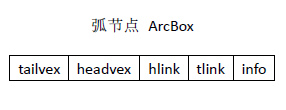 有向圖的十字鏈結串列:建圖、增刪弧與雙向遍歷輸出
本文討論有向圖的十字鏈結串列(Orthogonal List)表示法,涵蓋建圖、新增弧、刪除弧,以及以鄰接表格式輸出圖形(分為兩種視角:同尾弧串成的鏈、同頭弧串成的鏈),
 Android 自定義輸入框:圖示、標籤與輸入欄位一次完成
在 Android 介面中,表單輸入框常需要搭配圖示、標籤、提示文字與不同輸入類型。若每個畫面都重複撰寫 ImageView、TextView 與 EditText 的組
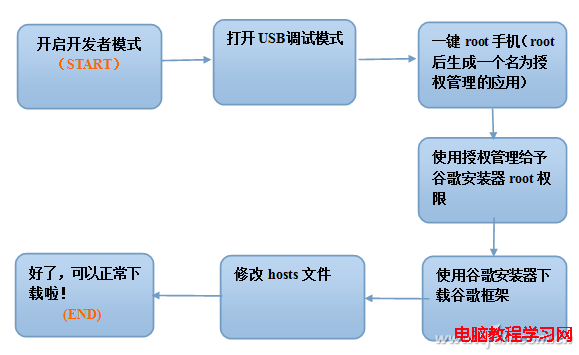 不刷機也能用Google Play?國行手機安裝谷歌服務框架教學
國行手機若缺少Google服務框架,可不用刷機也能安裝Google Play。先Root手機,安裝谷歌安裝器取得服務框架,再登入Google帳號。 若下載出現403錯誤,