

編輯:關於 Android 程式設計
專案中需要對外部儲存裝置的狀態變化做反應,例如 SD 卡被移除時要停止寫入、USB 大容量儲存模式切換時要暫停讀檔。整理成筆記以備後查。
Android 在外部儲存狀態改變時,會發送一系列 Intent.ACTION_MEDIA_* 廣播:
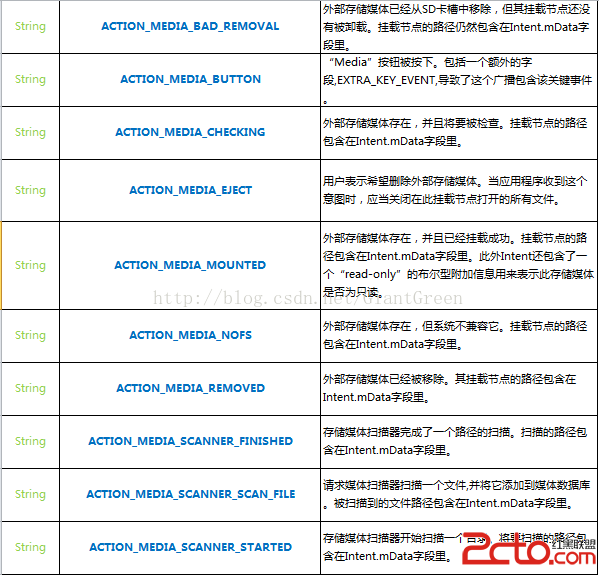
主要的幾個 action:
ACTION_MEDIA_MOUNTED:裝置已掛載並可讀寫。
ACTION_MEDIA_UNMOUNTED:裝置已卸載,但仍實體存在。
ACTION_MEDIA_REMOVED:裝置已被移除。
ACTION_MEDIA_SHARED:裝置透過 USB 分享給 PC,此時 App 無法存取。
ACTION_MEDIA_BAD_REMOVAL:裝置被非正常移除(例如未卸載就拔卡)。
ACTION_MEDIA_SCANNER_STARTED / FINISHED:媒體掃描開始與結束。
ACTION_MEDIA_CHECKING:正在檢查檔案系統。
ACTION_MEDIA_EJECT:裝置即將被退出。
ACTION_MEDIA_NOFS:檔案系統無法識別。
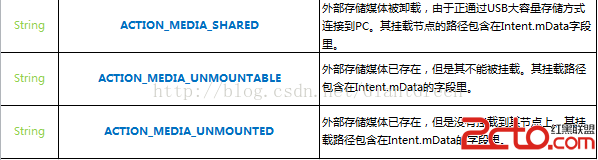
實測下來,各個情境觸發的 action 組合並不相同:
1. 正常掛載時:

2. 移除外部 SD 卡時:

3. 連接 PC 進入 USB 大容量儲存模式時:

4. 連接 PC 退出 USB 大容量儲存模式時:
可以注意到,進入 USB 分享模式的關鍵訊號是 ACTION_MEDIA_SHARED——收到它時,就代表 SD 卡被系統交給 PC 了,App 這邊任何讀寫都會失敗,必須先停下來。
public void startListen() {
    IntentFilter intentFilter = new IntentFilter(Intent.ACTION_MEDIA_MOUNTED);
    intentFilter.setPriority(1000);
    intentFilter.addAction(Intent.ACTION_MEDIA_UNMOUNTED);
    intentFilter.addAction(Intent.ACTION_MEDIA_REMOVED);
    intentFilter.addAction(Intent.ACTION_MEDIA_SHARED);
    intentFilter.addAction(Intent.ACTION_MEDIA_BAD_REMOVAL);
    intentFilter.addAction(Intent.ACTION_MEDIA_SCANNER_STARTED);
    intentFilter.addAction(Intent.ACTION_MEDIA_SCANNER_FINISHED);
    intentFilter.addAction(Intent.ACTION_MEDIA_CHECKING);
    intentFilter.addAction(Intent.ACTION_MEDIA_EJECT);
    intentFilter.addAction(Intent.ACTION_MEDIA_NOFS);
    intentFilter.addAction(Intent.ACTION_MEDIA_BUTTON);
    intentFilter.addAction(Intent.ACTION_MEDIA_SCANNER_SCAN_FILE);
    intentFilter.addDataScheme("file");
    registerReceiver(broadcastRec, intentFilter);
}

private final BroadcastReceiver broadcastRec = new BroadcastReceiver() {
    @Override
    public void onReceive(Context context, Intent intent) {
        String action = intent.getAction();
        Log.d("MediaAction", action);

        if (action.equals(Intent.ACTION_MEDIA_MOUNTED)) {
            // 裝置就緒,可以開始讀寫
        } else if (action.equals(Intent.ACTION_MEDIA_UNMOUNTED)) {
            // 已卸載,停止操作並釋放檔案句柄
        } else if (action.equals(Intent.ACTION_MEDIA_SHARED)) {
            // 被 PC 佔用,必須暫停所有 IO
        } else if (action.equals(Intent.ACTION_MEDIA_BAD_REMOVAL)) {
            // 非正常移除,資料可能損毀
        } else if (action.equals(Intent.ACTION_MEDIA_SCANNER_STARTED)) {
            // 媒體掃描中
        } else if (action.equals(Intent.ACTION_MEDIA_SCANNER_FINISHED)) {
            // 掃描完成,可重新整理檔案清單
        }
    }
};
dataScheme 是必須的。這些 MEDIA 廣播都帶有 file:// 形式的 Uri,如果在 IntentFilter 中沒有加上 addDataScheme("file"),filter 就無法匹配,Receiver 永遠收不到通知。這是很容易漏掉的一步。
記得反註冊。用程式碼註冊的 Receiver 必須在 onDestroy 中呼叫 unregisterReceiver(),否則會造成記憶體洩漏。另外,靜態註冊(在 Manifest 中宣告)從 Android 8.0 起對這類隱含廣播已大幅受限,因此程式碼註冊配合生命週期管理,是相容性最好的做法。
 自定義支持下拉刷新與上拉加載的 ListView
在 Android 開發中,RecyclerView 越來越常見,但 ListView 依然是理解列表控件、觸摸事件與視圖復用的重要基礎。本文分享一個簡單封裝的 List
 Android 自製 IphoneTreeView:為 ExpandableListView 加上懸浮分組指示器
早前我曾經實作過一次類似的效果,但那個版本在細節處理上相當粗糙。這一回,我參考了系統聯絡人中的 PinnedHeaderListView,並綜合社群裡各方公開的程式碼,重
 Android 資料儲存入門:SharedPreferences 用法全解
對一個完整的應用程式而言,資料儲存是基本配備。Android 提供四種主要方式:SharedPreferences、File、SQLite 與 ContentProvid
 深入剖析 Android Service 的綁定全流程
在我們日常的 Android 開發中,只要涉及 Service 的雙向通信,就離不開「綁定」這個動作。唯有當 Service 處於已綁定狀態時,客戶端才能拿到一個 Bin