

編輯:關於 Android 程式設計
有別於 SAX 和 PULL 兩種解析方式,DOM 解析會先把整個 XML 檔案全部載入記憶體,再組裝成一棵 DOM 樹,然後透過節點以及節點之間的關聯關係來解析 XML 檔案。這種方式的缺點是佔用記憶體較大,因此一般比較推薦使用 SAX 或 PULL。下面我們沿用同一個範例來做分析。
首先自訂一個 XML 檔案:Student.xml,注意這裡是新建 file 而不是 xml。
接著新建一個 Student 類別張三 男 18李四 女 19王五 男 20
package com.example.xml_sax_demo_1; public class Student { private int id; private String name; private int age; private String sex; public Student() { // TODO Auto-generated constructor stub } public int getId() { return id; } public Student(int id, String name, int age) { super(); this.id = id; this.name = name; this.age = age; } public void setId(int id) { this.id = id; } public String getName() { return name; } public void setName(String name) { this.name = name; } public int getAge() { return age; } public void setAge(int age) { this.age = age; } public String getSex() { return sex; } public void setSex(String sex) { this.sex = sex; } @Override public String toString() { return "Student [id=" + id + ", name=" + name + ",sex=" + sex + ", age=" + age + "]"; } }最後在 Activity 裡透過一個 Button 來觸發解析,過程中會用到幾個關鍵類別。
package com.example.xml_sax_demo_1; import java.io.InputStream; import java.util.ArrayList; import java.util.List; import javax.xml.parsers.DocumentBuilder; import javax.xml.parsers.DocumentBuilderFactory; import org.w3c.dom.Document; //注意使用的包都是org.w3c.dom.*的 import org.w3c.dom.Element; import org.w3c.dom.Node; import org.w3c.dom.NodeList; import android.os.Bundle; import android.support.v7.app.ActionBarActivity; import android.view.View; import android.view.View.OnClickListener; import android.widget.Button; public class MainActivity extends ActionBarActivity { @Override protected void onCreate(Bundle savedInstanceState) { super.onCreate(savedInstanceState); setContentView(R.layout.activity_main); Button button = (Button) findViewById(R.id.button); button.setOnClickListener(new OnClickListener() { @Override public void onClick(View arg0) { // TODO Auto-generated method stub try { readXML(); } catch (Exception e) { // TODO Auto-generated catch block e.printStackTrace(); } } }); } private void readXML() throws Exception { List list = new ArrayList(); InputStream stream = this.getClass().getClassLoader() .getResourceAsStream("Student.xml"); // 獲得輸入流 DocumentBuilderFactory factory = DocumentBuilderFactory.newInstance(); //一步步下去 DocumentBuilder builder = factory.newDocumentBuilder(); Document document = builder.parse(stream); Element element = document.getDocumentElement(); //實例化元素 NodeList nodeList = element.getElementsByTagName("student"); //獲得節點名為student的節點列表 for (int i = 0; i < nodeList.getLength(); i++) { Element studentElement = (Element) nodeList.item(i); //對應上面取得的列表 Student student = new Student(); //每個節點實例化一個student元素 student.setId(Integer.parseInt(studentElement.getAttribute("id"))); //取得屬性 NodeList childNodeList = studentElement.getChildNodes(); //取得子節點列表 for (int j = 0; j < childNodeList.getLength(); j++) { // if (childNodeList.item(j).getNodeType() == Node.ELEMENT_NODE) // { if (childNodeList.item(j).getNodeName().equals("name")) { //如果子節點名為name student.setName(childNodeList.item(j).getFirstChild() //將文本數據存儲起來 .getNodeValue()); } else if (childNodeList.item(j).getNodeName().equals("sex")) { student.setSex(childNodeList.item(j).getFirstChild() .getNodeValue()); } else if (childNodeList.item(j).getNodeName().equals("age")) { student.setAge(Integer.parseInt(childNodeList.item(j) .getFirstChild().getNodeValue())); } // } } list.add(student); //在列表中添加一個student對象 } for (Student stu : list) { System.out.println(stu.toString()); } } } 執行結果
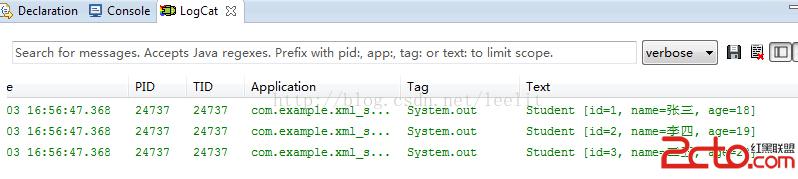
小結:從程式碼不難看出,DOM 解析是把整個 XML 檔案全部載入,組裝成一棵 DOM 樹,再透過節點及其相互關係來解析 XML。整個過程通常是不斷地迴圈遍歷,因此記憶體佔用相對較大,這也是它在大型檔案場景下不太受青睞的原因。
 Activity 跳轉動畫:從介面某位置「裂開拉伸」的炫酷過場
需求:Activity(或 Fragment)跳轉時,當前界面從某個位置裂開,上下各自拉出手機螢幕,之後跳轉到目標 Activity。整體效果如下圖。 思路: 1、在
 React Native TextInput 元件的基本用法
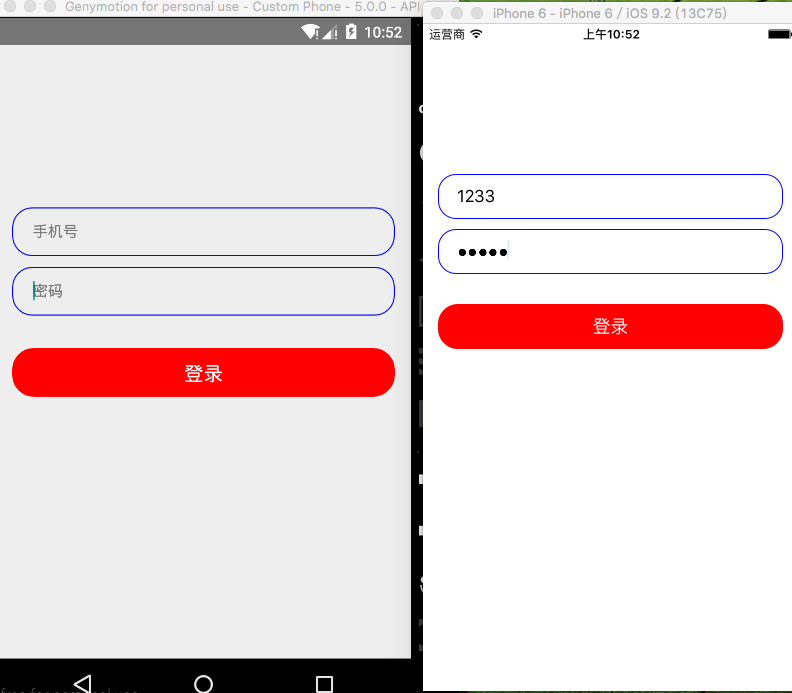
TextInput 是 React Native 中最重要的輸入元件之一,常用於帳號、密碼、搜尋與表單填寫。它可以同時適配 Android 與 iOS,並透過樣式表調整外
 安卓 7.0 長什麼樣?Android N 早期截圖重點
Android N 尚未正式發表前,國外開發者曾在 Android 開發者博客發現兩張新系統截圖。 截圖顯示新系統可能重新啟用日夜主題模式。這個功能曾在 Android
 Android 透過 Notification 與 NotificationManager 實作訊息通知
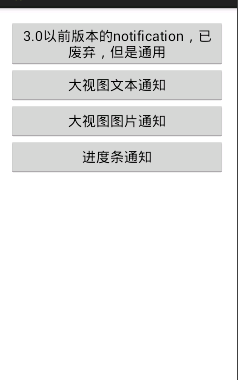
Notification 是一種讓你的應用程式在後台運行或未被開啟時,仍能提醒使用者有事件需要注意的機制。對於那些看不見的程式元件(BroadcastReceiver、S