

編輯:關於 Android 程式設計
命令模式(Command Pattern):將請求封裝成物件,以便使用不同的請求、佇列或日誌來參數化其他物件。命令模式也可以用來支援撤銷操作。
以下以「遙控器控制電燈與車庫門」為例,說明命令模式的實作步驟。
每個類都有特定的方法,例如 Light 有 on()/off(),GarageDoor 有 up()/down()/stop()/lightOn()/lightOff()。
public class Light {
    public Light() {}
    public void on() { System.out.println("Light is on"); }
    public void off() { System.out.println("Light is off"); }
}
public class GarageDoor {
    public GarageDoor() {}
    public void up() { System.out.println("Garage Door is Open"); }
    public void down() { System.out.println("Garage Door is Closed"); }
    public void stop() { System.out.println("Garage Door is Stopped"); }
    public void lightOn() { System.out.println("Garage light is on"); }
    public void lightOff() { System.out.println("Garage light is off"); }
}
提供所有命令的統一介面,具體命令繼承它並實作方法:
public interface Command {
    public void execute();
}
把具體類的方法封裝進命令介面:
public class LightOnCommand implements Command {
    Light light;
    public LightOnCommand(Light light) { this.light = light; }
    @Override public void execute() { light.on(); }
}
public class GarageDoorOpenCommand implements Command {
    GarageDoor garageDoor;
    public GarageDoorOpenCommand(GarageDoor garageDoor) { this.garageDoor = garageDoor; }
    @Override public void execute() { garageDoor.up(); }
}
public class SimpleRemoteControl {
    Command slot;
    public SimpleRemoteControl() {}
    public void setCommand(Command command) { this.slot = command; }
    public void buttonWasPressed() { slot.execute(); }
}
建立具體類與具體命令,把命令傳入接收者,執行統一動作:
public class RemoteControlTest {
    public static void main(String[] args) {
        SimpleRemoteControl remote = new SimpleRemoteControl();
        Light light = new Light();
        GarageDoor garageDoor = new GarageDoor();
        LightOnCommand lightOn = new LightOnCommand(light);
        GarageDoorOpenCommand garageOpen = new GarageDoorOpenCommand(garageDoor);
        remote.setCommand(lightOn);
        remote.buttonWasPressed();
        remote.setCommand(garageOpen);
        remote.buttonWasPressed();
    }
}
輸出結果:
Light is on
Garage Door is Open

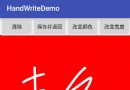 Android 自定義 View:手寫簽名板實作
概述 本文透過自定義 View 實現一個 Android 手寫簽名板,支持透明背景、貝塞爾平滑曲線,並能對最終結果進行邊緣空白裁剪。 自定義 LinePathView 核
 自定義WebView打造炫酷引導頁(含頂部進度條)
這次分享一個做法:用自定義的 WebView 承載 H5 引導頁,並在頂部疊一條隨加載進度變化的進度條。效果相當有質感,程式碼量卻不大。 MainActivity.ja
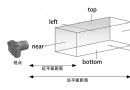 THREE.js 相機(Camera)詳解:正交投影與透視投影
既然我們是透過相機來渲染場景,那麼沒有相機便什麼也看不到。THREE.js 以 Camera 類別對相機進行抽象,將三維場景投影到二維螢幕。依投影方式不同,主要分為正交投
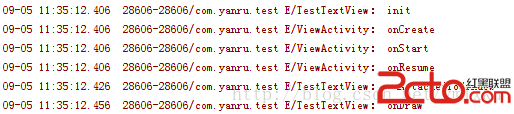 android——View / ViewGroup 的「生命週期」調用順序
自定義控件的很多奇怪問題,根源都出在「方法調用順序沒搞清楚」。把 View 與 ViewGroup 的關鍵回調串起來看,會清晰很多。 完整調用鏈 1. Activity