

編輯:關於 Android 程式設計
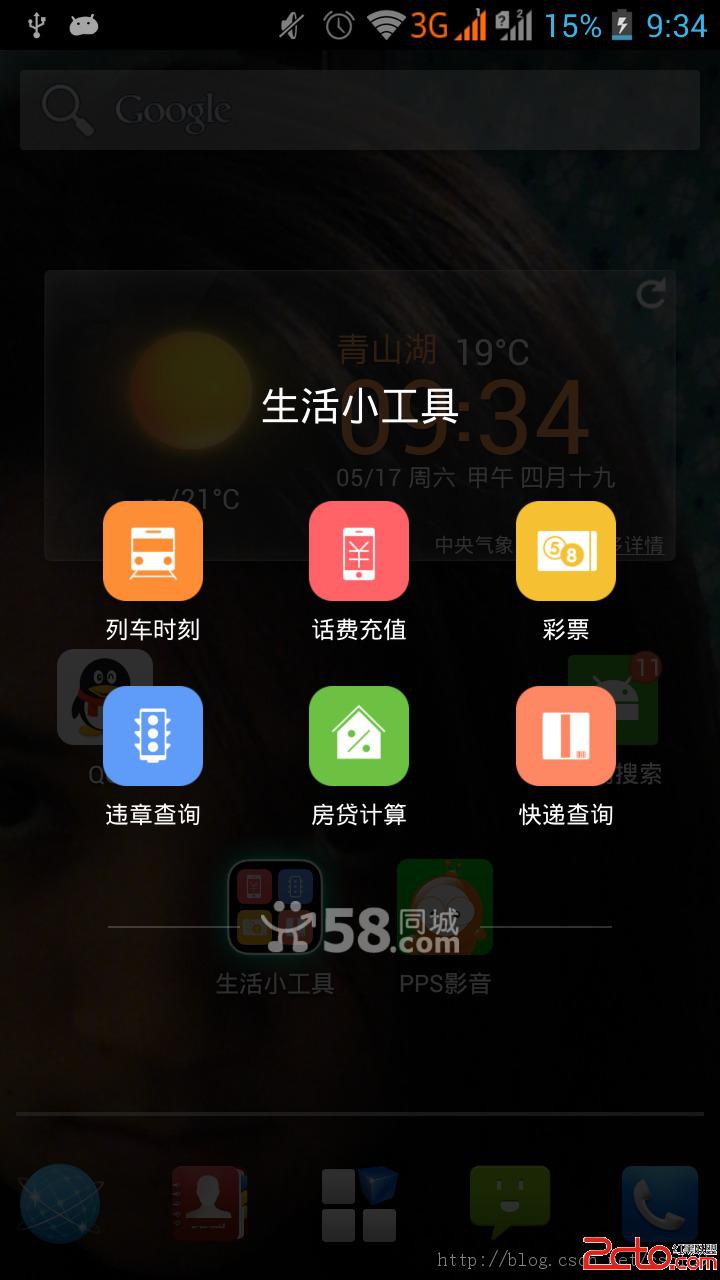
以下示範如何以程式方式在桌面建立一個應用捷徑,效果如下圖:
/**
 * 啟動某個 Activity 時,記得該 Activity 需在 manifest 中以 intent-filter 定義
 */
private void addShortCut() {
    // 安裝捷徑的 Intent
    Intent shortcut = new Intent("com.android.launcher.action.INSTALL_SHORTCUT");

    // 捷徑名稱
    shortcut.putExtra(Intent.EXTRA_SHORTCUT_NAME, "家居");

    // 是否允許重複建立
    shortcut.putExtra("duplicate", false);

    Intent shortcutIntent = new Intent();
    shortcutIntent.putExtra("tName", "家居");
    shortcutIntent.setClassName("com.shangc.houseproperty",
            "com.shangc.houseproperty.ui.activity.TestActivity");
    shortcutIntent.setFlags(Intent.FLAG_ACTIVITY_NEW_TASK);
    shortcut.putExtra(Intent.EXTRA_SHORTCUT_INTENT, shortcutIntent);

    // 捷徑圖示
    ShortcutIconResource iconRes =
            Intent.ShortcutIconResource.fromContext(mContext, R.drawable.ic_launcher);
    shortcut.putExtra(Intent.EXTRA_SHORTCUT_ICON_RESOURCE, iconRes);

    // 送出廣播
    mContext.sendBroadcast(shortcut);
}
這裡最容易出錯的一行是 setClassName():字串必須是「完整套件名稱 + 完整類別名稱」,寫錯時啟動捷徑會出現「應用程式未安裝」之類的錯誤訊息,而問題其實不在安裝狀態。另外,被指向的 Activity 若希望透過捷徑傳入額外參數(例如上面的 tName),該 Activity 需要在 manifest 中具備可被啟動的設定。
<uses-permission android:name="com.android.launcher.permission.INSTALL_SHORTCUT" />
<uses-permission android:name="com.android.launcher.permission.UNINSTALL_SHORTCUT" />
前者用於建立捷徑,後者用於移除捷徑。移除時把 action 換成 com.android.launcher.action.UNINSTALL_SHORTCUT,並帶上 EXTRA_SHORTCUT_NAME 即可。
常見的設計是點擊某個圖示後開啟一個半透明的 Activity,在其中提供捷徑建立、引導或說明等選項。半透明效果只要在 styles.xml 中為該 Activity 指定一個透明主題即可:
<style name="TranslucentTheme" parent="android:style/Theme.Translucent">
    <item name="android:windowBackground">@android:color/transparent</item>
    <item name="android:windowIsTranslucent">true</item>
    <item name="android:windowNoTitle">true</item>
</style>
再在 AndroidManifest.xml 中以 android:theme="@style/TranslucentTheme" 套用於該 Activity。
● 部分第三方桌面(Launcher)對 INSTALL_SHORTCUT 廣播的支援程度不一,某些客製 ROM 甚至直接攔截,因此使用前應先以 PackageManager 查詢是否有接收端,避免白做工。
● 使用前先檢查捷徑是否已存在,否則使用者每開一次程式桌面就多一顆圖示,體驗很差。可以透過 Launcher 的設定或自建記錄檔來去重。
● 若要提供動態捷徑(依使用者行為產生不同入口),Android 7.1 之後可改用 ShortcutManager 這套官方 API,相容性與可控性都更好。
● 以捷徑傳遞的 Intent 若會被外部桌面代為啟動,務必做好參數驗證,避免成為元件洩露的管道。
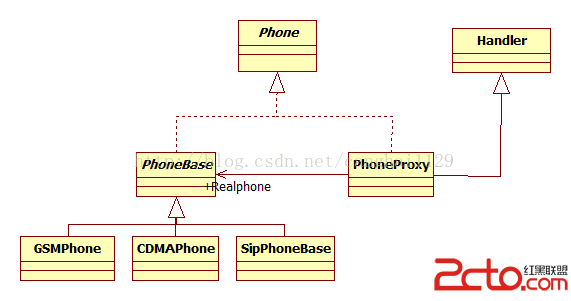 Android 與設計模式——代理(Proxy)模式
閻宏博士在《JAVA 與模式》一書的開篇,對代理(Proxy)模式下了這樣的定義: 代理模式屬於對象的結構型模式。它為某個對象提供一個代理對象,並由代理對象來控制對原對象
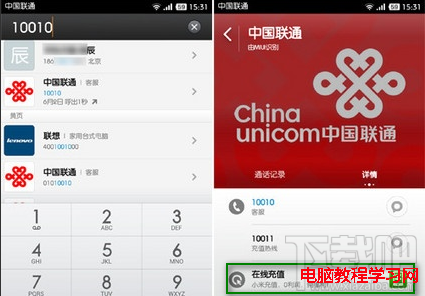 小米(MIUI)怎麼在撥號介面直接儲值話費
如果你用的是小米手機或刷了 MIUI 的機器,儲值話費其實不必開電腦、登入購物網站去找充值店家——撥號介面裡就藏著這個入口。下面看看實際怎麼操作。(前提是得綁好支付方式,
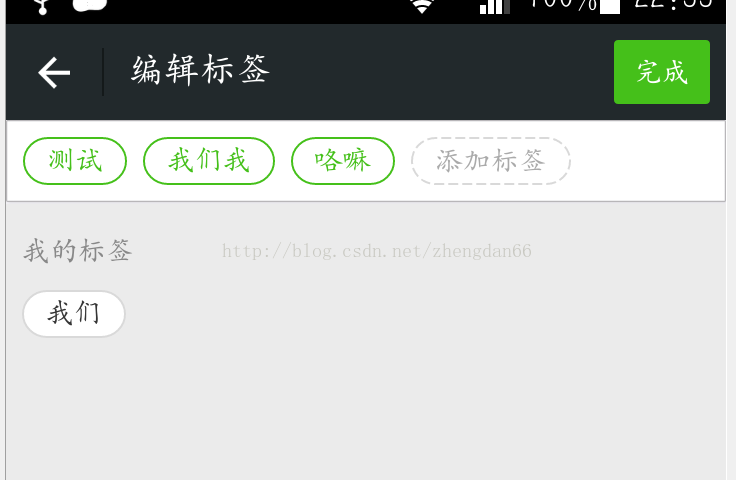 Android 仿微信標籤功能:FlowLayout 自動換行與標籤增刪
微信收藏中的標籤功能需要支援新增、刪除與自動換行。FlowLayout 是常見解法,它會依子 View 寬度與容器寬度決定是否換行,適合動態標籤、關鍵字與分類項目。
 ListView 整合下拉刷新、上拉加載與側滑刪除
在許多列表應用中,除了基本的資料展示,還常需要下拉刷新、上拉加載,甚至側滑刪除。若從零開始實作,往往要處理大量手勢、動畫與 UI 細節。因此,結合成熟元件是一個更有效率的