

編輯:關於 Android 程式設計
學習過程中碰到一個讓人困惑的問題:@+id/ 和 @android:id/ 到底差在哪?
<?xml version="1.0" encoding="utf-8"?>
<LinearLayout xmlns:android="https://schemas.android.com/apk/res/android"
    android:layout_width="fill_parent"
    android:layout_height="fill_parent"
    android:orientation="vertical" >

    <ListView
        android:id="@id/android:list"
        android:layout_width="fill_parent"
        android:layout_height="wrap_content"
        android:drawSelectorOnTop="false"
        android:scrollbars="vertical" >
    </ListView>
</LinearLayout>
模擬器執行後會抛出:
java.lang.RuntimeException: Your content must have a ListView whose id
attribute is 'android.R.id.list'
public class ListViewActivity extends ListActivity {

    @Override
    protected void onCreate(Bundle savedInstanceState) {
        super.onCreate(savedInstanceState);
        // 若使用自訂 layout,該檔案中必須有一個 ListView,
        // 且 id 一定要寫成 @android:id/list
        // 否則會報 "Your content must have a ListView whose id attribute is 'android.R.id.list'"
        setContentView(R.layout.listview);
    }
}
注意這裡繼承的是 ListActivity,不是普通的 Activity。ListActivity 綁定一個資料源並負責顯示,內部持有 ListView 完成資料綁定,資料來源通常是陣列或查詢結果的 Cursor。
它自帶一個預設佈局(內含全螢幕 ListView)。若使用預設佈局,反而要在 onCreate 中把 setContentView() 註解掉;若想自訂佈局,則該佈局必須包含一個 id 為 @android:id/list 的 ListView。
把 android:id="@id/android:list" 改成 android:id="@android:id/list",程式就能正常跑起來。
Android 系統中的元件用一個 int 型值來標識,也就是標籤裡的 id 屬性值。id 只接受資源型別的值,也就是必須以 @ 開頭,例如 @id/result、@+id/user。
加號的意義:在 @ 之後使用 +,表示修改並儲存佈局檔後,系統會自動在 R.java 中產生對應的 int 變數。變數名就是 / 後面的部分,例如 @+id/user 會產生 public static final int user = 0x7f030003;。若 R.java 中已存在同名變數,就不再重複產生,元件直接沿用既有值。
不加加號:代表引用一個已經存在的 id 資源。既然 id 本質上是資源 id,那麼任何既有資源都能拿來用,例如 @drawable/icon、@string/ok。
android: 前綴的意義:它表示這個資源來自系統的 R 類所在的 package。所以 @android:id/list 指的是 Android framework 自己定義的 list id,而 @+id/list 則是在你 App 自己的 R.java 中新增一個 list id,兩者是完全不同的資源,這正是上面那個錯誤的根源。
@+id/xxx。@android:id/xxx。res/values/ids.xml 宣告 <item type="id" name="xxx"/>,之後就能一律用 @id/xxx 引用。以上僅為個人學習過程的記錄,若有理解不到位之處還請指正。
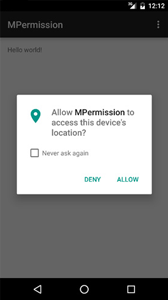 Android 6.0 執行期權限(Runtime Permissions)完整處理指南
儘管 Android 不斷演進,但 6.0 版本無疑是一個重要的分水嶺。關於 Android 6.0 的主要變化,可參考官方文件: https://developer.a
 小豬的 Android 入門之路 Day 8(下):獲取與解析網路資源
本節引言: 在 part 1 中,我們學習了網路互動裡常見的 XML 檔案相關概念,以及在 Android 中解析 XML 的三種不同形式——SAX、DOM、Pull;而
 Android Service 的使用:讓任務在後台默默運行
Service 正如其名,是一個「服務」。我們之前了解到 Activity 表示一個頁面,但如果某些操作不需要展示界面,只需在後台執行,這時就可以創建一個 Service
 Android 開發實戰:用 Intent 在頁面間傳遞數據
Intent 幾乎是每個 Android 開發者都會接觸到的核心類別,它承擔著在不同元件之間傳遞訊息與調度頁面的職責。本文就透過一個貼近實務的小範例,帶大家走一遍「點擊清