

編輯:關於 Android 程式設計
Android 的每個元件幾乎都有 android:layout_height、android:layout_width、android:layout_weight 這三個屬性。看似簡單,但 weight 的行為很容易讓人困惑。今天就把版面配置的相關規則整理成一篇總結。
android:layout_height / android:layout_width:
wrap_content:依內容自適應match_parent(舊名 fill_parent):填滿父容器px(像素)、dp(密度獨立像素)、sp(依使用者偏好字級縮放)、in(英吋)、mm(毫米)android:layout_weight:整數(可為小數)
想像一個橫向的 LinearLayout 要放三個元件。每個元件的寬度可以是「會變的」(如 TextView 隨文字長度伸縮)或「固定的」(如設定 50dp 的 ImageView)。三個位置各放一種元件,就有八種組合,分別觀察三個屬性的設定結果。
先記住一個前提:同一個 LinearLayout 中若不設比重,它會先滿足第一個元件的長與寬,不管後面還有沒有空間。這正是需要 weight 的原因。
<LinearLayout
    android:layout_width="match_parent"
    android:layout_height="wrap_content"
    android:orientation="horizontal">

    <TextView
        android:id="@+id/textView1"
        android:layout_width="wrap_content"
        android:layout_height="wrap_content"
        android:layout_weight="1"
        android:text="阿斯頓發薩達發薩達發薩達發射的阿斯頓發阿斯頓發" />

    <TextView
        android:id="@+id/textView2"
        android:layout_width="wrap_content"
        android:layout_height="wrap_content"
        android:layout_weight="1"
        android:text="阿斯頓發薩達發薩達發薩達發射的阿斯頓發阿斯頓發" />

    <TextView
        android:id="@+id/textView3"
        android:layout_width="wrap_content"
        android:layout_height="wrap_content"
        android:layout_weight="1"
        android:text="阿斯頓發薩達發薩達發薩達發射的阿斯頓發阿斯頓發" />
</LinearLayout>
三個等重的 TextView,內容長度相近,看起來像是平均分。但仔細看會發現:weight 相同不代表寬度相同,它分配的是「剩餘空間」,而不是「全部空間」。
<LinearLayout
    android:layout_width="match_parent"
    android:layout_height="match_parent"
    android:orientation="horizontal">

    <TextView
        android:id="@+id/textView1"
        android:layout_width="match_parent"
        android:layout_height="match_parent"
        android:layout_weight="1"
        android:text="1的阿斯頓發阿sadfasdfasdfsadfsadfsd斯頓發" />

    <TextView
        android:id="@+id/textView2"
        android:layout_width="match_parent"
        android:layout_height="match_parent"
        android:layout_weight="3"
        android:text="2頓發阿斯asdfa sdfadsfsdfasdfasdfasdfadsf頓發" />

    <ImageView
        android:layout_width="50dp"
        android:layout_height="50dp"
        android:src="@drawable/jiantou1" />
</LinearLayout>
固定寬度的 ImageView 先拿走 50dp,剩下的空間才由兩個 TextView 依 1:3 分配。
變不變、變不不、不不不、不不變、不變不、不變變——把會變與固定的元件換位置、換排列,就會發現:weight 的分配永遠發生在「扣除固定尺寸之後」的剩餘空間上,而元件在 LinearLayout 中的宣告順序會影響誰先取得空間。
把固定寬度的 ImageView 放在中間或最後,視覺上的比例也會跟著改變,這也是許多人搞不清 weight 的原因——它跟順序有關。
仔細觀察的話,規律其實很清楚:
當 layout_width 設為 fill_parent(match_parent)時,layout_weight 代表你的元件要「優先盡可能地大」,但這個大有限度,就是 fill_parent。
當 layout_width 設為 wrap_content 時,layout_weight 代表你的元件要「優先盡可能地小」,但這個小有限度,就是 wrap_content。
layout_height 的規則與 layout_width 完全相同。
換個角度說:weight 低的元件會先被壓縮到最小(wrap_content)或撐到最大(match_parent),把剩餘空間讓給 weight 高的。
<LinearLayout
    android:layout_width="match_parent"
    android:layout_height="match_parent"
    android:orientation="horizontal">

    <TextView
        android:layout_width="0dp"
        android:layout_height="match_parent"
        android:layout_weight="2"
        android:text="2頓發阿斯asdfa ssdfsdgsdfgdfadsfsdfasdfasdfasdfadsf頓發" />

    <TextView
        android:layout_width="0dp"
        android:layout_height="match_parent"
        android:layout_weight="1"
        android:text="2頓發阿斯asdfa ssdfsdgsdfgdfadsfsdfasdfasdfasdfadsf頓發" />

    <TextView
        android:layout_width="0dp"
        android:layout_height="match_parent"
        android:layout_weight="1"
        android:text="2頓發阿斯asdfa ssdfsdgsdfgdfadsfsdfasdfasdfasdfadsf頓發" />
</LinearLayout>
在水平的 LinearLayout 中設定 layout_weight 時,把元件的 layout_width 設為 0dp,效果等同 wrap_content,但行為更可預期——它會嚴格按比例分配「扣除固定尺寸後所剩餘的空間」。
為什麼 0dp 才是正解?因為 wrap_content 會讓元件先依內容量測一次,再參與比重分配,等於量了兩次;而 0dp 直接跳過第一次量測,一次到位。元件越多、內容越複雜,這個差異越明顯。這是效能與可預期性的雙重收益。
當 View 的 width 或 height 為 wrap_content 或 0dp/px/sp 時,若設定了 weight,layout 就會從剩餘未確定的空間中,依 weight 的總和(weightSum)計算要為這個 View 分配多少長寬。
width = leftWidth * weight / weightSum;
height = leftHeight * weight / weightSum;
另外,weight 的計算與版面配置,都發生在 LinearLayout 的 onMeasure 與 onLayout 函式中。
理解這一點之後,就能解釋所有看似奇怪的現象。例如「為什麼我設了 weight 卻沒效果」——通常是因為該方向的父容器尺寸是 wrap_content,導致 leftWidth 為 0,任何比例乘上 0 都還是 0。weight 要生效,父容器在該軸向必須有確定的尺寸。
最後提醒:在 android:orientation="vertical" 的 LinearLayout 中,weight 作用於高度;水平時才作用於寬度。搞錯方向是最常見的低級錯誤。若需要更複雜的比例配置,可考慮 ConstraintLayout 的 layout_constraintWidth_percent 或 Guideline,它用扁平化結構取代巢狀 LinearLayout,效能表現更好。
 Android 新闻客户端养成记(三):侧滑菜单与主界面
主界面的实现 前面已经完成了核心布局文件,接下来要做的是让客户端“活”起来。这一步的任务是实现侧滑菜单功能。 实现这个功能并不难,借助 V4 包下的 DrawerLay
 RecyclerView 滑動邊界檢測:打造可靠的頂部與底部判斷工具
從滑動監聽到邊界判斷 在 Android 開發中,RecyclerView 常用於長列表與動態資料展示。當我們需要實作「加載更多」、「回到頂部」、浮動按鈕的顯示與隱藏,或
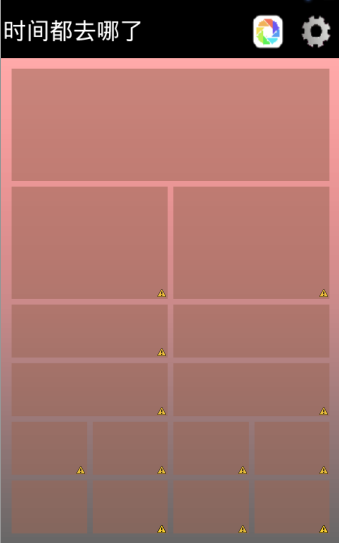 Android 中實作背景圖片顏色漸變的方法
這個技巧很常用,記錄一下。 效果圖: 首先新增一個 xml 檔 bg_gradient.xml: <?xml version=1.0 encoding=utf-8
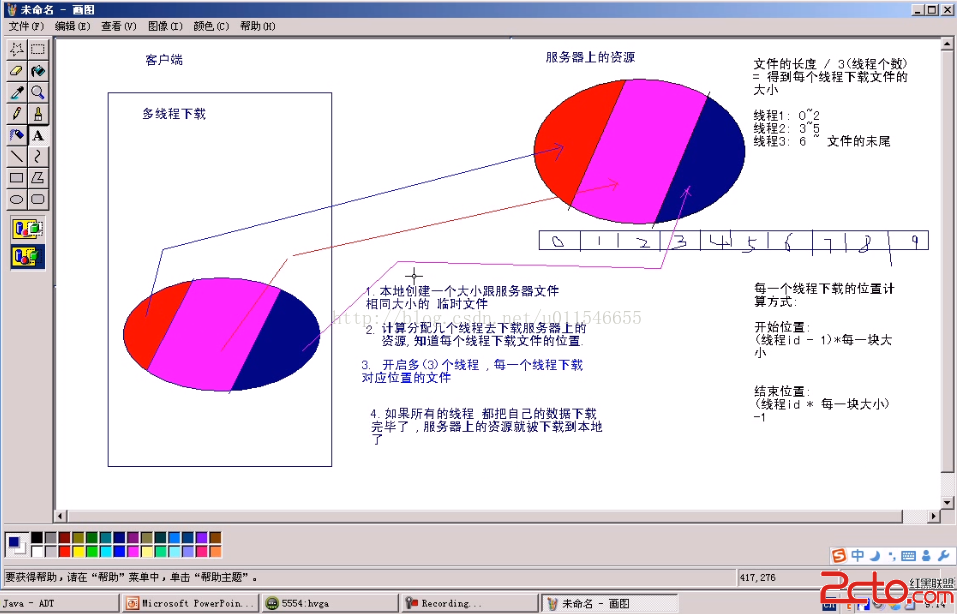 Android 多執行緒下載原理剖析
在 Android 開發中,多執行緒操作可謂家常便飯,對它的理解越深,越能讓自己的程式穩定高效地運行。這也是 Android 開發的一個重要知識點,接下來我們就來認識多執