

編輯:關於 Android 程式設計
只要在切換時透過 Locale 與 Configuration 更新資源的語言設定,後續開啟的子視窗就會自動改從 values-en 目錄下的 string.xml 取值:
Locale.setDefault(Locale.ENGLISH);
Configuration config = getBaseContext().getResources().getConfiguration();
config.locale = Locale.ENGLISH;
getBaseContext().getResources().updateConfiguration(config, getBaseContext().getResources().getDisplayMetrics());
Android 靠不同 values 目錄下的 string.xml 來管理多語言。以英文為例,會放在 values-en/string.xml:

<?xml version="1.0" encoding="utf-8"?>
<resources>
    <string name="app_name">Switch Language test</string>
    <string name="title_activity_sub">Sub activity</string>
    <string name="hello_world">Author: canto123</string>
    <string name="Exit">Exit</string>
    <string name="Data">Data=</string>
    <string name="DataTip">Lost data after language switched</string>
</resources>
而 values/string.xml 則是預設語言;如果找不到 values-en 對應的翻譯,系統就會退回使用這裡的字串:
<?xml version="1.0" encoding="utf-8"?>
<resources>
    <string name="app_name">語言切換實驗</string>
    <string name="hello_world">作者:雜貨鋪</string>
    <string name="menu_settings">Settings</string>
    <string name="Exit">退出</string>
    <string name="Data">數據=</string>
    <string name="title_activity_sub">子頁面</string>
    <string name="DataTip">可以看到切換後,數據丟失</string>
</resources>
如果希望切換語言後,目前頁面立刻顯示新語言,就必須重啟當前 Activity:
Intent intent = new Intent();
intent.setClass(this, MainActivity.class);
intent.setFlags(Intent.FLAG_ACTIVITY_CLEAR_TOP);
startActivity(intent);
特別注意:這種做法會讓該頁面的變數值被重新初始化,也就是原本的資料會遺失,實作時需要另外處理狀態保存。
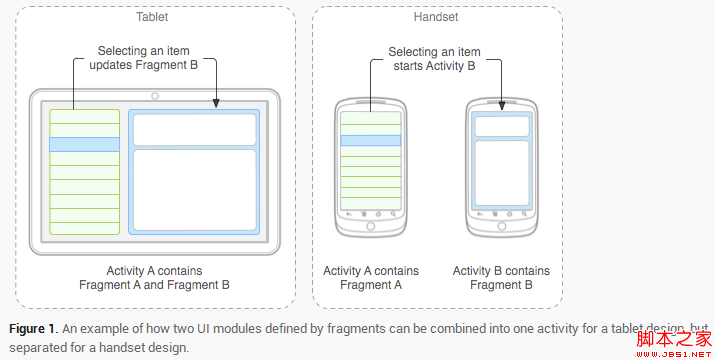 Android Fragment 入門:概念、生命週期與使用方式
Fragment 是什麼 Android 從 3.0(API Level 11)開始引入 Fragment。可以把 Fragment 想成 Activity 中的一個模塊
 Android Handler 入門:第一個訊息傳遞範例
這是一個最簡單的 Handler 範例,目的只是讓初學者對 Handler 有個初步的認識。範例在布局上放了一個按鈕,點擊後透過 Handler 傳送資料並列印出來(全部
 Android 仿微信手勢滑動退出 Activity 實作
微信那種「從左側邊緣往右拖,當前頁面跟著手指移開、露出背後的上一頁」的交互,是很多人想模仿的效果。先看成果: 原理 &
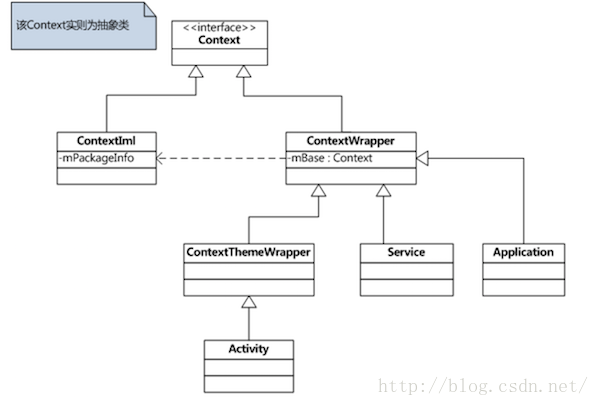 Android 插件化學習筆記:Activity 啟動流程 Hook 入門
Android 插件化學習筆記:Activity 啟動流程 Hook 本文記錄在 Activity 自身跳轉中進行 Hook 的實作思路,重點在於理解 Context 繼