

編輯:關於 Android 程式設計
ProgressBar 有兩大類外觀:圓圈轉動的「不確定進度」模式,以及一格格填滿的「水平進度條」模式。透過 style 屬性切換,同一個控制項就能呈現完全不同的樣子。以下用一個版面檔把常見的四種都列出來。
<?xml version="1.0" encoding="utf-8"?>
<LinearLayout xmlns:android="https://schemas.android.com/apk/res/android"
    android:layout_width="fill_parent"
    android:layout_height="fill_parent"
    android:orientation="vertical" >

    <TextView
        android:layout_width="fill_parent"
        android:layout_height="wrap_content"
        android:text="@string/hello" />

    <!-- 風格為大圓形進度條 -->
    <ProgressBar
        android:id="@+id/progressBar1"
        style="?android:attr/progressBarStyleLarge"
        android:layout_width="wrap_content"
        android:layout_height="wrap_content" />

    <!-- 正常圓形進度條 -->
    <ProgressBar
        android:id="@+id/progressBar2"
        android:layout_width="wrap_content"
        android:layout_height="wrap_content" />

    <!-- 小圓形進度條 -->
    <ProgressBar
        android:id="@+id/progressBar3"
        style="?android:attr/progressBarStyleSmall"
        android:layout_width="wrap_content"
        android:layout_height="wrap_content"
        android:indeterminate="true" />

    <!-- 橫向進度條:可加上 indeterminate 屬性,圓形加上則沒有效果 -->
    <ProgressBar
        android:id="@+id/progressBar4"
        style="?android:attr/progressBarStyleHorizontal"
        android:layout_width="wrap_content"
        android:layout_height="wrap_content"
        android:indeterminate="true" />

    <!-- 橫向進度條的進度狀態 -->
    <ProgressBar
        android:id="@+id/progressBar5"
        style="?android:attr/progressBarStyleHorizontal"
        android:layout_width="wrap_content"
        android:layout_height="wrap_content"
        android:max="1000"
        android:progress="200"
        android:secondaryProgress="500" />

</LinearLayout>
?android:attr/progressBarStyleLarge:大尺寸圓形轉圈。?android:attr/progressBarStyleSmall:小尺寸圓形轉圈,適合放在標題列或列表項裡。?android:attr/progressBarStyleHorizontal:橫向長條進度條,可顯示百分比。原範例把第 4、5 個都取名為 progressBar4,同一個版面裡出現重複 id 會造成 findViewById() 只能抓到其中一個,上面已改為 progressBar5。
android:indeterminate="true" 代表「不知道還要多久」,也就是一直轉圈的模式。這個屬性只在橫向樣式上有明顯意義;圓形樣式本身就是轉圈,加上去等於沒作用——這就是原始文章提到的那個現象。
要在程式碼中切換模式,用這兩個方法:
progressBar.setIndeterminate(false);   // 切換成可顯示百分比
progressBar.setProgress(600);          // 設定目前進度
progressBar.setMax(1000);              // 設定上限
android:secondaryProgress 會畫在主進度之上,顏色較淡。最典型的應用是網路音樂或影片播放器:主進度是「已播放位置」,次要進度是「已下載緩衝的位置」;另一個常見用法是安裝程式顯示「已下載 / 總大小」的雙層資訊。
XML 用 style 屬性指定樣式,程式碼中則要改用 ProgressDialog 或建構 Activity 時的 theme,也可以在 Java 裡直接指定:
ProgressBar bar = new ProgressBar(this,
        android.R.attr.progressBarStyleHorizontal);
LinearLayout layout = findViewById(R.id.container);
layout.addView(bar);
關鍵是第二個建構子參數要傳 android.R.attr.progressBarStyleHorizontal,而不是字串樣式名稱。
本文原始作者:gongzibai
 Android 離線緩存實作:Volley 與圖片快取打造斷網可讀體驗
離線體驗的核心,是在網路正常時把關鍵資料保存下來,讓使用者即使暫時斷網,也能看到上次載入的內容。新聞、社群、知識類應用常使用這種策略,以降低空白頁與等待焦慮。 在 And
 Android 應用程序窗口 View 的創建過程源碼解析
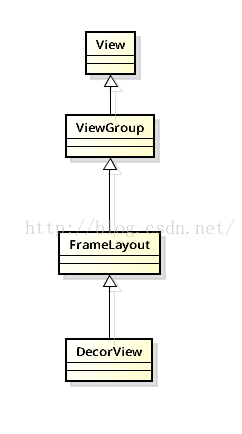
View 是 Android 界面開發中最重要的一類。我們看到的每一個界面,本質上都是由一個個 View 組成的。那麼,應用的界面究竟是何时、又是如何被創建出來的呢?本文
 動手做一個炫酷的 ViewPagerIndicator(不只仿 MIUI)
做 tab 切換時,多數人會直接抓 TabPageIndicator 來用,很多知名 App 也是。但指示器本身的原理並不難,自己寫一遍,之後要改成下劃線樣式也只是幾行的
 Android AlertDialog 彈出確認提示框的標準寫法
需要讓用戶二次確認危險操作時,AlertDialog 是最直接的選擇。以「刪除全部數據」為例: // 刪除全部 else if (id == R.id.btnDelet