

編輯:關於 Android 開發
登入表單常需要兩個小互動:輸入框有內容時右側出現清除按鈕,以及提交時若欄位為空則抖動提示。這兩個都能透過自訂 EditText 一次解決。
運行效果:
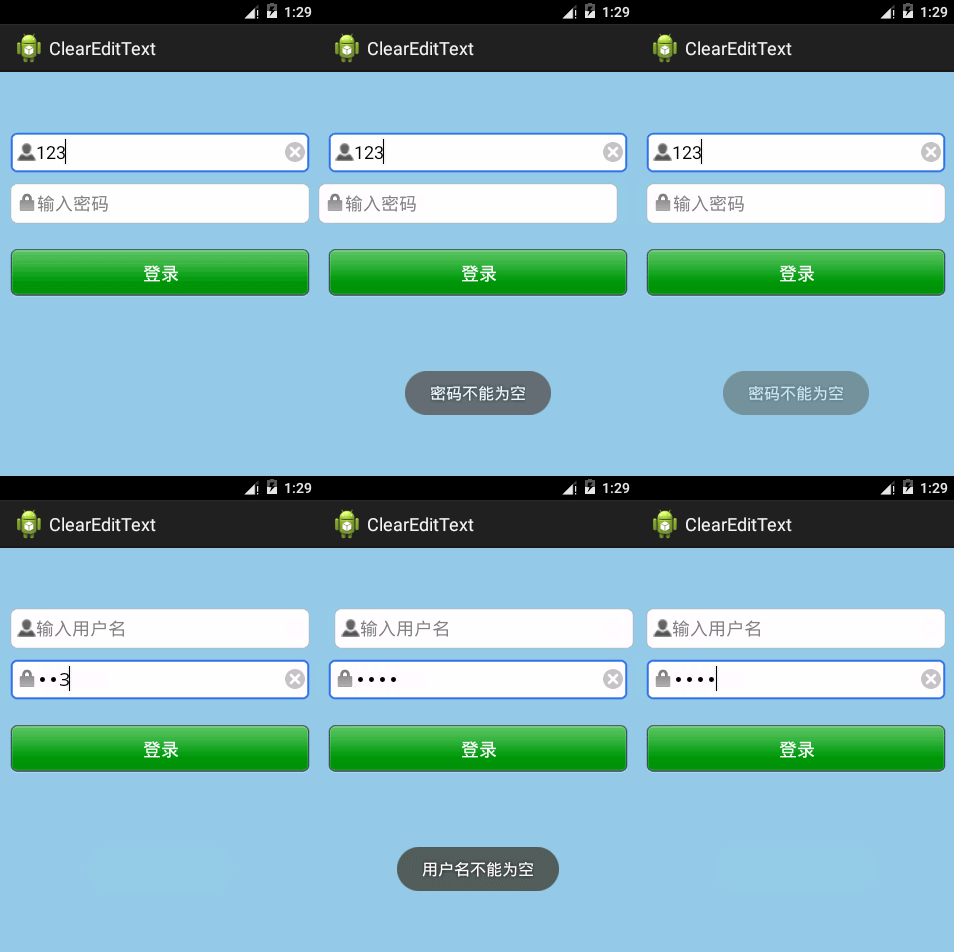
package com.lixu.clearedittext;

import android.app.Activity;
import android.os.Bundle;
import android.text.TextUtils;
import android.view.View;
import android.view.View.OnClickListener;
import android.widget.Button;
import android.widget.Toast;

public class MainActivity extends Activity {

    private Toast mToast;

    @Override
    protected void onCreate(Bundle savedInstanceState) {
        super.onCreate(savedInstanceState);
        setContentView(R.layout.activity_main);

        final ClearEditText username = (ClearEditText) findViewById(R.id.username);
        final ClearEditText password = (ClearEditText) findViewById(R.id.password);

        ((Button) findViewById(R.id.login)).setOnClickListener(new OnClickListener() {
            @Override
            public void onClick(View v) {
                if (TextUtils.isEmpty(username.getText())) {
                    // 播放晃動動畫
                    username.setShakeAnimation();
                    showToast("用戶名不能為空");
                    return;
                }

                if (TextUtils.isEmpty(password.getText())) {
                    password.setShakeAnimation();
                    showToast("密碼不能為空");
                    return;
                }
            }
        });
    }

    /** 顯示 Toast 訊息 */
    private void showToast(String msg) {
        if (mToast == null) {
            mToast = Toast.makeText(this, msg, Toast.LENGTH_SHORT);
        } else {
            mToast.setText(msg);
        }
        mToast.show();
    }
}
package com.lixu.clearedittext;

import android.content.Context;
import android.graphics.drawable.Drawable;
import android.text.Editable;
import android.text.TextWatcher;
import android.util.AttributeSet;
import android.view.MotionEvent;
import android.view.View;
import android.view.View.OnFocusChangeListener;
import android.view.animation.Animation;
import android.view.animation.CycleInterpolator;
import android.view.animation.TranslateAnimation;
import android.widget.EditText;

public class ClearEditText extends EditText
        implements OnFocusChangeListener, TextWatcher {

    /** 清除按鈕的 Drawable 引用 */
    private Drawable mClearDrawable;

    /** 控制項是否有焦點 */
    private boolean hasFoucs;

    public ClearEditText(Context context) {
        this(context, null);
    }

    public ClearEditText(Context context, AttributeSet attrs) {
        // 這個建構子很重要,不寫的話很多屬性無法在 XML 中定義
        this(context, attrs, android.R.attr.editTextStyle);
    }

    public ClearEditText(Context context, AttributeSet attrs, int defStyle) {
        super(context, attrs, defStyle);
        init();
    }

    private void init() {
        // 取得 EditText 的 DrawableRight,若 XML 沒設定就用預設圖片
        mClearDrawable = getCompoundDrawables()[2];
        if (mClearDrawable == null) {
            mClearDrawable = getResources().getDrawable(R.drawable.delete_selector);
        }

        mClearDrawable.setBounds(0, 0,
                mClearDrawable.getIntrinsicWidth(),
                mClearDrawable.getIntrinsicHeight());

        // 預設隱藏圖示
        setClearIconVisible(false);

        // 監聽焦點變化
        setOnFocusChangeListener(this);

        // 監聽輸入內容變化
        addTextChangedListener(this);
    }

    /**
     * EditText 無法直接設定點擊事件,因此以「按下的位置」模擬點擊。
     * 當按下的 x 座標落在
     *   (寬度 - 圖示到右邊的間距 - 圖示寬度)
     * 與
     *   (寬度 - 圖示到右邊的間距)
     * 之間,就視為點中了圖示。垂直方向不另外判斷。
     */
    @Override
    public boolean onTouchEvent(MotionEvent event) {
        if (event.getAction() == MotionEvent.ACTION_UP) {
            if (getCompoundDrawables()[2] != null) {

                boolean touchable = event.getX() > (getWidth() - getTotalPaddingRight())
                        && (event.getX() < (getWidth() - getPaddingRight()));

                if (touchable) {
                    this.setText("");
                }
            }
        }

        return super.onTouchEvent(event);
    }

    /** 焦點變化時,依內容長度決定清除圖示的顯示與隱藏 */
    @Override
    public void onFocusChange(View v, boolean hasFocus) {
        this.hasFoucs = hasFocus;
        if (hasFocus) {
            setClearIconVisible(getText().length() > 0);
        } else {
            setClearIconVisible(false);
        }
    }

    /** 設定清除圖示的顯示與隱藏,透過 setCompoundDrawables 繪製上去 */
    protected void setClearIconVisible(boolean visible) {
        Drawable right = visible ? mClearDrawable : null;
        setCompoundDrawables(
                getCompoundDrawables()[0],
                getCompoundDrawables()[1],
                right,
                getCompoundDrawables()[3]);
    }

    /** 輸入內容變化時的回呼 */
    @Override
    public void onTextChanged(CharSequence s, int start, int count, int after) {
        if (hasFoucs) {
            setClearIconVisible(s.length() > 0);
        }
    }

    @Override
    public void beforeTextChanged(CharSequence s, int start, int count, int after) {
    }

    @Override
    public void afterTextChanged(Editable s) {
    }

    /** 播放晃動動畫 */
    public void setShakeAnimation() {
        this.setAnimation(shakeAnimation(5));
    }

    /**
     * 晃動動畫
     * @param counts 一秒鐘晃動多少下
     */
    public static Animation shakeAnimation(int counts) {
        Animation translateAnimation = new TranslateAnimation(0, 10, 0, 0);
        translateAnimation.setInterpolator(new CycleInterpolator(counts));
        translateAnimation.setDuration(1000);
        return translateAnimation;
    }
}
<RelativeLayout xmlns:android="https://schemas.android.com/apk/res/android"
    xmlns:tools="https://schemas.android.com/tools"
    android:layout_width="match_parent"
    android:layout_height="match_parent"
    android:background="#95CAE4">

    <com.lixu.clearedittext.ClearEditText
        android:id="@+id/username"
        android:layout_width="fill_parent"
        android:layout_height="wrap_content"
        android:layout_marginTop="60dp"
        android:layout_marginLeft="10dip"
        android:layout_marginRight="10dip"
        android:background="@drawable/login_edittext_bg"
        android:drawableLeft="@drawable/icon_user"
        android:drawableRight="@drawable/delete_selector"
        android:hint="輸入用戶名"
        android:singleLine="true" />

    <com.lixu.clearedittext.ClearEditText
        android:id="@+id/password"
        android:layout_width="fill_parent"
        android:layout_height="wrap_content"
        android:layout_below="@id/username"
        android:layout_marginTop="10dip"
        android:layout_marginLeft="10dip"
        android:layout_marginRight="10dip"
        android:background="@drawable/login_edittext_bg"
        android:drawableLeft="@drawable/account_icon"
        android:drawableRight="@drawable/delete_selector"
        android:hint="輸入密碼"
        android:password="true"
        android:singleLine="true" />

    <Button
        android:id="@+id/login"
        android:layout_width="fill_parent"
        android:layout_height="wrap_content"
        android:layout_below="@+id/password"
        android:layout_marginTop="25dp"
        android:layout_marginLeft="10dip"
        android:layout_marginRight="10dip"
        android:background="@drawable/login_button_bg"
        android:text="登錄"
        android:textColor="@android:color/white"
        android:textSize="18sp" />

</RelativeLayout>
delete_selector.xml
<?xml version="1.0" encoding="utf-8"?>
<selector xmlns:android="https://schemas.android.com/apk/res/android">
    <item android:state_pressed="true"
          android:drawable="@drawable/search_clear_pressed" />
    <item android:drawable="@drawable/search_clear_normal" />
</selector>
login_button_bg.xml
<?xml version="1.0" encoding="UTF-8"?>
<selector xmlns:android="https://schemas.android.com/apk/res/android">
    <item android:state_pressed="true"
          android:drawable="@drawable/btn_style_one_pressed" />
    <item android:state_focused="true"
          android:drawable="@drawable/btn_style_one_focused" />
    <item android:drawable="@drawable/btn_style_one_normal" />
</selector>
login_edittext_bg.xml
<?xml version="1.0" encoding="UTF-8"?>
<selector xmlns:android="https://schemas.android.com/apk/res/android">
    <item android:state_focused="true"
          android:drawable="@drawable/login_edit_pressed" />
    <item android:state_pressed="true"
          android:drawable="@drawable/login_edit_pressed" />
    <item android:drawable="@drawable/login_edit_normal" />
</selector>
為什麼三個建構子都要寫?只寫 ClearEditText(Context) 的話,在 XML 中設定的屬性不會生效,因為 Android 是透過帶 AttributeSet 的建構子來 inflate 版面。
點擊範圍的算法。核心在 onTouchEvent 中的 touchable 判斷:把 x 座標限制在「寬度 − 總右內距」與「寬度 − 右內距」之間,就等於只回應右側圖示那一塊區域,避免整個輸入框被點到就清空。這裡用 ACTION_UP 而非 ACTION_DOWN,是為了避免使用者只是想把游標移到尾端時誤觸清空。
晃動動畫。CycleInterpolator 決定左右往返的次數,TranslateAnimation(0, 10, 0, 0) 的位移量只有 10 像素,幅度小、節奏快,視覺上才是「抖動」而不是「滑走」。若想更明顯可調到 15 到 20,但別超過 25,否則看起來會像版面跑掉。
一個可以再加強的地方。範例中的 setShakeAnimation() 在連續點擊登入時會不斷重設動畫,導致抖動看起來卡住。實務上可以先呼叫 clearAnimation() 再設定,讓每次點擊都能重新播放一次完整的動畫。
 第三方開源水面波浪動畫元件 WaveView 使用教學
 WaveView 是一款相當有趣的 Android 第三方開源波形元件。在許多常見應用的開發中,它常以生動的水面波
 給 Android GridView 畫上分割線:兩種思路的完整實現
給 GridView 畫分割線 ListView 想加分割線很簡單,布局裡寫上 android:divider 和 android:dividerHeight 就完事。可
 Android 自定義 View:動態錯誤提示動畫實作
 動態錯誤提示常見於表單驗證、登入失敗或網路異常等場景。本文以自定義 View 為例,說明如何讓圓圈與叉號逐步繪製出
 我的 Android 第二課:專案結構、清單檔、DDMS 與打電話案例
 各位好,小編又來分享知識了。上一篇筆記講解了 Android 工具與 SDK 的設定,今天則要帶大