

編輯:關於 Android 開發
Android 系統會持續發送電池狀態相關的廣播,其中 Intent.ACTION_BATTERY_CHANGED 就是最常用的一個。只要註冊這個廣播接收器,就能一次拿到電量、電壓、溫度、充電方式、電池健康度等一整套資訊,完全不需要申請額外權限。
由於 ACTION_BATTERY_CHANGED 屬於系統的粘性廣播(sticky broadcast),除了動態註冊,也可以直接在 AndroidManifest.xml 中靜態宣告;不過若只是要在特定時機查詢,動態註冊後在 onPause() 中反註冊,是比較保險的做法。
<RelativeLayout xmlns:android="https://schemas.android.com/apk/res/android" xmlns:tools="https://schemas.android.com/tools" android:layout_width="match_parent" android:layout_height="match_parent" android:orientation="vertical" > <Button android:id="@+id/btn_battery" android:layout_width="match_parent" android:layout_height="wrap_content" android:text="獲取電池的信息" /> <TextView android:id="@+id/tv_battery" android:layout_width="match_parent" android:layout_height="wrap_content" /> </RelativeLayout>
package com.example.yanlei.yl; import android.content.BroadcastReceiver; import android.content.Context; import android.content.Intent; import android.content.IntentFilter; import android.os.BatteryManager; import android.os.Bundle; import android.support.v7.app.AppCompatActivity; import android.view.View; import android.view.View.OnClickListener; import android.widget.Button; import android.widget.TextView; public class MainActivity extends AppCompatActivity { // 定義電池信息的按鈕 private Button btnBattery; // 定義顯示電池信息的textview private TextView tvBattery; @Override public void onCreate(Bundle savedInstanceState) { super.onCreate(savedInstanceState); setContentView(R.layout.activity_main); // 得到布局中的所有對象 findView(); // 設置對象的監聽器 setListener(); } private void findView() { // 得到布局中的所有對象 btnBattery = (Button) findViewById(R.id.btn_battery); tvBattery = (TextView) findViewById(R.id.tv_battery); } // 設置對象的監聽器 private void setListener() { btnBattery.setOnClickListener(listener); } OnClickListener listener = new OnClickListener() { @Override public void onClick(View v) { // TODO Auto-generated method stub switch (v.getId()) { // 當前的音量 case R.id.btn_battery: IntentFilter filter = new IntentFilter(); filter.addAction(Intent.ACTION_BATTERY_CHANGED); registerReceiver(mBroadcastReceiver, filter); break; } } }; // 聲明廣播接受者對象 private BroadcastReceiver mBroadcastReceiver = new BroadcastReceiver() { @Override public void onReceive(Context context, Intent intent) { // TODO Auto-generated method stub String action = intent.getAction(); if (action.equals(Intent.ACTION_BATTERY_CHANGED)) { // 得到電池狀態: // BatteryManager.BATTERY_STATUS_CHARGING:充電狀態。 // BatteryManager.BATTERY_STATUS_DISCHARGING:放電狀態。 // BatteryManager.BATTERY_STATUS_NOT_CHARGING:未充滿。 // BatteryManager.BATTERY_STATUS_FULL:充滿電。 // BatteryManager.BATTERY_STATUS_UNKNOWN:未知狀態。 int status = intent.getIntExtra("status", 0); // 得到健康狀態: // BatteryManager.BATTERY_HEALTH_GOOD:狀態良好。 // BatteryManager.BATTERY_HEALTH_DEAD:電池沒有電。 // BatteryManager.BATTERY_HEALTH_OVER_VOLTAGE:電池電壓過高。 // BatteryManager.BATTERY_HEALTH_OVERHEAT:電池過熱。 // BatteryManager.BATTERY_HEALTH_UNKNOWN:未知狀態。 int health = intent.getIntExtra("health", 0); // boolean類型 boolean present = intent.getBooleanExtra("present", false); // 得到電池剩余容量 int level = intent.getIntExtra("level", 0); // 得到電池最大值。通常為100。 int scale = intent.getIntExtra("scale", 0); // 得到圖標ID int icon_small = intent.getIntExtra("icon-small", 0); // 充電方式: BatteryManager.BATTERY_PLUGGED_AC:AC充電。 BatteryManager.BATTERY_PLUGGED_USB:USB充電。 int plugged = intent.getIntExtra("plugged", 0); // 得到電池的電壓 int voltage = intent.getIntExtra("voltage", 0); // 得到電池的溫度,0.1度單位。例如 表示197的時候,意思為19.7度 int temperature = intent.getIntExtra("temperature", 0); // 得到電池的類型 String technology = intent.getStringExtra("technology"); // 得到電池狀態 String statusString = ""; // 根據狀態id,得到狀態字符串 switch (status) { case BatteryManager.BATTERY_STATUS_UNKNOWN: statusString = "unknown"; break; case BatteryManager.BATTERY_STATUS_CHARGING: statusString = "charging"; break; case BatteryManager.BATTERY_STATUS_DISCHARGING: statusString = "discharging"; break; case BatteryManager.BATTERY_STATUS_NOT_CHARGING: statusString = "not charging"; break; case BatteryManager.BATTERY_STATUS_FULL: statusString = "full"; break; } //得到電池的壽命狀態 String healthString = ""; //根據狀態id,得到電池壽命 switch (health) { case BatteryManager.BATTERY_HEALTH_UNKNOWN: healthString = "unknown"; break; case BatteryManager.BATTERY_HEALTH_GOOD: healthString = "good"; break; case BatteryManager.BATTERY_HEALTH_OVERHEAT: healthString = "overheat"; break; case BatteryManager.BATTERY_HEALTH_DEAD: healthString = "dead"; break; case BatteryManager.BATTERY_HEALTH_OVER_VOLTAGE: healthString = "voltage"; break; case BatteryManager.BATTERY_HEALTH_UNSPECIFIED_FAILURE: healthString = "unspecified failure"; break; } //得到充電模式 String acString = ""; //根據充電狀態id,得到充電模式 switch (plugged) { case BatteryManager.BATTERY_PLUGGED_AC: acString = "plugged ac"; break; case BatteryManager.BATTERY_PLUGGED_USB: acString = "plugged usb"; break; } //顯示電池信息 tvBattery.setText("電池的狀態:" + statusString + "\n健康值: "+ healthString + "\n電池剩余容量: " + level + "\n電池的最大值:" + scale + "\n小圖標:" + icon_small + "\n充電方式:" + plugged + "\n充電方式: " + acString + "\n電池的電壓:" + voltage + "\n電池的溫度:" + (float) temperature * 0.1 + "\n電池的類型:" + technology); } } }; @Override protected void onPause() { super.onPause(); // 解除注冊監聽 unregisterReceiver(mBroadcastReceiver); } }
從同一個 Intent 裡,你可以取出以下資訊:
status:充電狀態,可能是充電中、放電中、未充電、已充滿或未知。
health:電池健康度,例如良好、電力耗盡、電壓過高、過熱等。
level 與 scale:前者是剩餘容量,後者是滿量(多為 100),兩者相除才是百分比。
plugged:充電來源,例如 AC 電源或 USB。
voltage:電壓,單位毫伏。
temperature:溫度,單位是 0.1 度,也就是拿到 197 代表 19.7 度。
technology:電池技術類型,例如鋰電池。
present:裝置是否具備可更換電池。
第一,範例在 onPause() 中直接呼叫 unregisterReceiver(),如果按鈕被點擊多次而重複註冊,就會拋出 IllegalArgumentException。實務上建議在 onCreate() 註冊一次、在 onDestroy() 反註冊,或先加上解除註冊的防護判斷。
第二,電壓與溫度數值會隨裝置與晶片方案而異,呈現給使用者時最好加上單位並做合理範圍檢查,避免顯示明顯異常的數字。
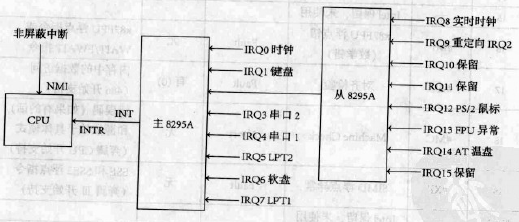 Linux 內核系列(八):操作系統開發之時鐘中斷與 8259A 中斷控制器
Linux 內核系列 — 時鐘中斷 外部中斷的情況相對複雜一些,因為需要建立硬件中斷與向量號之間的對應關係。外部中斷分為不可屏蔽中斷(NMI)與可屏蔽中斷兩種,分別由 C
 挖掘藍牙隱藏 API:用反射實作配對與解除配對
上一篇講了 Android 藍牙的基本用法,這次我們再往下挖一層,看看藍牙相關的隱藏 API。用過 Android 系統設定的人都知道,藍牙搜尋到裝置後可以進行「配對」與
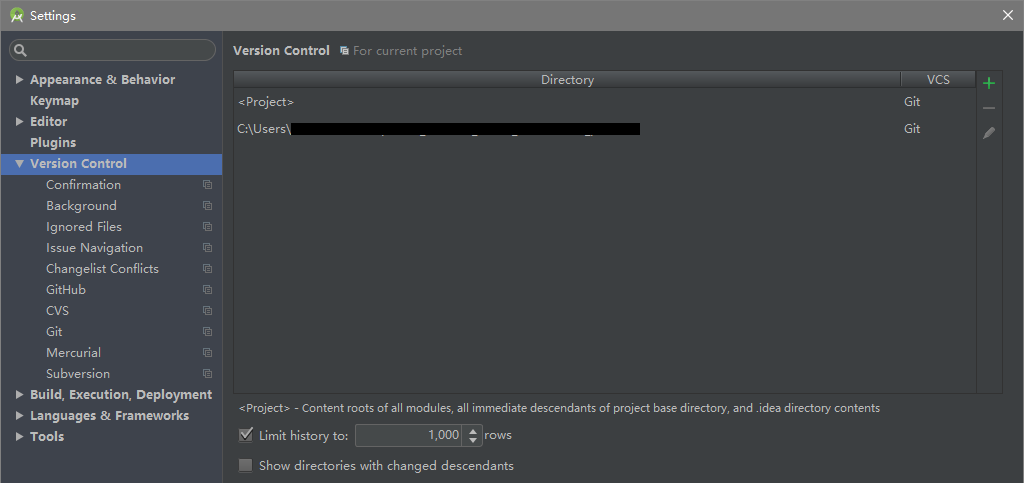 Android Studio 整合 Git 與 Coding.net 設定記錄
Android Studio 與 Git 設定 使用 Git 管理 Android 專案時,第一步是在 Android Studio 中設定 Git 路徑,並確認版本控制
 Android 實作文字分享與接收:Intent.createChooser 的重要性
在 Android 中實作文字分享,通常會使用 ACTION_SEND,並指定 te